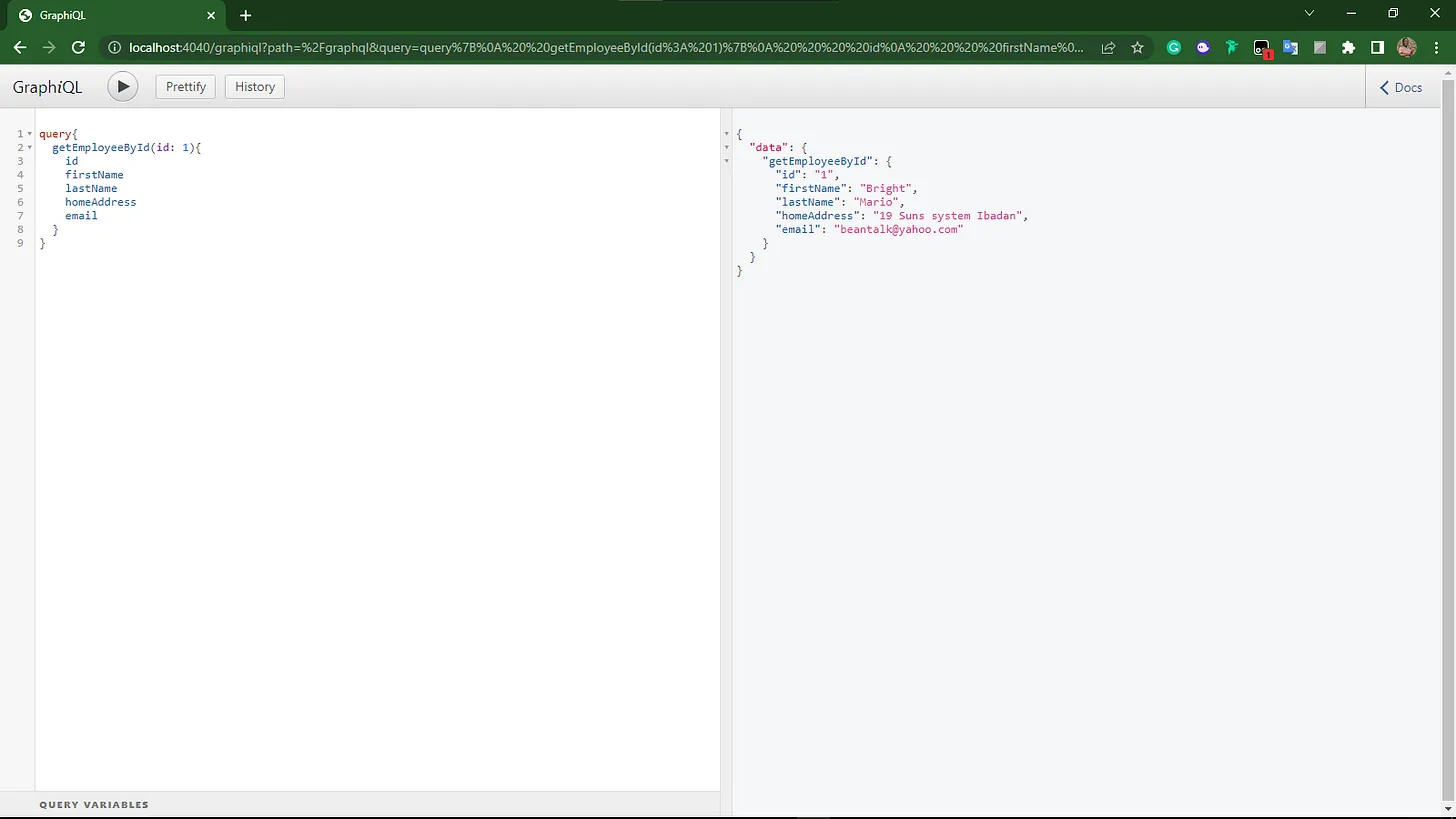
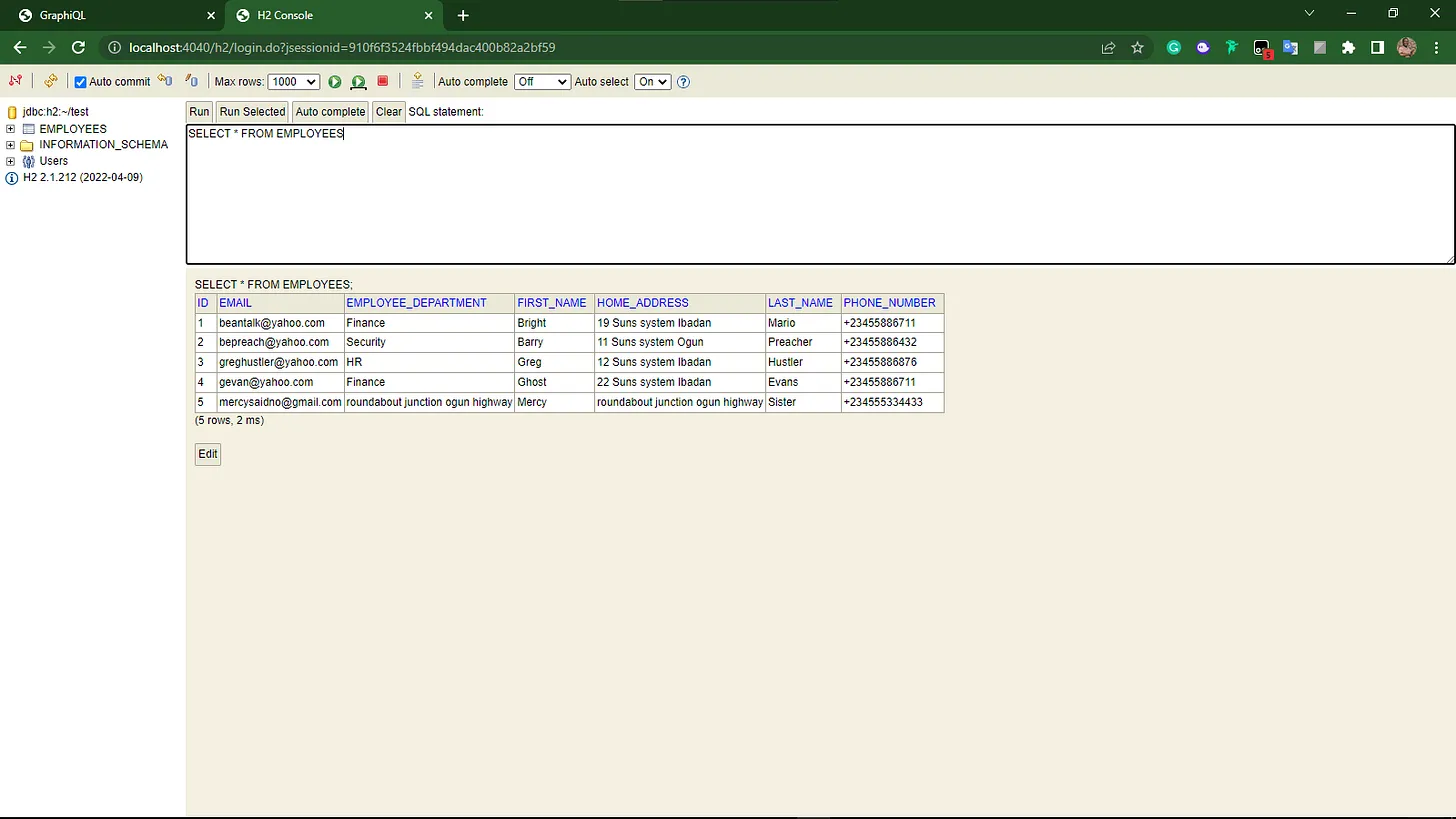
<?xml version="1.0" encoding="utf-8"?>
<feed xmlns="http://www.w3.org/2005/Atom">
  <author>
    <name>David Ogar</name>
  </author>
  <generator uri="https://hexo.io/">Hexo</generator>
  <id>https://owogogah.com/</id>
  <link href="https://owogogah.com/" rel="alternate"/>
  <link href="https://owogogah.com/atom.xml" rel="self"/>
  <rights>All rights reserved 2026, David Ogar</rights>
  <subtitle>semiconductors. autonomous systems. ai.</subtitle>
  <title>owogogah</title>
  <updated>2026-01-15T11:10:26.000Z</updated>
  <entry>
    <author>
      <name>David Ogar</name>
    </author>
    <category term="Semradr" scheme="https://owogogah.com/tags/Semradr/"/>
    <category term="Building in Public" scheme="https://owogogah.com/tags/Building-in-Public/"/>
    <category term="Decision Making" scheme="https://owogogah.com/tags/Decision-Making/"/>
    <category term="Systems Thinking" scheme="https://owogogah.com/tags/Systems-Thinking/"/>
    <content>
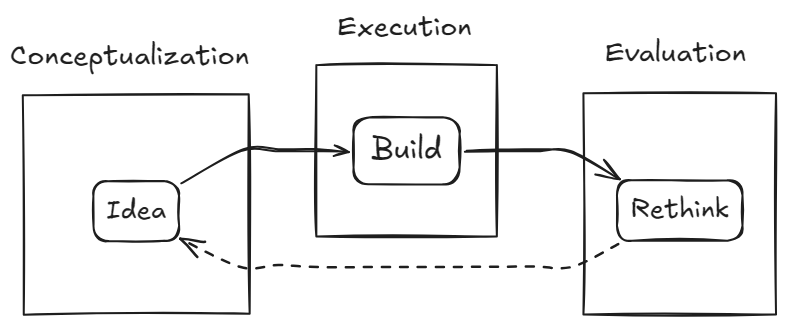
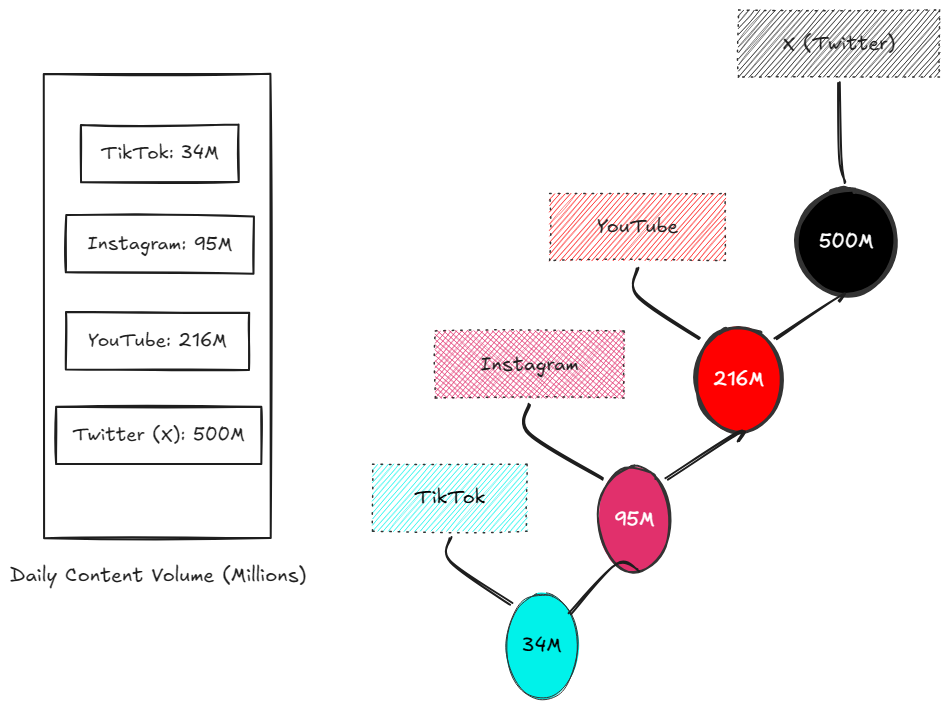
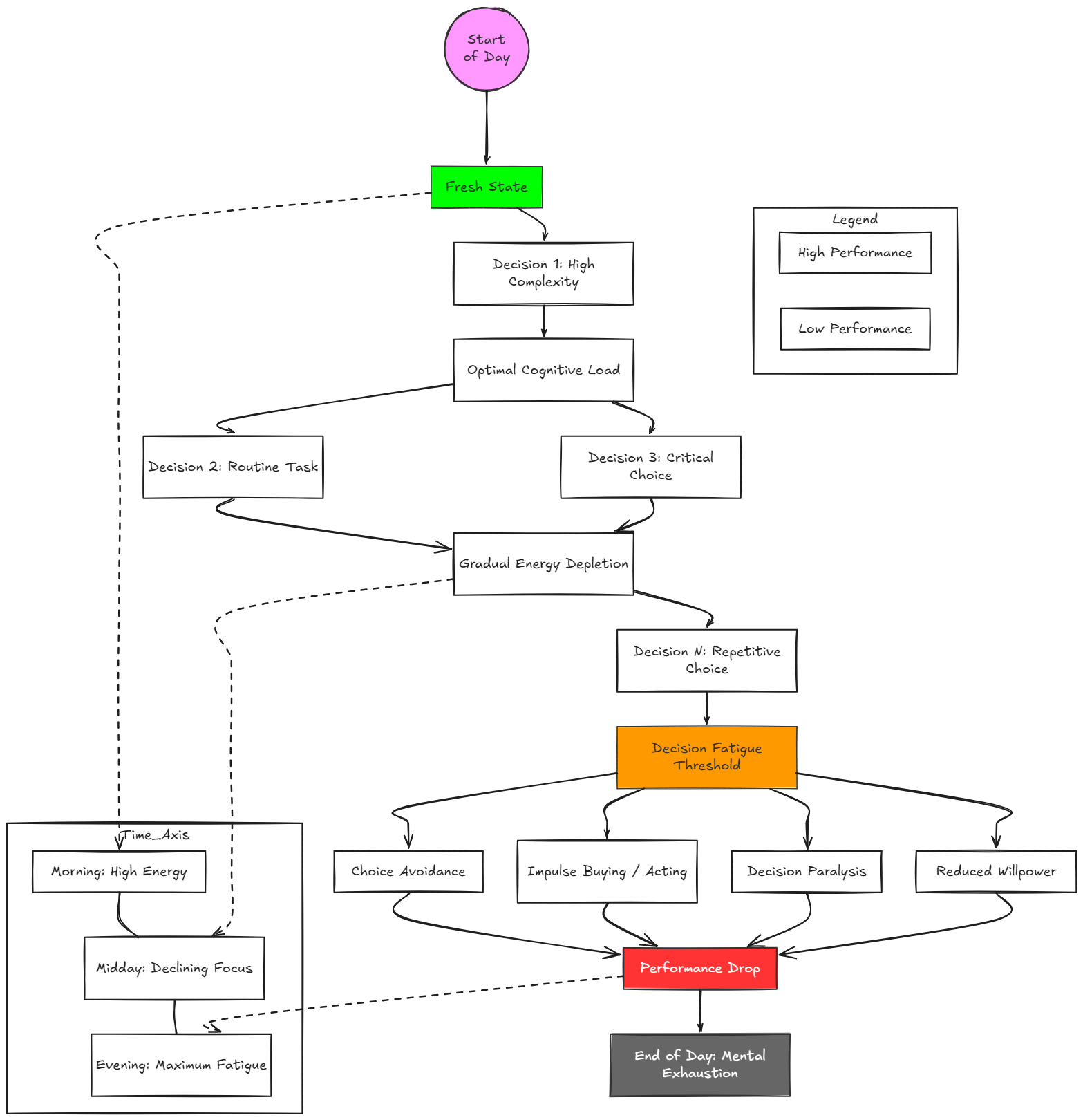
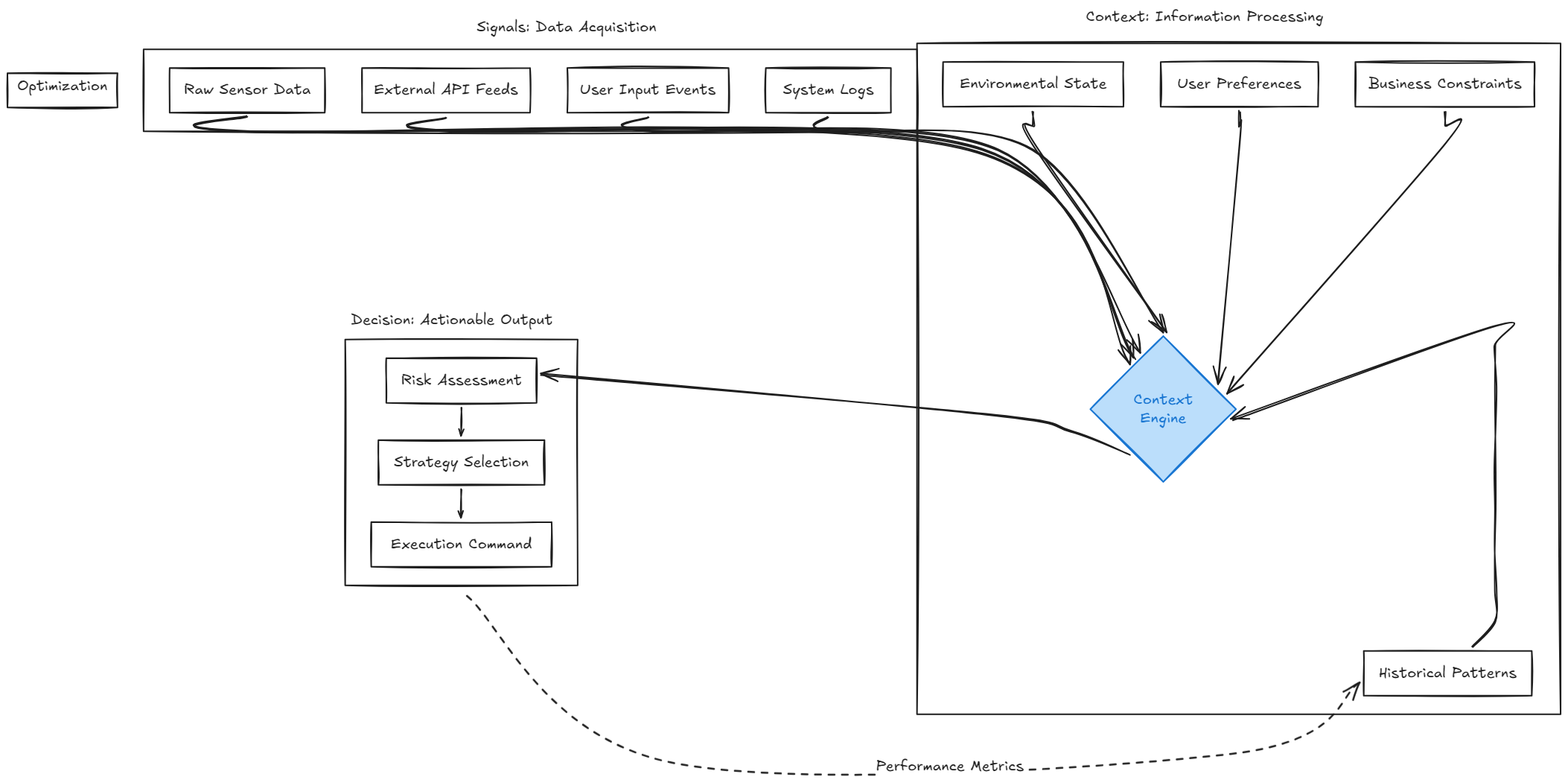
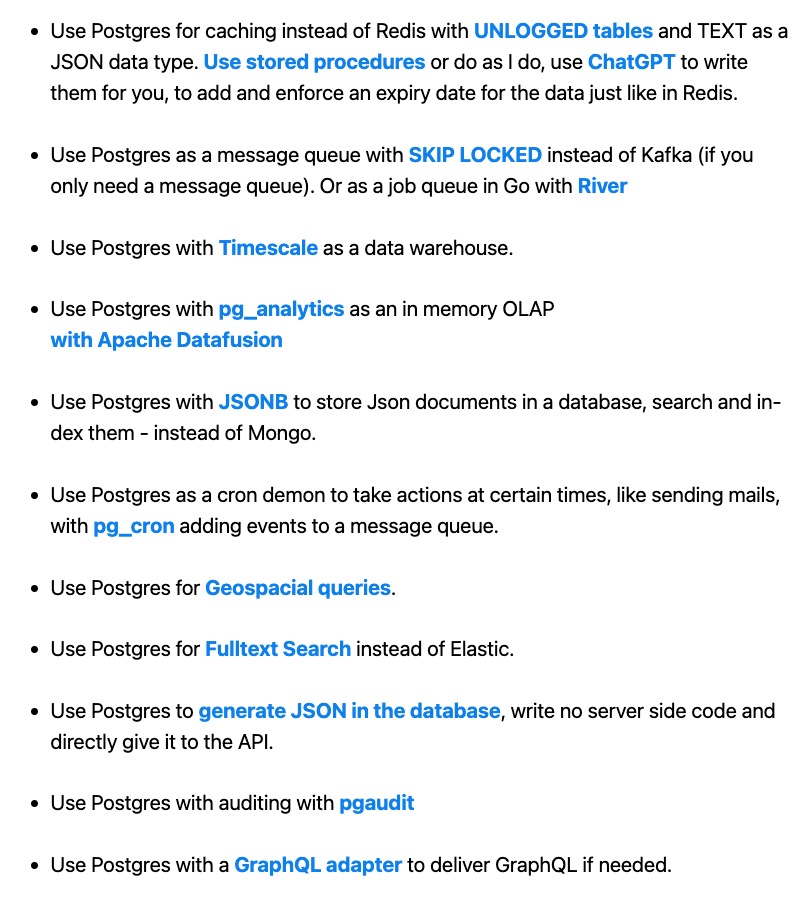
      <![CDATA[<h2 id="Why-This-Post-Exists"><a href="#Why-This-Post-Exists" class="headerlink" title="Why This Post Exists"></a>Why This Post Exists</h2><p>This is not a launch post.</p><p>It’s a <strong>record of intent</strong>.</p><p>I’m writing this to clearly document:</p><ul><li>what Semradr started as,</li><li>what problems showed up during real building,</li><li>and what direction the product is now taking.</li></ul><p>Think of this as a proof-of-work — not promises.</p><span id="more"></span><p><img src="/images/building-semradr-1/1.png" alt="idea-phase" title="idea-phase"></p><hr><h2 id="The-Early-Days-of-Semradr"><a href="#The-Early-Days-of-Semradr" class="headerlink" title="The Early Days of Semradr"></a>The Early Days of Semradr</h2><p>Semradr started with a simple observation leading to a question:</p><blockquote><p>How do creators&#x2F;creatives alike, teams figure out what to create next — without burning out?</p></blockquote><p>People don’t struggle because they lack tools. They suffer from burnout as a result of consistently creating contents, perhaps on multiple platforms(max input, less results); they don’t know <strong>what content to create next</strong>. But the algorithm favours the bold, the gold diggers.</p><p><img src="/images/building-semradr-1/2.png" alt="content-metrics" title="content-metrics"></p><ul><li>Contents are being posted daily.</li><li>Platform algorithms are changing weekly.</li><li>Creators were tired.</li><li>Businesses wanted results but didn’t know what to ask for.</li></ul><blockquote><p>Should they be a consistent protocol that regulates how platforms navigate content algorithm, that is equal, free and non-bias?</p></blockquote><p>So the ideas formed around analytics and performance tracking across platforms.<br>During this phase, the idea was straightforward.<br>Build a tool that helps people understand what’s working, what isn’t, and what direction to move in — especially in content and marketing.</p><p>At the time, the problem looked like a <em>social media problem</em>(we tracked performance across social platforms).</p><ul><li>creators chasing performance resulting to burnouts (core passion)</li><li>agencies answering “what should we do next quarter?”</li><li>teams reacting instead of planning</li></ul><p>So the early shape of Semradr leaned towards content analytics and performance visibility for creators, teams etc.</p><hr><h2 id="The-Original-Intent"><a href="#The-Original-Intent" class="headerlink" title="The Original Intent"></a>The Original Intent</h2><p>From day one, the goal was never “more posts”.</p><p>The intent was:</p><ul><li>reduce guesswork</li><li>reduce repeated research</li><li>reduce decision fatigue</li></ul><hr><h2 id="What-Changed-During-Building"><a href="#What-Changed-During-Building" class="headerlink" title="What Changed During Building"></a>What Changed During Building</h2><p>Semradr was meant to act like a <strong>radar</strong> — not a dashboard full of numbers, but something that helps you see signals early and decide calmly. The idea was to give creators a lighthouse, not a posting hack. But a development progressed, a new problem showed up. The few people I spoke to, wanted scheduling, wanted posting, decision fatigue.</p><p>Creators, freelancers, agencies, and small teams were:</p><ul><li>Managing multiple clients</li><li>Guessing strategies every quarter</li><li>Manually researching trends</li><li>Struggling to prove ROI</li><li>Losing clients because they looked reactive, not proactive</li></ul><p><img src="/images/building-semradr-1/3.png" alt="decision-fatigue graph" title="decision-fatigue graph"></p><h3 id="1-Social-Media-Infrastructure-Is-Fragile"><a href="#1-Social-Media-Infrastructure-Is-Fragile" class="headerlink" title="1. Social Media Infrastructure Is Fragile"></a>1. Social Media Infrastructure Is Fragile</h3><p>Building schedulers or another social media tool sounded attractive, but in practice:</p><ul><li>APIs are restrictive and unstable</li><li>Platform reviews (Meta, X, LinkedIn, etc.) are slow and unpredictable</li><li>Permissions change often</li><li>Features can disappear overnight</li></ul><p>This introduces <strong>platform risk</strong> into the core of the product.</p><hr><h3 id="2-External-Data-Collection-Is-Expensive"><a href="#2-External-Data-Collection-Is-Expensive" class="headerlink" title="2. External Data Collection Is Expensive"></a>2. External Data Collection Is Expensive</h3><p>Scraping or pulling large volumes of external data:</p><ul><li>costs money</li><li>costs time</li><li>requires constant maintenance</li><li>breaks often</li></ul><p>At scale, this becomes less of a feature and more of a liability.</p><hr><h3 id="3-The-Real-Problem-Wasn’t-Posting"><a href="#3-The-Real-Problem-Wasn’t-Posting" class="headerlink" title="3. The Real Problem Wasn’t Posting"></a>3. The Real Problem Wasn’t Posting</h3><p>As these constraints became clearer, so did something else:</p><p>Most people don’t fail because they can’t publish.<br>They fail because they make <strong>uncertain decisions repeatedly</strong>.</p><p>The pain shows up as:</p><ul><li>“What should we focus on this month?”</li><li>“Why didn’t this work?”</li><li>“Should we double down or pivot?”</li><li>“How do I justify this to a client or team?”</li></ul><p>This problem exists <strong>with or without social media</strong>.</p><hr><h2 id="The-Shift-in-Semradr’s-Direction"><a href="#The-Shift-in-Semradr’s-Direction" class="headerlink" title="The Shift in Semradr’s Direction"></a>The Shift in Semradr’s Direction</h2><p>At that point, it no longer made sense to build:</p><ul><li>another scheduler</li><li>another posting tool</li><li>another social-only analytics product</li></ul><p>Semradr started shifting toward something more fundamental:</p><p><strong>Decision intelligence.</strong></p><p>Not decisions made emotionally.<br>Not decisions made from isolated metrics.<br>But decisions grounded in signals, demographics, context, present and past outcomes.</p><p><img src="/images/building-semradr-1/4.png" alt="context-decision" title="context-decision"></p><hr><h2 id="Is-This-Another-Data-Company"><a href="#Is-This-Another-Data-Company" class="headerlink" title="Is This Another Data Company?"></a>Is This Another Data Company?</h2><p>In practice: yes, maybe?<br>In purpose: not really.</p><p>Data is a means, not the product.</p><p>Raw data alone doesn’t help most people.<br>What helps is:</p><ul><li>interpretation</li><li>comparison</li><li>understanding consequences before acting</li></ul><p>Semradr is less about <em>showing data</em> and more about <em>using data to reduce uncertainty</em>.</p><hr><h2 id="Data-Backed-vs-Guess-Based-Decisions"><a href="#Data-Backed-vs-Guess-Based-Decisions" class="headerlink" title="Data-Backed vs Guess-Based Decisions"></a>Data-Backed vs Guess-Based Decisions</h2><p>Over time, if you’ve tried running a business, or operating with a team. A single pattern shows up clearly:<br>You rely on that pattern, call it a hunch to:</p><ul><li>move with intention</li><li>explain outcomes clearly</li><li>waste less energy</li><li>iterate faster</li><li>plan for fail safes</li></ul><p>Teams without this tend to:</p><ul><li>react emotionally</li><li>repeat cycles</li><li>chase trends late</li><li>struggle to explain results</li><li>burn out</li></ul><p>Semradr exists to <strong>compress learning</strong> and make those differences visible earlier. This is about saving time, saving costs, manpower, reducing guess work</p><hr><h2 id="What-Semradr-Is-Being-Built-to-Do"><a href="#What-Semradr-Is-Being-Built-to-Do" class="headerlink" title="What Semradr Is Being Built to Do"></a>What Semradr Is Being Built to Do</h2><p>At its core, Semradr is being built to help people answer:</p><blockquote><p>Given what I know now, what’s the most reasonable next move?</p></blockquote><p>That applies to:</p><ul><li>creators</li><li>freelancers</li><li>agencies</li><li>small teams</li><li>founders</li><li>solo builders</li></ul><p>It’s not limited to one platform, one format, or one channel.</p><hr><h2 id="Feedback-Is-Part-of-the-Process"><a href="#Feedback-Is-Part-of-the-Process" class="headerlink" title="Feedback Is Part of the Process"></a>Feedback Is Part of the Process</h2><p>This project is being built deliberately, not quietly but not loudly either.</p><p>If you have:</p><ul><li>questions</li><li>edge cases</li><li>feature ideas</li><li>critical feedback</li><li>even collaborations</li></ul><p>Please feel free to email me at <a href="mailto:&#100;&#97;&#118;&#x69;&#x64;&#x68;&#101;&#114;&#111;&#49;&#x32;&#53;&#64;&#103;&#109;&#x61;&#x69;&#108;&#x2e;&#x63;&#x6f;&#109;">davidhero125@gmail.com</a>.</p><p>Thoughtful input helps keep the system honest.</p><hr><h2 id="Closing"><a href="#Closing" class="headerlink" title="Closing"></a>Closing</h2><p>Semradr isn’t an experiment.<br>It isn’t a growth hack.<br>It isn’t a side idea.</p><p>It’s a long-term attempt to build something solid in an ecosystem full of noise.</p><p>This post exists so the direction is clear to me, and to anyone paying attention.</p><p>— <em>David</em><br>Building Semradr</p>]]>
    </content>
    <id>https://owogogah.com/2026/01/15/building-semradr-part-1/</id>
    <link href="https://owogogah.com/2026/01/15/building-semradr-part-1/"/>
    <published>2026-01-15T00:00:00.000Z</published>
    <summary>
      <![CDATA[<h2 id="Why-This-Post-Exists"><a href="#Why-This-Post-Exists" class="headerlink" title="Why This Post Exists"></a>Why This Post Exists</h2><p>This is not a launch post.</p>
<p>It’s a <strong>record of intent</strong>.</p>
<p>I’m writing this to clearly document:</p>
<ul>
<li>what Semradr started as,</li>
<li>what problems showed up during real building,</li>
<li>and what direction the product is now taking.</li>
</ul>
<p>Think of this as a proof-of-work — not promises.</p>]]>
    </summary>
    <title>What I’m Actually Building (and Why)</title>
    <updated>2026-01-15T11:10:26.000Z</updated>
  </entry>
  <entry>
    <author>
      <name>David Ogar</name>
    </author>
    <category term="dreams" scheme="https://owogogah.com/tags/dreams/"/>
    <category term="advice" scheme="https://owogogah.com/tags/advice/"/>
    <category term="reflect" scheme="https://owogogah.com/tags/reflect/"/>
    <category term="self" scheme="https://owogogah.com/tags/self/"/>
    <category term="letter" scheme="https://owogogah.com/tags/letter/"/>
    <content>
      <![CDATA[<h2 id="Prologue"><a href="#Prologue" class="headerlink" title="Prologue"></a>Prologue</h2><p><em>This is not another end-of-year review. Nothing interesting happened. I hope this robs you of any excitement brewing. I know that I know nothing, but by the time you’re done reading this. I hope you can learn a thing or two. I’d appreciate reviews or feedback. Dàálụ</em></p><p>The first draft for this piece started on the night of Saturday, 2nd of January 2026, at exactly 21:42 UTC +1 and was completed on the same night. It is more or less important to attribute how I started or why I am starting and finishing this in a single stretch. Dear aunties and uncles, the last time I completed and published a draft was in July 2024. Although I actively curate a collection of drafts, the result of what my aching mind conceives. I write, to clear my mind, to gain clarity, to fathom imagination. Likening this to when an artist picks a brush and scribbles a few lines on a canvas.</p><span id="more"></span><p>I’d indulge you a little. Pablo Picasso consistently maintained a daily routine of painting throughout his 70-year career. Estimated at a total of about 50,000 pieces. What happens when you prioritize execution over quality? Expectations and results are like distant cousins, but the enemy of none(banger!). These two are related, but not closely aligned. They both stem from the input of hard work(read labour), hope, effort, or intention. Yet often don’t resemble each other. Disappointment comes not from their existence, but from how we relate to them.</p><h2 id="The-Discipline-Is-Not-Control-But-Containment"><a href="#The-Discipline-Is-Not-Control-But-Containment" class="headerlink" title="The Discipline Is Not Control, But Containment"></a>The Discipline Is Not Control, But Containment</h2><p>The anarchy of imagination is what happens when the mind refuses to obey rules, when ideas stop asking for permission. It displaces the natural order, logic, social approval, timelines, man power. It is the commonest commodity known to man. I’d break this down. When a child asks for a new bicycle for Christmas, the child does not ask about the source or the money at hand. Their imagination precedes order. Order comes later, often too early, especially for the kind of environment we find ourselves in(laughs in Omo Igbo).</p><p>I just presented a recap of my life metaphorically since after university, and why I stopped writing for a while. My drafts were filled with several think pieces, titles to write on, gossips etc. I was fed with vision and hope, but lacked adaptable systems(read discipline).</p><h3 id="My-life-my-super-story"><a href="#My-life-my-super-story" class="headerlink" title="My life, my super story"></a>My life, my super story</h3><p>“Study to shew thyself approved unto God, a workman that needeth not to be ashamed, rightly dividing the word of truth”(2 Tim 2:15).</p><p>My kind of work, sprinkled with curiosity, affords me the privilege to stay abreast of what’s happening daily. My routine included(in no order), Twitter&#x2F;X, Github, Nairaland, Gmail(for newsletters), respond to emails, Slack messages, approve pull requests, write code, YouTube, WhatsApp (communicate with family), NairaLife, and so forth.</p><p>This lifestyle was devoid of discipline. It felt like I was planting big, career-wise, but never really amounted to what qualifies as a banger(ifykyk). I’ve been involved in a lot of different things; I have lived many lives. I am&#x2F;used to be a photographer, a music minister(church choir), rapper, I sold newspapers, I performed spoken words, standup comedy, and most recently, an engineer. My day-to-day involves building software, and on the side, a makeshift creative studio I run as a creative director.</p><h2 id="Systems-Fear-Imagination-Because-It-Exposes-Contingency"><a href="#Systems-Fear-Imagination-Because-It-Exposes-Contingency" class="headerlink" title="Systems Fear Imagination Because It Exposes Contingency"></a>Systems Fear Imagination Because It Exposes Contingency</h2><p>When one imagines, one dreams. Creates positive outcomes, irrespective of the current environment.</p><blockquote><p>If wishes were horses, beggars would ride.</p></blockquote><p>Imagination provides hope for the argument that a situation might turn around, structure is temporary, and an unforeseen outcome. As an adult, this might feel threatening; it exposes you to your current reality. You choose this life, whatever you’re in now, as a result of your past inputs.</p><p>Anarchy in this sense is not destruction; it becomes the refusal to accept the inevitability.<br>If you imagine a different life, a different role, impact, you create an imbalance of your current identity, you make up for excuses, you fight for less.</p><blockquote><p>Okpolo eye, no be open eye.</p></blockquote><p>This Nigerian phrase captures the state of being literally blinded by the truth or being easily fooled. Loudness with irrelevant confidence.</p><p>This shouldn’t be a reason to be pessimistic either. It’s just a call to what surrounds you, an endeavoured outcome of when you lack discipline or structure.</p><h2 id="My-Core-Principles"><a href="#My-Core-Principles" class="headerlink" title="My Core Principles"></a>My Core Principles</h2><ul><li><p>Balance imagination with execution:<br>Curiosity breeds imagination, but requires the systemic ability to execute them effectively. Structure provides freedom, fosters creativity, avoids burnout, and makes the process fun. Imagination does not come from the imagination god; it requires constant feeding through diverse experiences, learnings and observation. A healthy structure becomes a building block for new ideas.</p></li><li><p>Practice deliberate execution: The term <a href="https://www.highagency.com/">high agency</a> can be interchanged in this regard. An individual known for authenticity: true to self, invests time intentionally, active and reactive, able to work alone.</p></li><li><p>Encourage collaboration: I’ve sent hundreds of DM’s with no reply. But it doesn’t just stop there. I also want to provide opportunities for people bounce ideas on one another. I believe diversity and inclusion often lead to more robust and innovative solutions. (Feel free to reach out if you’re a collab)</p></li><li><p>Create patterns, break patterns: Build a habit where I challenge day to day existing dogmas and ask “what if?” Be the bad apple for once.</p></li></ul><h2 id="The-Dangers-of-Suppressing-Imagination"><a href="#The-Dangers-of-Suppressing-Imagination" class="headerlink" title="The Dangers of Suppressing Imagination"></a>The Dangers of Suppressing Imagination</h2><p>I fear for the young ones. My kinsmen(read Nigeria and Nigerians) have succeeded in creating a lasting impression that parties, money, and afrobeats are all there is to life. The reality of those who dare to choose a different path are faced with the difficulty to dream.</p><blockquote><p>You never chop, how you want to take dream</p></blockquote><p>The culture imposes a hidden jail on your mind. When imagination is denied:</p><ul><li>Cynicism replaces curiosity</li><li>Imitation replaces creation</li><li>Busyness replaces meaning</li><li>Burnout replaces wonder</li></ul><p>You are a creator when you dream. Remember to create sustainable structures. Remember, discipline is not control, but containment. Create frameworks, essays, routines, manuals, and habits that serve as containers to breed wild ideas. They provide shape without removing its power.</p><p>Till next time.</p>]]>
    </content>
    <id>https://owogogah.com/2026/01/03/the_arnarchy_of_imagination/</id>
    <link href="https://owogogah.com/2026/01/03/the_arnarchy_of_imagination/"/>
    <published>2026-01-03T15:44:31.000Z</published>
    <summary>
      <![CDATA[<h2 id="Prologue"><a href="#Prologue" class="headerlink" title="Prologue"></a>Prologue</h2><p><em>This is not another end-of-year review. Nothing interesting happened. I hope this robs you of any excitement brewing. I know that I know nothing, but by the time you’re done reading this. I hope you can learn a thing or two. I’d appreciate reviews or feedback. Dàálụ</em></p>
<p>The first draft for this piece started on the night of Saturday, 2nd of January 2026, at exactly 21:42 UTC +1 and was completed on the same night. It is more or less important to attribute how I started or why I am starting and finishing this in a single stretch. Dear aunties and uncles, the last time I completed and published a draft was in July 2024. Although I actively curate a collection of drafts, the result of what my aching mind conceives. I write, to clear my mind, to gain clarity, to fathom imagination. Likening this to when an artist picks a brush and scribbles a few lines on a canvas.</p>]]>
    </summary>
    <title>The Anarchy of Imagination</title>
    <updated>2026-04-21T20:07:10.263Z</updated>
  </entry>
  <entry>
    <author>
      <name>David Ogar</name>
    </author>
    <category term="queue" scheme="https://owogogah.com/tags/queue/"/>
    <category term="async" scheme="https://owogogah.com/tags/async/"/>
    <category term="typescript" scheme="https://owogogah.com/tags/typescript/"/>
    <category term="web scraping" scheme="https://owogogah.com/tags/web-scraping/"/>
    <content>
      <![CDATA[<p><img src="/images/queue/async_queue.jpeg" alt="abstract queue" title="ai generated abstract queue image"></p><h2 id="Background-Story"><a href="#Background-Story" class="headerlink" title="Background Story"></a>Background Story</h2><p>Sometime in January, I needed to scrape about 10k assets(images&#x2F;texts) and data for some nft data project I had ongoing at the time. The data were unstructured, about 6-7 different varieties in total. At the end, I need to insert these 10k data into an excel sheet and a json file.<br>A manual approach to this isn’t viable, if I needed to scrape these data, I had to build a system in place that is fault tolerable due to the following:  </p><ul><li>network latency (the network speed in my area is not to be relied on)</li><li>power (same as network)</li><li>accuracy (ensure the file names&#x2F;descriptions matches the specific file )</li><li>efficiency (scrape and organize in a short time)</li></ul><p>So with these as my functional requirements, I had to come up with the best approach to solve my problem.</p><span id="more"></span><h3 id="Webscraping-101"><a href="#Webscraping-101" class="headerlink" title="Webscraping 101"></a>Webscraping 101</h3><p>I use typescript with <a href="https://nestjs.com/">nest.js</a> for most of my everyday project because of the familiarity and easy setup.<br>So let’s do some webscraping before building our queue service.</p><h3 id="dependencies"><a href="#dependencies" class="headerlink" title="dependencies"></a>dependencies</h3><p><code>puppeteer:</code> for webscraping, read the <a href="https://pptr.dev/">docs</a> for more info.<br><code>excel-js:</code> to convert data to excel, check <a href="https://www.npmjs.com/package/exceljs">docs here</a>.<br><code>@tensorflow-models/mobilenet</code> and <code>tensorflow/tfjs-node:</code> build on top Tensorflow-js, for some image classification, see the <a href="https://js.tensorflow.org/api/latest/">docs here</a></p><h4 id="let’s-do-some-basic-scraping"><a href="#let’s-do-some-basic-scraping" class="headerlink" title="let’s do some basic scraping"></a>let’s do some basic scraping</h4><figure class="highlight ts"><table><tr><td class="gutter"><pre><span class="line">1</span><br><span class="line">2</span><br><span class="line">3</span><br><span class="line">4</span><br><span class="line">5</span><br><span class="line">6</span><br><span class="line">7</span><br><span class="line">8</span><br><span class="line">9</span><br><span class="line">10</span><br><span class="line">11</span><br><span class="line">12</span><br><span class="line">13</span><br><span class="line">14</span><br><span class="line">15</span><br><span class="line">16</span><br><span class="line">17</span><br><span class="line">18</span><br><span class="line">19</span><br><span class="line">20</span><br><span class="line">21</span><br><span class="line">22</span><br><span class="line">23</span><br><span class="line">24</span><br><span class="line">25</span><br><span class="line">26</span><br><span class="line">27</span><br><span class="line">28</span><br><span class="line">29</span><br><span class="line">30</span><br><span class="line">31</span><br><span class="line">32</span><br><span class="line">33</span><br><span class="line">34</span><br><span class="line">35</span><br><span class="line">36</span><br><span class="line">37</span><br><span class="line">38</span><br><span class="line">39</span><br><span class="line">40</span><br><span class="line">41</span><br><span class="line">42</span><br><span class="line">43</span><br><span class="line">44</span><br><span class="line">45</span><br><span class="line">46</span><br><span class="line">47</span><br><span class="line">48</span><br><span class="line">49</span><br><span class="line">50</span><br><span class="line">51</span><br><span class="line">52</span><br><span class="line">53</span><br><span class="line">54</span><br><span class="line">55</span><br><span class="line">56</span><br><span class="line">57</span><br><span class="line">58</span><br><span class="line">59</span><br><span class="line">60</span><br><span class="line">61</span><br><span class="line">62</span><br><span class="line">63</span><br><span class="line">64</span><br><span class="line">65</span><br><span class="line">66</span><br><span class="line">67</span><br><span class="line">68</span><br><span class="line">69</span><br><span class="line">70</span><br><span class="line">71</span><br><span class="line">72</span><br><span class="line">73</span><br><span class="line">74</span><br><span class="line">75</span><br><span class="line">76</span><br><span class="line">77</span><br><span class="line">78</span><br><span class="line">79</span><br><span class="line">80</span><br><span class="line">81</span><br><span class="line">82</span><br><span class="line">83</span><br><span class="line">84</span><br><span class="line">85</span><br><span class="line">86</span><br><span class="line">87</span><br><span class="line">88</span><br><span class="line">89</span><br><span class="line">90</span><br><span class="line">91</span><br><span class="line">92</span><br><span class="line">93</span><br><span class="line">94</span><br><span class="line">95</span><br><span class="line">96</span><br><span class="line">97</span><br><span class="line">98</span><br><span class="line">99</span><br><span class="line">100</span><br><span class="line">101</span><br><span class="line">102</span><br><span class="line">103</span><br><span class="line">104</span><br><span class="line">105</span><br><span class="line">106</span><br><span class="line">107</span><br><span class="line">108</span><br><span class="line">109</span><br><span class="line">110</span><br><span class="line">111</span><br><span class="line">112</span><br><span class="line">113</span><br><span class="line">114</span><br><span class="line">115</span><br><span class="line">116</span><br><span class="line">117</span><br><span class="line">118</span><br><span class="line">119</span><br><span class="line">120</span><br><span class="line">121</span><br><span class="line">122</span><br><span class="line">123</span><br><span class="line">124</span><br><span class="line">125</span><br><span class="line">126</span><br><span class="line">127</span><br><span class="line">128</span><br><span class="line">129</span><br><span class="line">130</span><br><span class="line">131</span><br><span class="line">132</span><br><span class="line">133</span><br><span class="line">134</span><br><span class="line">135</span><br><span class="line">136</span><br><span class="line">137</span><br><span class="line">138</span><br><span class="line">139</span><br><span class="line">140</span><br><span class="line">141</span><br><span class="line">142</span><br><span class="line">143</span><br><span class="line">144</span><br><span class="line">145</span><br><span class="line">146</span><br><span class="line">147</span><br><span class="line">148</span><br><span class="line">149</span><br><span class="line">150</span><br><span class="line">151</span><br><span class="line">152</span><br><span class="line">153</span><br><span class="line">154</span><br><span class="line">155</span><br><span class="line">156</span><br><span class="line">157</span><br><span class="line">158</span><br><span class="line">159</span><br><span class="line">160</span><br><span class="line">161</span><br><span class="line">162</span><br><span class="line">163</span><br><span class="line">164</span><br><span class="line">165</span><br><span class="line">166</span><br><span class="line">167</span><br><span class="line">168</span><br><span class="line">169</span><br><span class="line">170</span><br><span class="line">171</span><br><span class="line">172</span><br><span class="line">173</span><br><span class="line">174</span><br><span class="line">175</span><br><span class="line">176</span><br><span class="line">177</span><br><span class="line">178</span><br><span class="line">179</span><br><span class="line">180</span><br><span class="line">181</span><br><span class="line">182</span><br><span class="line">183</span><br><span class="line">184</span><br><span class="line">185</span><br><span class="line">186</span><br><span class="line">187</span><br><span class="line">188</span><br><span class="line">189</span><br><span class="line">190</span><br><span class="line">191</span><br><span class="line">192</span><br><span class="line">193</span><br><span class="line">194</span><br><span class="line">195</span><br><span class="line">196</span><br><span class="line">197</span><br><span class="line">198</span><br><span class="line">199</span><br><span class="line">200</span><br><span class="line">201</span><br><span class="line">202</span><br><span class="line">203</span><br><span class="line">204</span><br><span class="line">205</span><br><span class="line">206</span><br><span class="line">207</span><br><span class="line">208</span><br><span class="line">209</span><br><span class="line">210</span><br><span class="line">211</span><br><span class="line">212</span><br><span class="line">213</span><br><span class="line">214</span><br><span class="line">215</span><br><span class="line">216</span><br><span class="line">217</span><br><span class="line">218</span><br><span class="line">219</span><br><span class="line">220</span><br><span class="line">221</span><br><span class="line">222</span><br><span class="line">223</span><br><span class="line">224</span><br><span class="line">225</span><br><span class="line">226</span><br><span class="line">227</span><br><span class="line">228</span><br><span class="line">229</span><br><span class="line">230</span><br><span class="line">231</span><br><span class="line">232</span><br><span class="line">233</span><br><span class="line">234</span><br><span class="line">235</span><br><span class="line">236</span><br><span class="line">237</span><br></pre></td><td class="code"><pre><span class="line"><span class="meta">@Injectable</span>()</span><br><span class="line"><span class="keyword">export</span> <span class="keyword">class</span> <span class="title class_">ScrapperService</span> &#123;</span><br><span class="line"></span><br><span class="line">    <span class="attr">url</span>: <span class="built_in">string</span> = <span class="string">&#x27;the_web_url_you_want_to_scrape_from&#x27;</span>;</span><br><span class="line"></span><br><span class="line">    get_path = <span class="string">`add_your_chrome&#x27;s_path_here`</span>;</span><br><span class="line">    </span><br><span class="line">    <span class="keyword">private</span> <span class="keyword">readonly</span> <span class="attr">scrapedData</span>: <span class="built_in">any</span>[] = [];</span><br><span class="line"></span><br><span class="line">    <span class="keyword">private</span> <span class="keyword">readonly</span> logger = <span class="keyword">new</span> <span class="title class_">Logger</span>(<span class="title class_">ScrapperService</span>.<span class="property">name</span>);</span><br><span class="line"></span><br><span class="line">    <span class="title function_">constructor</span>(<span class="params"><span class="keyword">private</span> <span class="attr">queueService</span>: <span class="title class_">QueueService</span></span>) &#123;</span><br><span class="line">        <span class="variable language_">this</span>.<span class="title function_">loadModel</span>(); <span class="comment">//load image classification model if any</span></span><br><span class="line">    &#125;</span><br><span class="line"></span><br><span class="line">    <span class="keyword">private</span> <span class="keyword">async</span> <span class="title function_">loadModel</span>(<span class="params"></span>) &#123;</span><br><span class="line">    <span class="comment">// Assuming you have your model loading logic here</span></span><br><span class="line">    <span class="comment">// this.model = await tf.loadGraphModel(</span></span><br><span class="line">    <span class="comment">//   add the path to your model</span></span><br><span class="line">    <span class="comment">// );</span></span><br><span class="line">  &#125;</span><br><span class="line"></span><br><span class="line">  <span class="keyword">async</span> <span class="title function_">processID</span>(<span class="params"><span class="attr">id</span>: <span class="built_in">string</span></span>) &#123; <span class="comment">// process single ID, method takes in the ids of the data to be scrapped</span></span><br><span class="line">    <span class="keyword">try</span> &#123;</span><br><span class="line">      <span class="variable language_">this</span>.<span class="property">logger</span>.<span class="title function_">log</span>(<span class="string">&#x27;starting to scrape&#x27;</span>);</span><br><span class="line">      <span class="comment">//allow puppeteer to scrape</span></span><br><span class="line">      <span class="keyword">const</span> browser = <span class="keyword">await</span> puppeteer.<span class="title function_">launch</span>(&#123;</span><br><span class="line">        <span class="attr">args</span>: [<span class="string">&#x27;--no-sandbox&#x27;</span>],</span><br><span class="line">        <span class="attr">headless</span>: <span class="literal">true</span>,</span><br><span class="line">        <span class="attr">ignoreHTTPSErrors</span>: <span class="literal">true</span>,</span><br><span class="line">        <span class="attr">executablePath</span>: <span class="variable language_">this</span>.<span class="property">get_path</span>,</span><br><span class="line">      &#125;);</span><br><span class="line">      <span class="keyword">const</span> <span class="attr">addInscriptionId</span>: <span class="built_in">string</span> = <span class="string">`<span class="subst">$&#123;<span class="variable language_">this</span>.url&#125;</span><span class="subst">$&#123;id&#125;</span>`</span>;</span><br><span class="line">      <span class="variable language_">console</span>.<span class="title function_">log</span>(addInscriptionId);</span><br><span class="line">      <span class="keyword">const</span> page = <span class="keyword">await</span> browser.<span class="title function_">newPage</span>();</span><br><span class="line">      <span class="keyword">await</span> page.<span class="title function_">setUserAgent</span>(</span><br><span class="line">        <span class="string">&#x27;Mozilla/5.0 (Windows NT 10.0; Win64; x64) AppleWebKit/537.36 (KHTML, like Gecko) Chrome/91.0.4472.124 Safari/537.36&#x27;</span>,</span><br><span class="line">      );</span><br><span class="line"></span><br><span class="line">      page.<span class="title function_">setDefaultNavigationTimeout</span>(<span class="number">2</span> * <span class="number">60</span> * <span class="number">1000</span>);</span><br><span class="line"></span><br><span class="line">      <span class="keyword">await</span> <span class="title class_">Promise</span>.<span class="title function_">all</span>([</span><br><span class="line">        page.<span class="title function_">waitForNavigation</span>(),</span><br><span class="line">        page.<span class="title function_">goto</span>(addInscriptionId),</span><br><span class="line">      ]);</span><br><span class="line">      <span class="keyword">const</span> titles = <span class="keyword">await</span> page.$eval(</span><br><span class="line">        <span class="string">&#x27;.dogescription-title&#x27;</span>,</span><br><span class="line">        <span class="function">(<span class="params"><span class="attr">elements</span>: <span class="built_in">any</span></span>) =&gt;</span> &#123;</span><br><span class="line">          <span class="keyword">return</span> elements.<span class="property">textContent</span>.<span class="title function_">trim</span>();</span><br><span class="line">        &#125;,</span><br><span class="line">      );</span><br><span class="line">      <span class="keyword">const</span> spanText = <span class="keyword">await</span> page.<span class="title function_">evaluate</span>(<span class="function">() =&gt;</span> &#123;</span><br><span class="line">        <span class="keyword">const</span> <span class="attr">span</span>: <span class="built_in">any</span> = <span class="variable language_">document</span>.<span class="title function_">querySelector</span>(<span class="string">&#x27;span[data-v-5edf691f]&#x27;</span>);</span><br><span class="line">        <span class="keyword">return</span> span ? span.<span class="property">textContent</span>.<span class="title function_">trim</span>() : <span class="literal">null</span>;</span><br><span class="line">      &#125;);</span><br><span class="line">      <span class="keyword">const</span> imageUrl = <span class="keyword">await</span> page.$eval(</span><br><span class="line">        <span class="string">&#x27;img.dogescription-picture&#x27;</span>,</span><br><span class="line">        <span class="function">(<span class="params"><span class="attr">img</span>: <span class="built_in">any</span></span>) =&gt;</span> img.<span class="title function_">getAttribute</span>(<span class="string">&#x27;src&#x27;</span>),</span><br><span class="line">      );</span><br><span class="line"></span><br><span class="line">      <span class="comment">// if images and titles are found</span></span><br><span class="line">      <span class="comment">// you could handle logic to check if they match or not</span></span><br><span class="line">      <span class="keyword">if</span> (titles &amp;&amp; imageUrl) &#123;</span><br><span class="line">        <span class="keyword">const</span> imageBuffer = <span class="keyword">await</span> page.<span class="title function_">goto</span>(imageUrl);</span><br><span class="line">        <span class="keyword">const</span> scriptDirectory = __dirname;</span><br><span class="line">        <span class="keyword">const</span> imageFolderPath = path.<span class="title function_">join</span>(</span><br><span class="line">          scriptDirectory,</span><br><span class="line">          <span class="string">&#x27;..&#x27;</span>,</span><br><span class="line">          <span class="string">&#x27;..&#x27;</span>,</span><br><span class="line">          <span class="string">&#x27;..&#x27;</span>,</span><br><span class="line">          <span class="string">&#x27;scrapped-images&#x27;</span>,</span><br><span class="line">        );</span><br><span class="line">        <span class="keyword">await</span> fs.<span class="property">promises</span>.<span class="title function_">mkdir</span>(imageFolderPath, &#123; <span class="attr">recursive</span>: <span class="literal">true</span> &#125;); <span class="comment">// create the folder if not available</span></span><br><span class="line">        <span class="keyword">const</span> filename = path.<span class="title function_">join</span>(</span><br><span class="line">          imageFolderPath,</span><br><span class="line">          <span class="string">`<span class="subst">$&#123;titles.replace(/\s+/g, <span class="string">&#x27;_&#x27;</span>)&#125;</span>.png`</span>,</span><br><span class="line">        );</span><br><span class="line">        <span class="keyword">if</span> (imageBuffer) &#123;</span><br><span class="line">          fs.<span class="title function_">writeFileSync</span>(filename, <span class="keyword">await</span> imageBuffer.<span class="title function_">buffer</span>(), <span class="string">&#x27;base64&#x27;</span>);</span><br><span class="line">          <span class="variable language_">console</span>.<span class="title function_">log</span>(<span class="string">`Image for <span class="subst">$&#123;id&#125;</span> saved as <span class="subst">$&#123;filename&#125;</span>`</span>);</span><br><span class="line">        &#125; <span class="keyword">else</span> &#123;</span><br><span class="line">          <span class="variable language_">console</span>.<span class="title function_">error</span>(<span class="string">`Failed to download image for <span class="subst">$&#123;id&#125;</span>.`</span>);</span><br><span class="line">        &#125;</span><br><span class="line">      &#125; <span class="keyword">else</span> &#123;</span><br><span class="line">        <span class="variable language_">console</span>.<span class="title function_">error</span>(<span class="string">`Title or image URL not found for <span class="subst">$&#123;id&#125;</span>.`</span>);</span><br><span class="line">      &#125;</span><br><span class="line">      <span class="keyword">await</span> browser.<span class="title function_">close</span>();</span><br><span class="line"></span><br><span class="line">      <span class="keyword">const</span> save2Json = &#123;</span><br><span class="line">        <span class="attr">inscriptionId</span>: id,</span><br><span class="line">        <span class="attr">name</span>: titles,</span><br><span class="line">        <span class="attr">number</span>: spanText,</span><br><span class="line">        <span class="attr">imageUrl</span>: imageUrl,</span><br><span class="line">        <span class="attr">collectionSymbol</span>: <span class="string">&#x27;doginalsdragon&#x27;</span>,</span><br><span class="line">        <span class="attr">attributes</span>: &#123;</span><br><span class="line">          <span class="attr">rank</span>: <span class="string">&#x27;string&#x27;</span>,</span><br><span class="line">          <span class="attr">wings</span>: <span class="string">&#x27;string&#x27;</span>,</span><br><span class="line">          <span class="attr">neck</span>: <span class="string">&#x27;string&#x27;</span>,</span><br><span class="line">          <span class="attr">mouth</span>: <span class="string">&#x27;string&#x27;</span>,</span><br><span class="line">          <span class="attr">shirt</span>: <span class="string">&#x27;string&#x27;</span>,</span><br><span class="line">          <span class="attr">eye</span>: <span class="string">&#x27;string&#x27;</span>,</span><br><span class="line">        &#125;,</span><br><span class="line">      &#125;;</span><br><span class="line">      <span class="variable language_">this</span>.<span class="property">scrapedData</span>.<span class="title function_">push</span>(save2Json);</span><br><span class="line">      <span class="keyword">return</span> save2Json;</span><br><span class="line">    &#125; <span class="keyword">catch</span> (err) &#123;</span><br><span class="line">      <span class="keyword">return</span> <span class="title function_">runMeErrorHelper</span>(err);</span><br><span class="line">    &#125;</span><br><span class="line">  &#125;</span><br><span class="line"></span><br><span class="line">  <span class="comment">// handle batch processing of ids[] in array format 500 per batch</span></span><br><span class="line">  <span class="keyword">async</span> <span class="title function_">processArrayIds</span>(<span class="attr">ids</span>: <span class="built_in">string</span>[]): <span class="title class_">Promise</span>&lt;<span class="built_in">void</span>&gt; &#123;</span><br><span class="line">    <span class="keyword">const</span> totalId = ids.<span class="property">length</span>;</span><br><span class="line">    <span class="keyword">let</span> processedCount = <span class="number">0</span>;</span><br><span class="line"></span><br><span class="line">    <span class="keyword">try</span> &#123;</span><br><span class="line">      <span class="keyword">for</span> (<span class="keyword">const</span> id <span class="keyword">of</span> ids) &#123;</span><br><span class="line">        <span class="variable language_">this</span>.<span class="property">logger</span>.<span class="title function_">log</span>(</span><br><span class="line">          <span class="string">`added new id to queue for processing <span class="subst">$&#123;id&#125;</span> of <span class="subst">$&#123;totalId&#125;</span>`</span>,</span><br><span class="line">        );</span><br><span class="line">        <span class="variable language_">this</span>.<span class="property">queueService</span>.<span class="title function_">enqueue</span>(id);</span><br><span class="line">      &#125;</span><br><span class="line"></span><br><span class="line">      <span class="keyword">while</span> (!<span class="variable language_">this</span>.<span class="property">queueService</span>.<span class="title function_">isEmpty</span>()) &#123;</span><br><span class="line">        <span class="keyword">const</span> id = <span class="variable language_">this</span>.<span class="property">queueService</span>.<span class="title function_">dequeue</span>();</span><br><span class="line">        <span class="keyword">if</span> (id) &#123;</span><br><span class="line">          <span class="keyword">const</span> startTime = performance.<span class="title function_">now</span>(); <span class="comment">// Record start time</span></span><br><span class="line"></span><br><span class="line">          <span class="keyword">try</span> &#123;</span><br><span class="line">            <span class="keyword">await</span> <span class="variable language_">this</span>.<span class="title function_">processID</span>(id);</span><br><span class="line">            processedCount++;</span><br><span class="line"></span><br><span class="line">            <span class="keyword">const</span> endTime = performance.<span class="title function_">now</span>(); <span class="comment">// Record end time</span></span><br><span class="line">            <span class="keyword">const</span> elapsedTime = endTime - startTime; <span class="comment">// Calculate elapsed time in milliseconds</span></span><br><span class="line"></span><br><span class="line">            <span class="variable language_">this</span>.<span class="property">logger</span>.<span class="title function_">log</span>(</span><br><span class="line">              <span class="string">`processed <span class="subst">$&#123;processedCount&#125;</span> of <span class="subst">$&#123;totalId&#125;</span>, <span class="subst">$&#123;<span class="variable language_">this</span>.queueService.getSize()&#125;</span> left. Time taken: <span class="subst">$&#123;elapsedTime.toFixed(<span class="number">2</span>)&#125;</span> ms for ID <span class="subst">$&#123;id&#125;</span>`</span>,</span><br><span class="line">            );</span><br><span class="line">          &#125; <span class="keyword">catch</span> (err) &#123;</span><br><span class="line">            <span class="variable language_">console</span>.<span class="title function_">error</span>(<span class="string">`Error processing ID <span class="subst">$&#123;id&#125;</span>:`</span>, err);</span><br><span class="line">            <span class="comment">// if processing of ids fails, saved already processed data</span></span><br><span class="line">            <span class="keyword">await</span> <span class="variable language_">this</span>.<span class="title function_">saveScrapedDataToJson</span>();</span><br><span class="line">          &#125;</span><br><span class="line">        &#125; <span class="keyword">else</span> &#123;</span><br><span class="line">          <span class="variable language_">this</span>.<span class="property">logger</span>.<span class="title function_">log</span>(</span><br><span class="line">            <span class="string">&#x27;the ids have finished processing, you can add more for processing&#x27;</span>,</span><br><span class="line">          );</span><br><span class="line">        &#125;</span><br><span class="line">      &#125;</span><br><span class="line">      <span class="keyword">await</span> <span class="variable language_">this</span>.<span class="title function_">saveScrapedDataToJson</span>();</span><br><span class="line">    &#125; <span class="keyword">catch</span> (err) &#123;</span><br><span class="line">      <span class="variable language_">console</span>.<span class="title function_">log</span>(<span class="string">&#x27;we found an error here: &#x27;</span>, err);</span><br><span class="line">      <span class="keyword">return</span> <span class="title function_">runMeErrorHelper</span>(err);</span><br><span class="line">    &#125;</span><br><span class="line">  &#125;</span><br><span class="line"></span><br><span class="line">  <span class="keyword">async</span> <span class="title function_">saveScrapedDataToJson</span>(): <span class="title class_">Promise</span>&lt;<span class="built_in">void</span>&gt; &#123;</span><br><span class="line">    <span class="keyword">const</span> jsonFilePath = path.<span class="title function_">join</span>(</span><br><span class="line">      __dirname,</span><br><span class="line">      <span class="string">&#x27;..&#x27;</span>,</span><br><span class="line">      <span class="string">&#x27;..&#x27;</span>,</span><br><span class="line">      <span class="string">&#x27;..&#x27;</span>,</span><br><span class="line">      <span class="string">&#x27;data.json&#x27;</span>,</span><br><span class="line">    );</span><br><span class="line">    fs.<span class="title function_">writeFileSync</span>(</span><br><span class="line">      jsonFilePath,</span><br><span class="line">      <span class="title class_">JSON</span>.<span class="title function_">stringify</span>(<span class="variable language_">this</span>.<span class="property">scrapedData</span>, <span class="literal">null</span>, <span class="number">2</span>),</span><br><span class="line">      <span class="string">&#x27;utf-8&#x27;</span>,</span><br><span class="line">    );</span><br><span class="line">  &#125;</span><br><span class="line"></span><br><span class="line">  <span class="comment">// create excel from json data</span></span><br><span class="line">  <span class="keyword">async</span> <span class="title function_">moveJsonToExcel</span>(<span class="params"></span>) &#123;</span><br><span class="line">    <span class="variable language_">console</span>.<span class="title function_">log</span>(<span class="string">&#x27;hello&#x27;</span>);</span><br><span class="line">    <span class="keyword">try</span> &#123;</span><br><span class="line">      <span class="keyword">const</span> jsonFilePath = path.<span class="title function_">join</span>(</span><br><span class="line">        __dirname,</span><br><span class="line">        <span class="string">&#x27;..&#x27;</span>,</span><br><span class="line">        <span class="string">&#x27;..&#x27;</span>,</span><br><span class="line">        <span class="string">&#x27;..&#x27;</span>,</span><br><span class="line">        <span class="string">&#x27;data.json&#x27;</span>,</span><br><span class="line">      );</span><br><span class="line"></span><br><span class="line">      <span class="keyword">const</span> jsonData = <span class="title class_">JSON</span>.<span class="title function_">parse</span>(fs.<span class="title function_">readFileSync</span>(jsonFilePath, <span class="string">&#x27;utf-8&#x27;</span>));</span><br><span class="line">      <span class="variable language_">console</span>.<span class="title function_">log</span>(jsonData);</span><br><span class="line"></span><br><span class="line">      <span class="keyword">const</span> workbook = <span class="keyword">new</span> <span class="title class_">ExcelJS</span>.<span class="title class_">Workbook</span>();</span><br><span class="line">      <span class="keyword">const</span> excel = workbook.<span class="title function_">addWorksheet</span>(<span class="string">&#x27;Excel Data&#x27;</span>);</span><br><span class="line"></span><br><span class="line">      excel.<span class="property">columns</span> = [</span><br><span class="line">        &#123; <span class="attr">header</span>: <span class="string">&#x27;InscriptionId&#x27;</span>, <span class="attr">key</span>: <span class="string">&#x27;inscriptionId&#x27;</span> &#125;,</span><br><span class="line">        &#123; <span class="attr">header</span>: <span class="string">&#x27;ImageUrl&#x27;</span>, <span class="attr">key</span>: <span class="string">&#x27;imageUrl&#x27;</span> &#125;,</span><br><span class="line">        &#123; <span class="attr">header</span>: <span class="string">&#x27;Name&#x27;</span>, <span class="attr">key</span>: <span class="string">&#x27;name&#x27;</span> &#125;,</span><br><span class="line">        &#123; <span class="attr">header</span>: <span class="string">&#x27;Number&#x27;</span>, <span class="attr">key</span>: <span class="string">&#x27;number&#x27;</span> &#125;,</span><br><span class="line">        &#123; <span class="attr">header</span>: <span class="string">&#x27;Hat&#x27;</span>, <span class="attr">key</span>: <span class="string">&#x27;hat&#x27;</span> &#125;,</span><br><span class="line">        &#123; <span class="attr">header</span>: <span class="string">&#x27;Eye&#x27;</span>, <span class="attr">key</span>: <span class="string">&#x27;eye&#x27;</span> &#125;,</span><br><span class="line">        &#123; <span class="attr">header</span>: <span class="string">&#x27;Mouth&#x27;</span>, <span class="attr">key</span>: <span class="string">&#x27;mouth&#x27;</span> &#125;,</span><br><span class="line">        &#123; <span class="attr">header</span>: <span class="string">&#x27;Necklace&#x27;</span>, <span class="attr">key</span>: <span class="string">&#x27;necklace&#x27;</span> &#125;,</span><br><span class="line">        &#123; <span class="attr">header</span>: <span class="string">&#x27;Shoes&#x27;</span>, <span class="attr">key</span>: <span class="string">&#x27;shoes&#x27;</span> &#125;,</span><br><span class="line">      ];</span><br><span class="line"></span><br><span class="line">      jsonData.<span class="title function_">forEach</span>(<span class="function">(<span class="params"><span class="attr">item</span>: <span class="built_in">any</span></span>) =&gt;</span> &#123;</span><br><span class="line">        <span class="keyword">let</span> <span class="attr">attributes</span>: <span class="built_in">any</span> = &#123;&#125;;</span><br><span class="line"></span><br><span class="line">        <span class="keyword">if</span> (item.<span class="property">attributes</span> &amp;&amp; item.<span class="property">attributes</span>.<span class="property">length</span> &gt; <span class="number">0</span>) &#123;</span><br><span class="line">          attributes = item.<span class="property">attributes</span>[<span class="number">0</span>];</span><br><span class="line">        &#125; <span class="keyword">else</span> <span class="keyword">if</span> (item.<span class="property">attributes</span>) &#123;</span><br><span class="line">          attributes = item.<span class="property">attributes</span>;</span><br><span class="line">        &#125;</span><br><span class="line"></span><br><span class="line">        excel.<span class="title function_">addRow</span>(&#123;</span><br><span class="line">          <span class="attr">inscriptionId</span>: item.<span class="property">inscriptionId</span>,</span><br><span class="line">          <span class="attr">imageUrl</span>: item.<span class="property">imageUrl</span>,</span><br><span class="line">          <span class="attr">name</span>: item.<span class="property">name</span>,</span><br><span class="line">          <span class="attr">number</span>: item.<span class="property">number</span>,</span><br><span class="line">          <span class="attr">hat</span>: attributes?.<span class="property">Hat</span>,</span><br><span class="line">          <span class="attr">eye</span>: attributes?.<span class="property">Eye</span>,</span><br><span class="line">          <span class="attr">mouth</span>: attributes?.<span class="property">Mouth</span>,</span><br><span class="line">          <span class="attr">necklace</span>: attributes?.<span class="property">Necklace</span>,</span><br><span class="line">          <span class="attr">shoes</span>: attributes?.<span class="property">Shoes</span>,</span><br><span class="line">        &#125;);</span><br><span class="line">      &#125;);</span><br><span class="line"></span><br><span class="line">      <span class="keyword">const</span> filePath = path.<span class="title function_">join</span>(</span><br><span class="line">        __dirname,</span><br><span class="line">        <span class="string">&#x27;..&#x27;</span>,</span><br><span class="line">        <span class="string">&#x27;..&#x27;</span>,</span><br><span class="line">        <span class="string">&#x27;..&#x27;</span>,</span><br><span class="line">        <span class="string">&#x27;data-excel.xlsx&#x27;</span>,</span><br><span class="line">      );</span><br><span class="line">      <span class="keyword">await</span> workbook.<span class="property">xlsx</span>.<span class="title function_">writeFile</span>(filePath);</span><br><span class="line">    &#125; <span class="keyword">catch</span> (err) &#123;</span><br><span class="line">      <span class="variable language_">console</span>.<span class="title function_">error</span>(<span class="string">&#x27;Error:&#x27;</span>, err);</span><br><span class="line">      <span class="keyword">return</span> <span class="title function_">runMeErrorHelper</span>(err);</span><br><span class="line">    &#125;</span><br><span class="line">  &#125;</span><br><span class="line">&#125;</span><br></pre></td></tr></table></figure><h3 id="Building-the-queue-service"><a href="#Building-the-queue-service" class="headerlink" title="Building the queue service"></a>Building the queue service</h3><p><strong>N&#x2F;B</strong>: They’re trade offs to these implementation. Having an isolated system for handling queue processing would be a preferred scalable solution. This takes the load off the server receiving requests. The system processes the data based on the priority, or whichever comes first. I am sharing this for the sole purpose of having to get things done quickly, with no other incurred cost like so. This is not the best implementation out there.</p><p>Typical systems used by big tech includes:</p><ul><li><a href="https://www.rabbitmq.com/docs">RabbitMq</a></li><li><a href="https://kafka.apache.org/documentation/">Apache Kafka</a></li><li><a href="https://cloud.google.com/pubsub/docs">Google Cloud Pub&#x2F;Sub</a></li><li><a href="https://aws.amazon.com/amazon-mq/">Amazon MQ</a> others includes <a href="https://aws.amazon.com/sns/">aws sns</a> and <a href="https://aws.amazon.com/sqs/">aws sqs</a></li><li><a href="https://redis.io/docs/latest/">Redis</a></li></ul><p>There are two separate approaches i’d talk about in this post. The baseline logic emulates how a queue operates <code>FIFO: First In First Out</code>, or selection based on level of priority etc.<br>The second one, utilizes postgres as our database engine. The database handle retrieval of the data, and process it for queuing operation.  </p><h3 id="1-Using-basic-queue-data-structure"><a href="#1-Using-basic-queue-data-structure" class="headerlink" title="1. Using basic queue data structure"></a>1. Using basic queue data structure</h3><figure class="highlight ts"><table><tr><td class="gutter"><pre><span class="line">1</span><br><span class="line">2</span><br><span class="line">3</span><br><span class="line">4</span><br><span class="line">5</span><br><span class="line">6</span><br><span class="line">7</span><br><span class="line">8</span><br><span class="line">9</span><br><span class="line">10</span><br><span class="line">11</span><br><span class="line">12</span><br><span class="line">13</span><br><span class="line">14</span><br><span class="line">15</span><br><span class="line">16</span><br><span class="line">17</span><br><span class="line">18</span><br><span class="line">19</span><br><span class="line">20</span><br><span class="line">21</span><br><span class="line">22</span><br><span class="line">23</span><br><span class="line">24</span><br><span class="line">25</span><br><span class="line">26</span><br><span class="line">27</span><br><span class="line">28</span><br><span class="line">29</span><br><span class="line">30</span><br><span class="line">31</span><br><span class="line">32</span><br><span class="line">33</span><br><span class="line">34</span><br><span class="line">35</span><br><span class="line">36</span><br><span class="line">37</span><br><span class="line">38</span><br></pre></td><td class="code"><pre><span class="line"></span><br><span class="line"><span class="meta">@Injectable</span>()</span><br><span class="line"><span class="keyword">export</span> <span class="keyword">class</span> <span class="title class_">QueueService</span> &#123;</span><br><span class="line">  <span class="keyword">private</span> <span class="attr">queue</span>: <span class="built_in">string</span>[] = [];</span><br><span class="line"></span><br><span class="line">  <span class="keyword">private</span> <span class="keyword">readonly</span> logger = <span class="keyword">new</span> <span class="title class_">Logger</span>(<span class="title class_">QueueService</span>.<span class="property">name</span>);</span><br><span class="line">  <span class="title function_">constructor</span>(<span class="params"></span>) &#123;&#125;</span><br><span class="line"></span><br><span class="line">    <span class="comment">// add data to queue</span></span><br><span class="line">  <span class="title function_">enqueue</span>(<span class="attr">id</span>: <span class="built_in">string</span>): <span class="built_in">void</span> &#123;</span><br><span class="line">    <span class="variable language_">this</span>.<span class="property">queue</span>.<span class="title function_">push</span>(id);</span><br><span class="line">    <span class="variable language_">this</span>.<span class="property">logger</span>.<span class="title function_">log</span>(<span class="string">`adding new id to the queue: <span class="subst">$&#123;id&#125;</span>`</span>);</span><br><span class="line">  &#125;</span><br><span class="line"></span><br><span class="line">    <span class="comment">// remove data from the queue</span></span><br><span class="line">  <span class="title function_">dequeue</span>(): <span class="built_in">string</span> | <span class="literal">null</span> &#123;</span><br><span class="line">    <span class="keyword">if</span> (<span class="variable language_">this</span>.<span class="title function_">isEmpty</span>()) &#123;</span><br><span class="line">      <span class="variable language_">this</span>.<span class="property">logger</span>.<span class="title function_">log</span>(</span><br><span class="line">        <span class="string">`oops, the queue is empty cannot perform dequeue operation`</span>,</span><br><span class="line">      );</span><br><span class="line">      <span class="keyword">return</span> <span class="literal">null</span>;</span><br><span class="line">    &#125;</span><br><span class="line"></span><br><span class="line">    <span class="keyword">const</span> id = <span class="variable language_">this</span>.<span class="property">queue</span>.<span class="title function_">shift</span>();</span><br><span class="line">    <span class="variable language_">this</span>.<span class="property">logger</span>.<span class="title function_">log</span>(<span class="string">`removing id from the queue: <span class="subst">$&#123;id&#125;</span>`</span>);</span><br><span class="line">    <span class="keyword">return</span> id;</span><br><span class="line">  &#125;</span><br><span class="line"></span><br><span class="line">  <span class="title function_">isEmpty</span>(): <span class="built_in">boolean</span> &#123;</span><br><span class="line">    <span class="keyword">return</span> <span class="variable language_">this</span>.<span class="property">queue</span>.<span class="property">length</span> === <span class="number">0</span>;</span><br><span class="line">  &#125;</span><br><span class="line"></span><br><span class="line">  <span class="title function_">getSize</span>(): <span class="built_in">number</span> &#123;</span><br><span class="line">    <span class="variable language_">this</span>.<span class="property">logger</span>.<span class="title function_">log</span>(<span class="string">`fetching the total size of the queue`</span>);</span><br><span class="line">    <span class="keyword">return</span> <span class="variable language_">this</span>.<span class="property">queue</span>.<span class="property">length</span>;</span><br><span class="line">  &#125;</span><br><span class="line">&#125;</span><br><span class="line"></span><br></pre></td></tr></table></figure><p>with this, we can run the operation based on the number of batches or data needed to be queried or so.</p><h3 id="2-Using-Postgres-with-SKIP-LOCKED"><a href="#2-Using-Postgres-with-SKIP-LOCKED" class="headerlink" title="2. Using Postgres with SKIP LOCKED"></a>2. Using Postgres with SKIP LOCKED</h3><blockquote><p>postgres, I use postgres for everything. - <code>unknown author</code></p></blockquote><p><img src="/images/queue/twitter_postgres.jpg" alt="from twitter" title="image from twitter"></p><p>postgres can handle if not all, of the weight be thrown at. The image above, affirms the many reason why one should choose postgres. Although, not entirely true are they could be pitfalls. Some application are well suited for certain use cases.</p><p>I have used postgres for async queue processing, and it delivered just well for my needs.</p><h4 id="How-SKIP-LOCKED-works-under-the-hood"><a href="#How-SKIP-LOCKED-works-under-the-hood" class="headerlink" title="How SKIP LOCKED works under the hood"></a>How SKIP LOCKED works under the hood</h4><p>Skip locked is a feature added in postgres 9.5 mainly for handling async queue processing to solve locking issues related with relational databases, for a guaranteed safety between transactions.</p><p>some advantages includes:</p><ul><li>improved performance</li><li>efficiency for atomic commits</li><li>avoid deadlocks</li><li>acid gracefully</li></ul><p>when not to use skip locked:</p><ul><li>ordering is important (could be negligible if data has a created date tag)</li><li>when all rows must be processed</li><li>long running transactions</li><li>when retry mechanism is not considered</li></ul><figure class="highlight sql"><table><tr><td class="gutter"><pre><span class="line">1</span><br><span class="line">2</span><br><span class="line">3</span><br><span class="line">4</span><br><span class="line">5</span><br><span class="line">6</span><br><span class="line">7</span><br><span class="line">8</span><br></pre></td><td class="code"><pre><span class="line"><span class="keyword">BEGIN</span>;</span><br><span class="line"></span><br><span class="line"><span class="keyword">SELECT</span> <span class="operator">*</span> <span class="keyword">FROM</span> orders</span><br><span class="line"><span class="keyword">WHERE</span> processed <span class="operator">=</span> <span class="literal">false</span></span><br><span class="line"><span class="keyword">FOR</span> <span class="keyword">UPDATE</span> <span class="keyword">SKIP</span> LOCKED</span><br><span class="line">LIMIT <span class="number">20</span>;</span><br><span class="line"></span><br><span class="line"><span class="keyword">COMMIT</span>;</span><br></pre></td></tr></table></figure><ul><li>starts a transaction with the BEGIN statement</li><li>selects an order where processed &#x3D;&#x3D; false</li><li>FOR UPDATE skips any row that is currently in use by another transaction or query</li><li>LIMIT 20 limits to processing 20 rows per transaction</li><li>COMMIT the transaction after</li></ul><p>adding retry mechanism or batch processing</p><h3 id="dependencies-1"><a href="#dependencies-1" class="headerlink" title="dependencies"></a>dependencies</h3><ul><li><code>typeorm</code> orm for node  </li><li><code>pg</code> pg instance for node</li><li><code>nestjs</code> framework interfaced with express or fastify</li></ul><figure class="highlight ts"><table><tr><td class="gutter"><pre><span class="line">1</span><br><span class="line">2</span><br><span class="line">3</span><br><span class="line">4</span><br><span class="line">5</span><br><span class="line">6</span><br><span class="line">7</span><br><span class="line">8</span><br><span class="line">9</span><br><span class="line">10</span><br><span class="line">11</span><br><span class="line">12</span><br><span class="line">13</span><br><span class="line">14</span><br><span class="line">15</span><br><span class="line">16</span><br><span class="line">17</span><br><span class="line">18</span><br><span class="line">19</span><br><span class="line">20</span><br><span class="line">21</span><br><span class="line">22</span><br><span class="line">23</span><br><span class="line">24</span><br><span class="line">25</span><br><span class="line">26</span><br><span class="line">27</span><br><span class="line">28</span><br><span class="line">29</span><br><span class="line">30</span><br><span class="line">31</span><br><span class="line">32</span><br><span class="line">33</span><br><span class="line">34</span><br><span class="line">35</span><br><span class="line">36</span><br><span class="line">37</span><br><span class="line">38</span><br><span class="line">39</span><br><span class="line">40</span><br><span class="line">41</span><br><span class="line">42</span><br><span class="line">43</span><br><span class="line">44</span><br><span class="line">45</span><br><span class="line">46</span><br><span class="line">47</span><br><span class="line">48</span><br><span class="line">49</span><br><span class="line">50</span><br><span class="line">51</span><br><span class="line">52</span><br><span class="line">53</span><br><span class="line">54</span><br></pre></td><td class="code"><pre><span class="line"><span class="meta">@Injectable</span></span><br><span class="line"><span class="keyword">export</span> <span class="keyword">class</span> <span class="title class_">QueueService</span>&#123;</span><br><span class="line">    <span class="title function_">constructor</span>(<span class="params"><span class="keyword">private</span> <span class="attr">queueRepository</span>: <span class="title class_">Repository</span>&lt;<span class="title class_">Queue</span>&gt;, </span></span><br><span class="line"><span class="params">    <span class="keyword">private</span> <span class="attr">dataSource</span>: <span class="title class_">DataSource</span></span></span><br><span class="line"><span class="params">    </span>)&#123;&#125;</span><br><span class="line">    <span class="keyword">async</span> <span class="title function_">handleBatchProcessing</span>(<span class="params">&#123; productId &#125;: &#123; productId: <span class="built_in">string</span> &#125;</span>) &#123;</span><br><span class="line">    <span class="keyword">try</span> &#123;</span><br><span class="line">      <span class="keyword">const</span> getTotalProduct = <span class="keyword">await</span> <span class="variable language_">this</span>.<span class="property">queueRepository</span>.<span class="title function_">count</span>(&#123;</span><br><span class="line">        <span class="attr">where</span>: &#123;</span><br><span class="line">          <span class="attr">product</span>: &#123;</span><br><span class="line">            <span class="attr">processed</span>: <span class="literal">false</span>,</span><br><span class="line">          &#125;,</span><br><span class="line">        &#125;,</span><br><span class="line">      &#125;);</span><br><span class="line">      <span class="keyword">let</span> <span class="attr">processedCount</span>: <span class="built_in">number</span> = <span class="number">0</span>;</span><br><span class="line">      <span class="keyword">let</span> <span class="attr">currentBatch</span>: <span class="built_in">number</span> = <span class="number">0</span>;</span><br><span class="line">      <span class="keyword">while</span> (processedCount &lt; getTotalProduct) &#123;</span><br><span class="line">        <span class="keyword">const</span> processedNumber =</span><br><span class="line">          <span class="keyword">await</span> <span class="variable language_">this</span>.<span class="title function_">queueOrderAndProcess</span>(productId);</span><br><span class="line">        processedCount += processedNumber;</span><br><span class="line">        currentBatch++;</span><br><span class="line">        <span class="variable language_">this</span>.<span class="property">logger</span>.<span class="title function_">log</span>(</span><br><span class="line">          <span class="string">`Batch <span class="subst">$&#123;currentBatch&#125;</span> processed <span class="subst">$&#123;processedNumber&#125;</span> notifications.`</span>,</span><br><span class="line">        );</span><br><span class="line">      &#125;</span><br><span class="line">    &#125; <span class="keyword">catch</span> (err) &#123;</span><br><span class="line">      <span class="keyword">throw</span> err;</span><br><span class="line">    &#125;</span><br><span class="line">  &#125;</span><br><span class="line"></span><br><span class="line">  <span class="keyword">private</span> <span class="keyword">async</span> <span class="title function_">queueOrderAndProcess</span>(<span class="attr">id</span>: <span class="built_in">string</span>): <span class="title class_">Promise</span>&lt;<span class="built_in">number</span>&gt;&#123;</span><br><span class="line">    <span class="keyword">const</span> queryRunner = <span class="variable language_">this</span>.<span class="property">dataSource</span>.<span class="title function_">createQueryRunner</span>();</span><br><span class="line">    <span class="keyword">await</span> queryRunner.<span class="title function_">connect</span>();</span><br><span class="line">    <span class="keyword">await</span> queryRunner.<span class="title function_">startTransaction</span>();</span><br><span class="line"></span><br><span class="line">    <span class="keyword">try</span>&#123;</span><br><span class="line">        <span class="comment">// processed the retrieved order from skip locked (20) per transaction</span></span><br><span class="line">        <span class="keyword">for</span> (<span class="keyword">let</span> i = <span class="number">0</span>; i &lt; getOrder.<span class="property">length</span>; i++) &#123;</span><br><span class="line">        <span class="keyword">const</span> p = getOrder[i];</span><br><span class="line">        <span class="variable language_">this</span>.<span class="property">logger</span>.<span class="title function_">log</span>(</span><br><span class="line">          <span class="string">`inserting into queue table, <span class="subst">$&#123;getOrder.length - i - <span class="number">1</span>&#125;</span> left`</span>,</span><br><span class="line">        );</span><br><span class="line">        <span class="comment">// do something to your order that is received. send notifications or something</span></span><br><span class="line"></span><br><span class="line">      &#125;</span><br><span class="line">      <span class="keyword">return</span> getOrder.<span class="property">length</span>;</span><br><span class="line">    &#125;<span class="keyword">catch</span>(err)&#123;</span><br><span class="line">        <span class="keyword">await</span> queryRunner.<span class="title function_">rollbackTransaction</span>();</span><br><span class="line">        <span class="keyword">throw</span> err;</span><br><span class="line">    &#125;<span class="keyword">finally</span>&#123;</span><br><span class="line">        <span class="keyword">await</span> queryRunner.<span class="title function_">release</span>();</span><br><span class="line">    &#125;</span><br><span class="line">  &#125;</span><br><span class="line">&#125;</span><br></pre></td></tr></table></figure><h2 id="TLDR"><a href="#TLDR" class="headerlink" title="TLDR"></a>TLDR</h2><ul><li><a href="https://blog.bytebytego.com/p/how-to-choose-a-message-queue-kafka">How to Choose a Message Queue</a></li><li><a href="https://www.2ndquadrant.com/en/blog/what-is-select-skip-locked-for-in-postgresql-9-5/">Skip Locked Queue Implementation with Postgres</a></li><li><a href="https://github.com/timgit/pg-boss">pg-boss for queueing jobs in nodejs</a></li><li><a href="https://apify.com/?fpr=ya6qx">webscraping with puppeteer</a></li></ul>]]>
    </content>
    <id>https://owogogah.com/2024/07/14/diy-queue/</id>
    <link href="https://owogogah.com/2024/07/14/diy-queue/"/>
    <published>2024-07-14T21:53:13.000Z</published>
    <summary>
      <![CDATA[<p><img src="/images/queue/async_queue.jpeg" alt="abstract queue" title="ai generated abstract queue image"></p>
<h2 id="Background-Story"><a href="#Background-Story" class="headerlink" title="Background Story"></a>Background Story</h2><p>Sometime in January, I needed to scrape about 10k assets(images&#x2F;texts) and data for some nft data project I had ongoing at the time. The data were unstructured, about 6-7 different varieties in total. At the end, I need to insert these 10k data into an excel sheet and a json file.<br>A manual approach to this isn’t viable, if I needed to scrape these data, I had to build a system in place that is fault tolerable due to the following:  </p>
<ul>
<li>network latency (the network speed in my area is not to be relied on)</li>
<li>power (same as network)</li>
<li>accuracy (ensure the file names&#x2F;descriptions matches the specific file )</li>
<li>efficiency (scrape and organize in a short time)</li>
</ul>
<p>So with these as my functional requirements, I had to come up with the best approach to solve my problem.</p>]]>
    </summary>
    <title>DIY Queue Service for Async Messaging</title>
    <updated>2026-04-21T20:07:10.263Z</updated>
  </entry>
  <entry>
    <author>
      <name>David Ogar</name>
    </author>
    <category term="science" scheme="https://owogogah.com/tags/science/"/>
    <category term="abstract" scheme="https://owogogah.com/tags/abstract/"/>
    <category term="programming" scheme="https://owogogah.com/tags/programming/"/>
    <content>
      <![CDATA[<blockquote><p>disclaimer:  My thoughts, ideas, are half-baked. I do not wish to conform or convince the reader, as I have no rights to plunge you into the deep with me. I am but a feeble fellow, and I practice my art in my own way narrowed down with curiosity and perseverance.</p></blockquote><h2 id="Introduction"><a href="#Introduction" class="headerlink" title="Introduction"></a>Introduction</h2><hr><p>This paper is not written to start another episode of a flat or round earth debate. Rather, I aim to spark a thought, and discuss what abstraction is, the pyramid of abstraction, and the price for abstraction.</p><span id="more"></span><p>Wikipedia defines Abstraction as a process wherein general rules and concepts are derived from using and classifying specific examples, literal (real or concrete) signifiers, first principles, or other methods. It also says it is the outcome of a concept that acts as a common noun for all subordinate concepts and connects any related concepts as a group, field, or category.</p><p>I had initially thought about writing this blog targeted at the software - tech-folks. But I implore you to walk with me, I will make this relatable to both code and real life. [you might find computer-related terms, abeg no vex]</p><p> My thoughts on this topic began to take form after reading the book “A History of Western Philosophy” by Bertrand Russel. On advancing what Western civilization has taught us, and where we are now. For a moment, I urge you to pause and think, from the first men, who wrote on stones with carvings, to the first paper material “papyrus”, down to our present use of computers. it can be seen clearly how the art of writing has evolved. Ask yourself, has this new form introduced a new set of super writers, or made the tradeoffs favorable? What would have been the narratives for writers like William Shakespeare, or for men like Socrates who was largely fond of teachings in the Greek square, perhaps if X existed in his time?</p><p>I like to think of abstractions as introducing new layers to a process or structure. Hidden and complicated facets can be simplified into something smaller, isolating away the important machining part of the system. For instance, should the final product of making a pen require 10 steps, it can be abstracted to require 4 - 6 steps. The easiest way to relate to abstraction can be likened to an artist or a painter. To draw the human body, you’d probably start with the head down to the legs. But with abstraction, a faster method can be introduced involving the use of certain shapes, requiring less time but with equal results.</p><p>At this point, it would resonate with you that the mind forces us to abstract with whatever we find complex. Perhaps this approach has done more damage than good, how then can we avoid the wrong abstraction? <a href="https://sandimetz.com/blog/2016/1/20/the-wrong-abstraction">The Wrong Abstraction by Sandi Metz</a> highlights that</p><blockquote><p>duplication is far cheaper than the wrong abstraction.</p></blockquote><h2 id="The-Abstraction-Pyramid"><a href="#The-Abstraction-Pyramid" class="headerlink" title="The Abstraction Pyramid"></a>The Abstraction Pyramid</h2><p>The Abstraction pyramid defines the fundamental concepts on which ideas and logic evolve. The main idea, I believe is that every work should be based on concrete details that can spawn into a subset of layers at the top. For instance, a piece of text or structure that is too abstract could rather be difficult to connect with, or even hard to understand. Physical details like smell, touch, sight, or even sound evoke clear thoughts aiding the connection of abstracted ideas from conceptual beliefs or facts.</p><p><img src="/images/abstractions/pyramid.png" alt="Abstraction Pyramid" title="abstraction pyramid"></p><p>The abstraction pyramid can effectively explain how complex systems or base ideas are built upon. With each layer, an abstraction of the other. The higher the pyramid, the higher the number of simpler interfaces. For clarity, the pyramid can be divided into three subsets.  </p><ul><li><p>The Base Layer: Represents the primary systemic beliefs on which systems are built. They could be laws of nature or primary instincts. Newton’s fundamental ideas on the laws of Motion evolved into several ways we can interact with machines or navigate the universe. From building bridges to space travel. These ideas hold the fundamental laws we obey or put into practice.</p></li><li><p>The Middle Layer: This layer is birthed one abstraction away from the base layer. This layer serves to bridge the gap that connects the top and the base layer. More noticeable attributes include a step further into complexity, domain expansion, and newer ideologies. Each of these attributes hides the underlying truth from the surface. In Biology, tissues, and organs can be categorized as known examples of the middle layer. Socio-political systems, involve communities or institutions.</p></li><li><p>The Top Layer: represents the most abstract of complex of systems. Here, there’s a perceived high-level functionality that leverages the base layer streamlined to serve a single purpose. In his layer, behaviors can be predictable. They integrate to form cohesive bonds with the middle layer. Much more likened to non-experts or end users to interact with, because of its known simplified interface.</p></li></ul><h2 id="The-price-for-Abstraction"><a href="#The-price-for-Abstraction" class="headerlink" title="The price for Abstraction"></a>The price for Abstraction</h2><p>Abstractions are never free, there’s always a price attached. The creator of the C++ programming language Bjarne Stroustrup: In his book Foundations of C++ said:</p><blockquote><p>In general, c++ implementations obey the zero-overhead principle: What you don’t use, you don’t pay for. Furthermore, what you do use, you couldn’t hand code any better.</p></blockquote><p>To properly put into perspective what Bjarne meant, let’s go with this approach: When you visit the market, you only pay for what you have in your bag or choose to go home with. You don’t have to pay for what you see, that you didn’t take. So as much as in C++, what you don’t use, doesn’t add up for extra weights, or spikes in low system performance. Your program only compiles with what you’ve used, with no need to do it any better. You see, this is not the same for JavaScript, like so.  </p><p>Here’s a simple example: A web server comparison in C++ and JavaScript, that implements a simple POST method to put items in a cart.</p><figure class="highlight c++"><table><tr><td class="gutter"><pre><span class="line">1</span><br><span class="line">2</span><br><span class="line">3</span><br><span class="line">4</span><br><span class="line">5</span><br><span class="line">6</span><br><span class="line">7</span><br><span class="line">8</span><br><span class="line">9</span><br><span class="line">10</span><br><span class="line">11</span><br><span class="line">12</span><br><span class="line">13</span><br><span class="line">14</span><br><span class="line">15</span><br><span class="line">16</span><br><span class="line">17</span><br><span class="line">18</span><br><span class="line">19</span><br><span class="line">20</span><br><span class="line">21</span><br><span class="line">22</span><br><span class="line">23</span><br><span class="line">24</span><br><span class="line">25</span><br><span class="line">26</span><br><span class="line">27</span><br><span class="line">28</span><br><span class="line">29</span><br><span class="line">30</span><br><span class="line">31</span><br><span class="line">32</span><br><span class="line">33</span><br><span class="line">34</span><br><span class="line">35</span><br></pre></td><td class="code"><pre><span class="line"><span class="comment">// c++ example using crow framework</span></span><br><span class="line"></span><br><span class="line"><span class="meta">#<span class="keyword">include</span> <span class="string">&quot;crow.h&quot;</span></span></span><br><span class="line"><span class="meta">#<span class="keyword">include</span> <span class="string">&lt;vector&gt;</span></span></span><br><span class="line"><span class="meta">#<span class="keyword">include</span> <span class="string">&lt;string&gt;</span></span></span><br><span class="line"><span class="meta">#<span class="keyword">include</span> <span class="string">&lt;chrono&gt;</span></span></span><br><span class="line"></span><br><span class="line"><span class="function"><span class="type">int</span> <span class="title">main</span><span class="params">()</span></span>&#123;</span><br><span class="line"> crow::SimpleApp app;</span><br><span class="line"> std::vector&lt;std::string&gt; cart;</span><br><span class="line"></span><br><span class="line"> <span class="built_in">CROW_ROUTE</span>(app, <span class="string">&quot;/add&quot;</span>)</span><br><span class="line"> .<span class="built_in">methods</span>(<span class="string">&quot;POST&quot;</span>_method)</span><br><span class="line"> ([&amp;](<span class="type">const</span> crow::request&amp; req)&#123;</span><br><span class="line">  <span class="comment">// neglect all err handling and so</span></span><br><span class="line">  <span class="keyword">auto</span> start = std::chrono::high_resolution_clock::<span class="built_in">now</span>();</span><br><span class="line">  <span class="keyword">auto</span> body = crow::json::<span class="built_in">load</span>(req.body);</span><br><span class="line">  </span><br><span class="line">  std::string item = body[<span class="string">&quot;item&quot;</span>].<span class="built_in">s</span>();</span><br><span class="line">  cart.<span class="built_in">push_back</span>(std::<span class="built_in">move</span>(item));</span><br><span class="line"></span><br><span class="line">  <span class="keyword">auto</span> end = std::chrono::high_resolution_clock::<span class="built_in">now</span>();</span><br><span class="line">  std:chrono::duration&lt;<span class="type">double</span>, std::milli&gt; duration = end - start;</span><br><span class="line">  </span><br><span class="line">  crow::json::wvalue res;</span><br><span class="line">  res[<span class="string">&quot;message&quot;</span>] = <span class="string">&quot;successful&quot;</span>;</span><br><span class="line">  res[<span class="string">&quot;cart_size&quot;</span>] = cart.<span class="built_in">size</span>();</span><br><span class="line">  res[<span class="string">&quot;time_taken&quot;</span>] = duration.<span class="built_in">count</span>();</span><br><span class="line">  </span><br><span class="line">  <span class="keyword">return</span> crow::<span class="built_in">response</span>(res);</span><br><span class="line"> &#125;);</span><br><span class="line"></span><br><span class="line"> app.<span class="built_in">port</span>(<span class="number">3030</span>).<span class="built_in">run</span>();</span><br><span class="line"> </span><br><span class="line">&#125;</span><br></pre></td></tr></table></figure><figure class="highlight js"><table><tr><td class="gutter"><pre><span class="line">1</span><br><span class="line">2</span><br><span class="line">3</span><br><span class="line">4</span><br><span class="line">5</span><br><span class="line">6</span><br><span class="line">7</span><br><span class="line">8</span><br><span class="line">9</span><br><span class="line">10</span><br><span class="line">11</span><br><span class="line">12</span><br><span class="line">13</span><br><span class="line">14</span><br><span class="line">15</span><br><span class="line">16</span><br><span class="line">17</span><br><span class="line">18</span><br><span class="line">19</span><br><span class="line">20</span><br><span class="line">21</span><br><span class="line">22</span><br><span class="line">23</span><br><span class="line">24</span><br><span class="line">25</span><br><span class="line">26</span><br><span class="line">27</span><br><span class="line">28</span><br></pre></td><td class="code"><pre><span class="line"><span class="comment">// JavaScript example using Express</span></span><br><span class="line"></span><br><span class="line"><span class="keyword">const</span> express = <span class="built_in">require</span>(<span class="string">&quot;express&quot;</span>)</span><br><span class="line"><span class="keyword">const</span> app = <span class="title function_">express</span>()</span><br><span class="line">app.<span class="title function_">use</span>(express.<span class="title function_">json</span>())</span><br><span class="line"></span><br><span class="line"><span class="keyword">let</span> cart = []</span><br><span class="line"></span><br><span class="line">app.<span class="title function_">post</span>(<span class="string">&#x27;/add&#x27;</span>, <span class="function">(<span class="params">req, res</span>) =&gt;</span> &#123;</span><br><span class="line"> <span class="comment">// neglect all err handling and so</span></span><br><span class="line"> <span class="keyword">const</span> start = process.<span class="title function_">hrtime</span>()</span><br><span class="line"> </span><br><span class="line"> <span class="keyword">const</span> item = req.<span class="property">body</span>.<span class="property">item</span></span><br><span class="line"> </span><br><span class="line"> cart.<span class="title function_">push</span>(item)</span><br><span class="line"> <span class="keyword">const</span> end = process.<span class="title function_">hrtime</span>(start)</span><br><span class="line"> <span class="comment">// convert the time to milliseconds</span></span><br><span class="line"> <span class="keyword">const</span> duration = (end[<span class="number">0</span>] * <span class="number">1e9</span> + end[<span class="number">1</span>]) / <span class="number">1e6</span> </span><br><span class="line"></span><br><span class="line"> res.<span class="title function_">json</span>(&#123;</span><br><span class="line">  <span class="attr">message</span>: <span class="string">&#x27;successful&#x27;</span>,</span><br><span class="line">  <span class="attr">cart_size</span>: cart.<span class="property">length</span>, </span><br><span class="line">  <span class="attr">time_taken</span>: duration</span><br><span class="line"> &#125;)</span><br><span class="line">&#125;)</span><br><span class="line"></span><br><span class="line">app.<span class="title function_">listen</span>(<span class="number">3000</span>, <span class="function">() =&gt;</span> <span class="variable language_">console</span>.<span class="title function_">log</span>(<span class="string">&#x27;Server running on port 3000&#x27;</span>));</span><br><span class="line"></span><br></pre></td></tr></table></figure><p>Now, let’s break down what both code does, and the adoption of abstraction therein. Comparing how C++ or JavaScript might handle this task.</p><p>The code runs a simple web server in port <code>3030</code> and <code>3000</code> respectively. In the request made, the item is stored in an array, and the time taken is calculated with a response returned. Software engineers are familiar with high, low-level languages, and machine code, etc. Now let’s look at this code and break it down in terms of memory management, performance, type safety, and concurrency. Recall I made attributes of the middle and top layers, and how they can be subdivided into different facets. In real-life practice, the performance or bottlenecks might not be noticeable. However, as it grows to handle more users&#x2F;requests, and other complex operations one language stands out from the other. From these two code examples, the key differences are:</p><ul><li><p>C++ programs are directly compiled to run directly on the operating system, allowing for more direct access to the system’s hardware.</p></li><li><p>On the other hand, JavaScript is interpreted or JIT(Just In Time) compiled within a runtime environment(v8 Engine, Event Loop, Garbage Collector). Which is usually the browser, providing another layer of abstraction away from the hardware.<br><a href="https://cstheory.stackexchange.com/questions/608/examples-of-the-price-of-abstraction">Further examples for the price of abstraction in computer science</a></p></li></ul><p>The lack of abstraction can be expensive and time-consuming. You can try writing some software in Assembly to find out, or to bankers who depend on abstracted risk models for each loan application in detail.</p><p>I’ve spent more time in my life learning that we can always use abstractions but at a price. The greater good here is finding one whose values align well with your interests, or what you aim to achieve. This is not to disapprove those who prefer to build from scratch, a wise and thoughtful approach I must commend you. I came across something on <a href="https://news.ycombinator.com/">Hacker News</a> that says, “People tend to discount the cost of all abstractions that they have internalized. Therefore when they get to a new environment, they immediately try to recreate and incorporate the abstractions that they have previously used”. This largely translates to, people taking up abstractions to prevent themselves from running into bigger problems in the future, an alternate route with no effects, whose path should be taken all the time.</p><h2 id="Conclusion"><a href="#Conclusion" class="headerlink" title="Conclusion"></a>Conclusion</h2><p>Abstractions evolve with time, like a parasite. It grows and studies the host environment. What would you call a good or bad abstraction, is it one which allows you to look under the hood, allowing for better optimization? That is a question only you can answer my friend. I am but a messenger, like Morpheus in the Matrix movie. I present to you the red pill, which enables you to understand what is happening inside the abstraction, or the blue pill, allowing you to only use that abstraction.</p><p>Aloha,<br>David❤️</p><p><img src="/images/abstractions/matrix_pills.jpg" alt="matrix" title="hand showing pills from the matrix movie"></p><h2 id="TLDR"><a href="#TLDR" class="headerlink" title="TLDR"></a>TLDR</h2><ul><li><a href="https://ideas.repec.org/h/elg/eechap/14176_15.html">The price of abstraction (repec.org)</a></li><li><a href="https://en.wikipedia.org/wiki/Abstraction_(computer_science)">Abstraction (computer science) - Wikipedia</a></li><li><a href="https://petergodfreysmith.com/PGSAbstractnIdealizn06.pdf">Abstractions, Idealizations, and Evolutionary Biology Peter Godfrey-Smith https://petergodfreysmith.com › PGSAbstractnId...</a></li><li><a href="https://apps.dtic.mil/sti/tr/pdf/ADA059394.pdf">The Evolution of Abstraction in Programming Languages - DTIC Defense Technical Information Center (.mil) https://apps.dtic.mil › sti › pdf › ADA059394</a></li></ul>]]>
    </content>
    <id>https://owogogah.com/2024/07/05/abstraction_makes_the_world_go_round/</id>
    <link href="https://owogogah.com/2024/07/05/abstraction_makes_the_world_go_round/"/>
    <published>2024-07-05T13:52:41.000Z</published>
    <summary>
      <![CDATA[<blockquote>
<p>disclaimer:  My thoughts, ideas, are half-baked. I do not wish to conform or convince the reader, as I have no rights to plunge you into the deep with me. I am but a feeble fellow, and I practice my art in my own way narrowed down with curiosity and perseverance.</p>
</blockquote>
<h2 id="Introduction"><a href="#Introduction" class="headerlink" title="Introduction"></a>Introduction</h2><hr>
<p>This paper is not written to start another episode of a flat or round earth debate. Rather, I aim to spark a thought, and discuss what abstraction is, the pyramid of abstraction, and the price for abstraction.</p>]]>
    </summary>
    <title>Abstraction Makes The World Go Round</title>
    <updated>2026-04-21T20:07:10.263Z</updated>
  </entry>
  <entry>
    <author>
      <name>David Ogar</name>
    </author>
    <category term="fundamentals" scheme="https://owogogah.com/tags/fundamentals/"/>
    <category term="ideas" scheme="https://owogogah.com/tags/ideas/"/>
    <category term="creativity" scheme="https://owogogah.com/tags/creativity/"/>
    <category term="learning" scheme="https://owogogah.com/tags/learning/"/>
    <content>
      <![CDATA[<p><img src="/images/boring_fundamentals/image_r.jpg" alt="boring stuff" title="man teaching boring stuff"></p><p>Happy New Year! If you’re reading this, I want to thank you for taking the time for the first issue of 2023. Also, for my newsletter subscribers, you’d know I’ve barely kept up with things here. My apologies, I had to fight a few internal battles that I underestimated. That aside, the good news is that I’m back and better, at least for now, I’m sure I believe😉😎.</p><span id="more"></span><p>We’ll start the year with the “The Boring Fundamentals” series. On the eve of the new year, I came across a video by Dan Koe where he covers plotting your world into domination. This issue sort of gained some insights from that video. To shed light on what the Boring Fundamentals is, at least from my perspective, it is the often overlooked but crucial foundation of various fields and industries. In a world where flashy trends and cutting-edge technologies dominate the headlines, it’s easy to lose sight of the “boring” fundamentals that are the building blocks of success. But as any expert will tell you, these fundamentals are the key to sustainable growth and long-term success. Whether you’re a business professional looking to brush up on the basics of finance or a tech enthusiast seeking to deepen your understanding of computer science, “The Boring Fundamentals” is what keeps you covered, and ahead in your circle. This issue will subsequently delve into the essential concepts and principles that form the foundation of various fields, providing practical insights and actionable takeaways along the way. So join me as I explore the often-unexciting but always-important world of the boring fundamentals.</p><p>I started the year with an unusual format, going against the norms or how I’ve always done it the previous years. I made a decision to not write down my goals for 2023, but instead, I wrote down achievable actions I want to take or execute weekly for the first quarter of the year. For context, I’m a software engineer and creative, so everything is made to align with what keeps me ahead in the industry and as an individual.</p><p>The importance of The Boring Fundamentals is often underestimated and misinterpreted especially in today’s fast-paced and constantly-evolving world. But as I have come to understand and will tell you, it’s the basics that form the foundation of any subject matter, and without a solid understanding of these fundamentals, it’s difficult to build a successful career or business. It is quite interesting to add that the greeks in the early times encourage public speaking and open criticism. I think this approach alone, asides from its benefits for a healthy democracy encouraged everyone to take a critical review of any topic, and a necessity for personal growth, and development of individual citizens.</p><p>Understanding “The Boring Fundamentals” fosters critical thinking, rhetorical skills, and confidence as an individual. Most importantly, it’s not in any way as exciting or glamorous to put in time or effort.</p><p>If you want to set yourself up for long-term success, don’t overlook the importance of “The Boring Fundamentals”. Whether you’re just starting out in your career or looking to take your skills to the next level, a deep understanding of the basics will serve you well.</p><p>Thank you for spending the time to read through my newsletter, it will be exciting to have you write back your review or anything you’d want to share😉👍</p><p>Aloha,<br>David.</p>]]>
    </content>
    <id>https://owogogah.com/2023/01/08/the-boring-fundamentals/</id>
    <link href="https://owogogah.com/2023/01/08/the-boring-fundamentals/"/>
    <published>2023-01-08T15:31:02.000Z</published>
    <summary>
      <![CDATA[<p><img src="/images/boring_fundamentals/image_r.jpg" alt="boring stuff" title="man teaching boring stuff"></p>
<p>Happy New Year! If you’re reading this, I want to thank you for taking the time for the first issue of 2023. Also, for my newsletter subscribers, you’d know I’ve barely kept up with things here. My apologies, I had to fight a few internal battles that I underestimated. That aside, the good news is that I’m back and better, at least for now, I’m sure I believe😉😎.</p>]]>
    </summary>
    <title>The Boring Fundamentals</title>
    <updated>2026-04-21T20:07:10.263Z</updated>
  </entry>
  <entry>
    <author>
      <name>David Ogar</name>
    </author>
    <category term="life" scheme="https://owogogah.com/tags/life/"/>
    <category term="experience" scheme="https://owogogah.com/tags/experience/"/>
    <category term="thoughts" scheme="https://owogogah.com/tags/thoughts/"/>
    <content>
      <![CDATA[<blockquote><p>Dear reader, if you’re thinking this is a horrible title for such a read, I am writing to tell you that I can’t help it. You’d have to pardon me, just incase.</p></blockquote><h2 id="June-July-2022"><a href="#June-July-2022" class="headerlink" title="June - July 2022"></a>June - July 2022</h2><p>I love to make plans a lot, every single day of my life and every event that occurs. I can’t always help it, but jot down these little task on my journal, notebook or even on my mind.</p><span id="more"></span><p>In as much as I love to keep things in my life private, I’d share my July experience with you. I started the year as an intern in my university, working with my professor as a researcher, well yeah. It was fun, and a position where I learnt new and interesting topics every single day. It has been that way until the strike that affected Nigerian Universities, and somehow looks like it isn’t coming off soon, had to put me out of work, for most of the time.<br>If you’re reading this, must have noticed that I am a software engineer. I do mostly backend stuff with Java (springboot&#x2F;spring frameworks) and Node.js(express).</p><h4 id="The-Job-Experience"><a href="#The-Job-Experience" class="headerlink" title="The Job Experience"></a>The Job Experience</h4><p>The experience has been a bitter sweet type. I kid you not, whosoever is job searching and finally lands one, should be offered a therapy session to ease out from the stress and anxiety.</p><p>I’ve sent in several applications, open-source contributions, community events and the likes and yet there’s nothing. Trust me, I had never had this experience in my life before.</p><p>On the positive side, I learnt a lot about crafting a near perfect resume, writing cover letters and getting out of my comfort zone to reach out to people. So far, it has been a good one, but the pain is too much.</p><p>Looking back to how I started the year, and where I am now, I can say I’m excited but not too, about my growth.</p><h4 id="Stuffs-I’ve-Leant"><a href="#Stuffs-I’ve-Leant" class="headerlink" title="Stuffs I’ve Leant"></a>Stuffs I’ve Leant</h4><p>I’ll be sharing this in no order, as I can’t wrap my head write now. Writing this post on my laptop.<br>I’ll try to elaborate in the nest way I can for certain topics, or habits.</p><ul><li><strong>Next.js&#x2F;React</strong></li></ul><p>Yes, I can boldly say this is one thing that July has blessed me with. I never enjoyed doing frontend development in the beginning. In fact, I hated the thought of building frontend applications. Not until I was forced to build my online portfolio. That alone was another hurdle in choosing the right framework, hosting, and what contents I should upload on there.</p><p>Settled for Next.js after doing my research. But most importantly, cos a senior friend I knew wanted me to help out with a project he had in hand at te time.</p><p>I was debating between writing next.js with javascript or with Typescript. See, the only time I laid my hands on Typescript was with angular, and that was about 4 months ago, didn’t know shit about what I was doing. I just looked at docs and built my frontend application I was testing for my full-stack project.</p><p>I had to settle for Javascript, but looking at how much I’ve carried on my head, I can comfortably pickup Typescript where necessary.</p><ul><li><p>Learnt how to write optimal, standard Next.js application for production.</p></li><li><p>How to setup dev environments to ensure strict software development cycles amongst developer teams.</p></li><li><p>Getting familiar with the Next.js ecosystem</p></li><li><p>Understand SSR with Next.js</p></li><li><p><strong>How Next.js works under the hood</strong></p></li></ul><p>I’d love to do a quick recap of how next.js works, and how you get your contents displayed.</p><p>Before I continue, in my experience I think the best way to host next.js applications should be with <a href="https://vercel.com/">Vercel</a>, AWS works as much that is if your team&#x2F;you host on AWS. But it’s really easy with Vercel and vercel fully optimizes for Next.js.</p><p>When your Next.js project is hosted, and a client wants to access the content on the page. Here’s a working procedure:</p><ul><li>User visits your website</li><li>The server then proceeds to generate a rendered HTML file that fetches all of the required data. || site displays no content, nothing is visible.</li><li>The browser then renders your site and downloads all your js files || website is visible but ui is not interactive.</li><li>Browser then executes the your js files, and your application is visible and ready for use by the client to interact with.</li></ul><p>Built my blog and portfolio using Next.js and tailwindcss which is now my favorite css framework.</p><ul><li><strong>Java</strong></li></ul><p>Got back to reading Java books, two of which I haven’t completed. Practiced more data structures and algorithms, learnt more about core Java, it’s API’s and system designs. Getting my hands more on cloud tools, CI&#x2F;CD. Likes of AWS Kubernetes, Docker, Jenkins, and Kafka.</p><p>Allow me to stop here, thank you.</p><p>Aloha❣<br>David</p>]]>
    </content>
    <id>https://owogogah.com/2022/08/08/july-round-up/</id>
    <link href="https://owogogah.com/2022/08/08/july-round-up/"/>
    <published>2022-08-08T15:39:28.000Z</published>
    <summary>
      <![CDATA[<blockquote>
<p>Dear reader, if you’re thinking this is a horrible title for such a read, I am writing to tell you that I can’t help it. You’d have to pardon me, just incase.</p>
</blockquote>
<h2 id="June-July-2022"><a href="#June-July-2022" class="headerlink" title="June - July 2022"></a>June - July 2022</h2><p>I love to make plans a lot, every single day of my life and every event that occurs. I can’t always help it, but jot down these little task on my journal, notebook or even on my mind.</p>]]>
    </summary>
    <title>July Monthly Roundup</title>
    <updated>2026-04-21T20:07:10.263Z</updated>
  </entry>
  <entry>
    <author>
      <name>David Ogar</name>
    </author>
    <category term="php" scheme="https://owogogah.com/tags/php/"/>
    <category term="typesense" scheme="https://owogogah.com/tags/typesense/"/>
    <category term="laravel" scheme="https://owogogah.com/tags/laravel/"/>
    <content>
      <![CDATA[<p><img src="/images/typesense/typesense.png" alt="typesense" title="typesense"></p><p><a href="https://typesense.org/">Typesense</a> offers a number of options to integrate with different tech stacks, and you may have noticed that both internal and external communities are working around the clock to make that a reality. Numerous use cases can also be found in your preferred language or framework of your choice. The integration of Typesense with Laradock and Laravel Scout will be covered in this particular article.</p><span id="more"></span><p>If you are reading this and still unfamiliar with Typesense, here’s a short intro:</p><blockquote><p>A modern, privacy-friendly and open source search engine built from the ground up using cutting-edge search algorithms, that take advantage of the latest advances in hardware capabilities.</p></blockquote><p>You can find additional documentation and a proper guide on how to get started <a href="https://typesense.org/docs/">here</a>. Still unsure about Typesense against other search engines, find a detailed comparison <a href="https://typesense.org/typesense-vs-algolia-vs-elasticsearch-vs-meilisearch/">here</a>.</p><br><h3 id="Laradocks-vs-Laravel-Scout"><a href="#Laradocks-vs-Laravel-Scout" class="headerlink" title="Laradocks vs Laravel Scout"></a>Laradocks vs Laravel Scout</h3><p>For the non-PHP devs, I’ll briefly explain what Laradock and Laravel scout is before I dive deeper.</p><blockquote><p><a href="https://laradock.io/">Laradock</a> is a PHP development environment for docker that comes with a pre-configured service for common services. You can find a long list of services that it supports, and you can have them turned on&#x2F;off, or as many instances as you want.</p></blockquote><p><a href="https://laravel.com/docs/9.x/scout">Laravel Scout</a> is a PHP library offering driver-based solutions to handle manipulation with the index data model by adding a full-text search for that model.</p><p>Laravel Scout supports MySQL and PostgreSQL databases and comes with Algolia or MeiliSearch. During development, a collection driver serves locally and does not require third-party integration or dependencies.</p><br><h3 id="Setting-Up-Typesense-with-Laravel-Scout"><a href="#Setting-Up-Typesense-with-Laravel-Scout" class="headerlink" title="Setting Up Typesense with Laravel Scout"></a>Setting Up Typesense with Laravel Scout</h3><p>Create a new PHP application by running one of the code commands mentioned below:</p><ol><li>Using Composer create-project</li></ol><figure class="highlight bash"><table><tr><td class="gutter"><pre><span class="line">1</span><br></pre></td><td class="code"><pre><span class="line">composer create-project laravel/laravel typesense-demo</span><br></pre></td></tr></table></figure><p>2.Using the Laravel Installer</p><figure class="highlight bash"><table><tr><td class="gutter"><pre><span class="line">1</span><br></pre></td><td class="code"><pre><span class="line">laravel new typesense-demo</span><br></pre></td></tr></table></figure><p>The above command creates a new Laravel project in your specified directory</p><p>To begin a new Laravel project, I’ll use the command</p><figure class="highlight bash"><table><tr><td class="gutter"><pre><span class="line">1</span><br></pre></td><td class="code"><pre><span class="line">composer create-project</span><br></pre></td></tr></table></figure><br><p>Installing Laravel scout with the composer command</p><figure class="highlight bash"><table><tr><td class="gutter"><pre><span class="line">1</span><br></pre></td><td class="code"><pre><span class="line">composer require laravel/scout</span><br></pre></td></tr></table></figure><p>Before installing the Typesense driver, install the correct HTTP plug adapter based on the <code>guzzlehttp/guzzle</code> version you have available on your system.</p><p>i.e if you are running on Laravel 8, the <code>guzzlehttp/guzzle</code> version will be version 7.</p><br><p>Typesense uses this HTTP plug to communicate with various PHP HTTP libraries through a single API.</p><p>Here’s the command</p><figure class="highlight bash"><table><tr><td class="gutter"><pre><span class="line">1</span><br></pre></td><td class="code"><pre><span class="line">composer require php-http/guzzle7-adapter</span><br></pre></td></tr></table></figure><p>Install the Typesense driver</p><figure class="highlight bash"><table><tr><td class="gutter"><pre><span class="line">1</span><br></pre></td><td class="code"><pre><span class="line">composer require typesense/laravel-scout-typesense-driver</span><br></pre></td></tr></table></figure><br><h3 id="Initiate-the-service-provider"><a href="#Initiate-the-service-provider" class="headerlink" title="Initiate the service provider"></a>Initiate the service provider</h3><figure class="highlight php"><table><tr><td class="gutter"><pre><span class="line">1</span><br><span class="line">2</span><br><span class="line">3</span><br><span class="line">4</span><br><span class="line">5</span><br></pre></td><td class="code"><pre><span class="line"><span class="comment">// config/app.php</span></span><br><span class="line"><span class="string">&#x27;providers&#x27;</span> =&gt; [</span><br><span class="line">    <span class="comment">// ...</span></span><br><span class="line">    <span class="title class_">Typesense\LaravelTypesense\TypesenseServiceProvider</span>::<span class="variable language_">class</span>,</span><br><span class="line">],</span><br></pre></td></tr></table></figure><br><p>Add Laravel scout as a provider to avoid the “unresolvable dependency error”.</p><figure class="highlight php"><table><tr><td class="gutter"><pre><span class="line">1</span><br><span class="line">2</span><br><span class="line">3</span><br><span class="line">4</span><br><span class="line">5</span><br></pre></td><td class="code"><pre><span class="line"><span class="comment">// config/app.php</span></span><br><span class="line"><span class="string">&#x27;providers&#x27;</span> =&gt; [</span><br><span class="line">    <span class="comment">// ...</span></span><br><span class="line">    <span class="title class_">Laravel\Scout\ScoutServiceProvider</span>::<span class="variable language_">class</span>,</span><br><span class="line">],</span><br></pre></td></tr></table></figure><p>Configure your environmental variables inside the .env file.</p><p>Add <code>SCOUT_DRIVER=typesense</code> to the .env file.</p><p>Publish your configuration for Laravel scout with the command</p><p><code>php artisan vendor:publish --provider=&quot;Laravel\Scout\ScoutServiceProvider&quot;</code></p><p>This command enables us to modify the created config&#x2F;scout.php file and copy the configuration file in the application from the vendor package file in our case, the typesense-driver and all tags are published. Thus, any changes made to the code base will not be lost. The publish command also provides a few options that specifically assist in choosing which file should be published.</p><p>Add the following code within config&#x2F;scout.php</p><figure class="highlight php"><table><tr><td class="gutter"><pre><span class="line">1</span><br><span class="line">2</span><br><span class="line">3</span><br><span class="line">4</span><br><span class="line">5</span><br><span class="line">6</span><br><span class="line">7</span><br><span class="line">8</span><br><span class="line">9</span><br><span class="line">10</span><br><span class="line">11</span><br><span class="line">12</span><br><span class="line">13</span><br><span class="line">14</span><br><span class="line">15</span><br><span class="line">16</span><br><span class="line">17</span><br><span class="line">18</span><br><span class="line">19</span><br><span class="line">20</span><br><span class="line">21</span><br><span class="line">22</span><br><span class="line">23</span><br></pre></td><td class="code"><pre><span class="line"><span class="comment">// add to config/scout.php</span></span><br><span class="line"></span><br><span class="line"><span class="string">&#x27;typesense&#x27;</span> =&gt; [</span><br><span class="line">    <span class="string">&#x27;api_key&#x27;</span>         =&gt; <span class="string">&#x27;abcd&#x27;</span>,</span><br><span class="line">    <span class="string">&#x27;nodes&#x27;</span>           =&gt; [</span><br><span class="line">      [</span><br><span class="line">        <span class="string">&#x27;host&#x27;</span>     =&gt; <span class="string">&#x27;localhost&#x27;</span>,</span><br><span class="line">        <span class="string">&#x27;port&#x27;</span>     =&gt; <span class="string">&#x27;8108&#x27;</span>,</span><br><span class="line">        <span class="string">&#x27;path&#x27;</span>     =&gt; <span class="string">&#x27;&#x27;</span>,</span><br><span class="line">        <span class="string">&#x27;protocol&#x27;</span> =&gt; <span class="string">&#x27;http&#x27;</span>,</span><br><span class="line">      ],</span><br><span class="line">    ],</span><br><span class="line">    <span class="string">&#x27;nearest_node&#x27;</span>    =&gt; [</span><br><span class="line">        <span class="string">&#x27;host&#x27;</span>     =&gt; <span class="string">&#x27;localhost&#x27;</span>,</span><br><span class="line">        <span class="string">&#x27;port&#x27;</span>     =&gt; <span class="string">&#x27;8108&#x27;</span>,</span><br><span class="line">        <span class="string">&#x27;path&#x27;</span>     =&gt; <span class="string">&#x27;&#x27;</span>,</span><br><span class="line">        <span class="string">&#x27;protocol&#x27;</span> =&gt; <span class="string">&#x27;http&#x27;</span>,</span><br><span class="line">    ],</span><br><span class="line">    <span class="string">&#x27;connection_timeout_seconds&#x27;</span>   =&gt; <span class="number">2</span>,</span><br><span class="line">    <span class="string">&#x27;healthcheck_interval_seconds&#x27;</span> =&gt; <span class="number">30</span>,    </span><br><span class="line">    <span class="string">&#x27;num_retries&#x27;</span>                  =&gt; <span class="number">3</span>,</span><br><span class="line">    <span class="string">&#x27;retry_interval_seconds&#x27;</span>       =&gt; <span class="number">1</span>,</span><br><span class="line">  ],</span><br></pre></td></tr></table></figure><br><p>Now we have completely configured our Typesense integration with Laravel scout.</p><p>For the primary usage, see the following code below or you can consider checking the Laravel Scout documentation first.</p><p>Let’s add a searchable trait to the models you want to perform a search on. toSearchableArray method, in this case, defines the fields that the model should make a search on and implements <code>TypesenseSearch</code>.</p><figure class="highlight php"><table><tr><td class="gutter"><pre><span class="line">1</span><br><span class="line">2</span><br><span class="line">3</span><br><span class="line">4</span><br><span class="line">5</span><br><span class="line">6</span><br><span class="line">7</span><br><span class="line">8</span><br><span class="line">9</span><br><span class="line">10</span><br><span class="line">11</span><br><span class="line">12</span><br><span class="line">13</span><br><span class="line">14</span><br><span class="line">15</span><br><span class="line">16</span><br><span class="line">17</span><br><span class="line">18</span><br><span class="line">19</span><br><span class="line">20</span><br><span class="line">21</span><br><span class="line">22</span><br><span class="line">23</span><br><span class="line">24</span><br><span class="line">25</span><br><span class="line">26</span><br><span class="line">27</span><br><span class="line">28</span><br><span class="line">29</span><br><span class="line">30</span><br><span class="line">31</span><br><span class="line">32</span><br><span class="line">33</span><br><span class="line">34</span><br><span class="line">35</span><br><span class="line">36</span><br><span class="line">37</span><br><span class="line">38</span><br><span class="line">39</span><br><span class="line">40</span><br><span class="line">41</span><br><span class="line">42</span><br><span class="line">43</span><br><span class="line">44</span><br><span class="line">45</span><br><span class="line">46</span><br><span class="line">47</span><br><span class="line">48</span><br><span class="line">49</span><br><span class="line">50</span><br><span class="line">51</span><br><span class="line">52</span><br><span class="line">53</span><br><span class="line">54</span><br><span class="line">55</span><br><span class="line">56</span><br><span class="line">57</span><br><span class="line">58</span><br><span class="line">59</span><br></pre></td><td class="code"><pre><span class="line"><span class="meta">&lt;?php</span></span><br><span class="line"><span class="keyword">namespace</span> <span class="title class_">App</span>;</span><br><span class="line"><span class="keyword">use</span> <span class="title">Illuminate</span>\<span class="title">Database</span>\<span class="title">Eloquent</span>\<span class="title">Model</span>;</span><br><span class="line"><span class="keyword">use</span> <span class="title">Typesense</span>\<span class="title">LaravelTypesense</span>\<span class="title">Interfaces</span>\<span class="title">TypesenseDocument</span>;</span><br><span class="line"><span class="keyword">use</span> <span class="title">Laravel</span>\<span class="title">Scout</span>\<span class="title">Searchable</span>;</span><br><span class="line"></span><br><span class="line"><span class="class"><span class="keyword">class</span> <span class="title">Todo</span> <span class="keyword">extends</span> <span class="title">Model</span> <span class="keyword">implements</span> <span class="title">TypesenseDocument</span></span></span><br><span class="line"><span class="class"></span>&#123;</span><br><span class="line">    <span class="keyword">use</span> <span class="title">Searchable</span>;</span><br><span class="line">      <span class="comment">/**</span></span><br><span class="line"><span class="comment">     * Get the indexable data array for the model.</span></span><br><span class="line"><span class="comment">     * <span class="doctag">@return</span> array</span></span><br><span class="line"><span class="comment">     */</span></span><br><span class="line">    <span class="keyword">public</span> <span class="function"><span class="keyword">function</span> <span class="title">toSearchableArray</span>(<span class="params"></span>)</span></span><br><span class="line"><span class="function">    </span>&#123;</span><br><span class="line">        <span class="keyword">return</span> <span class="title function_ invoke__">array_merge</span>(</span><br><span class="line">            <span class="variable">$this</span>-&gt;<span class="title function_ invoke__">toArray</span>(), </span><br><span class="line">            [</span><br><span class="line"> // Cast id to <span class="keyword">string</span> <span class="keyword">and</span> turn created_at into an int32 timestamp</span><br><span class="line"> // in order to maintain compatibility with the Typesense index definition below</span><br><span class="line">                <span class="string">&#x27;id&#x27;</span> =&gt; (<span class="keyword">string</span>) <span class="variable language_">$this</span>-&gt;id,</span><br><span class="line">                <span class="string">&#x27;created_at&#x27;</span> =&gt; <span class="variable language_">$this</span>-&gt;created_at-&gt;timestamp,</span><br><span class="line">            ]</span><br><span class="line">        );</span><br><span class="line">    &#125;</span><br><span class="line">     <span class="comment">/**</span></span><br><span class="line"><span class="comment">     * The Typesense schema to be created.</span></span><br><span class="line"><span class="comment">     * <span class="doctag">@return</span> array</span></span><br><span class="line"><span class="comment">     */</span></span><br><span class="line">    <span class="keyword">public</span> <span class="function"><span class="keyword">function</span> <span class="title">getCollectionSchema</span>(<span class="params"></span>): <span class="title">array</span> </span>&#123;</span><br><span class="line">        <span class="keyword">return</span> [</span><br><span class="line">            <span class="string">&#x27;name&#x27;</span> =&gt; <span class="variable language_">$this</span>-&gt;<span class="title function_ invoke__">searchableAs</span>(),</span><br><span class="line">            <span class="string">&#x27;fields&#x27;</span> =&gt; [</span><br><span class="line">                [</span><br><span class="line">                    <span class="string">&#x27;name&#x27;</span> =&gt; <span class="string">&#x27;id&#x27;</span>,</span><br><span class="line">                    <span class="string">&#x27;type&#x27;</span> =&gt; <span class="string">&#x27;string&#x27;</span>,</span><br><span class="line">                ],</span><br><span class="line">                [</span><br><span class="line">                    <span class="string">&#x27;name&#x27;</span> =&gt; <span class="string">&#x27;name&#x27;</span>,</span><br><span class="line">                    <span class="string">&#x27;type&#x27;</span> =&gt; <span class="string">&#x27;string&#x27;</span>,</span><br><span class="line">                ],</span><br><span class="line">                [</span><br><span class="line">                    <span class="string">&#x27;name&#x27;</span> =&gt; <span class="string">&#x27;created_at&#x27;</span>,</span><br><span class="line">                    <span class="string">&#x27;type&#x27;</span> =&gt; <span class="string">&#x27;int64&#x27;</span>,</span><br><span class="line">                ],</span><br><span class="line">            ],</span><br><span class="line">            <span class="string">&#x27;default_sorting_field&#x27;</span> =&gt; <span class="string">&#x27;created_at&#x27;</span>,</span><br><span class="line">        ];</span><br><span class="line">    &#125;</span><br><span class="line">     <span class="comment">/**</span></span><br><span class="line"><span class="comment">     * The fields to be queried against. See https://typesense.org/docs/0.21.0/api/documents.html#search.</span></span><br><span class="line"><span class="comment">     * <span class="doctag">@return</span> array</span></span><br><span class="line"><span class="comment">     */</span></span><br><span class="line">    <span class="keyword">public</span> <span class="function"><span class="keyword">function</span> <span class="title">typesenseQueryBy</span>(<span class="params"></span>): <span class="title">array</span> </span>&#123;</span><br><span class="line">        <span class="keyword">return</span> [</span><br><span class="line">            <span class="string">&#x27;name&#x27;</span>,</span><br><span class="line">        ];</span><br><span class="line">    &#125;    </span><br><span class="line">&#125;</span><br></pre></td></tr></table></figure><br><p><strong>You can now sync your data with search services:</strong></p><figure class="highlight bash"><table><tr><td class="gutter"><pre><span class="line">1</span><br></pre></td><td class="code"><pre><span class="line">php artisan scout:import App\\Models\\Todo</span><br></pre></td></tr></table></figure><p>This command now allows you to get your model data synced with the search services, it also comes with automatic data syncing for any changes you make.</p><br><p><strong>Perform a search on your models with</strong></p><figure class="highlight bash"><table><tr><td class="gutter"><pre><span class="line">1</span><br></pre></td><td class="code"><pre><span class="line">Todo::search(<span class="string">&#x27;Test&#x27;</span>)-&gt;get();</span><br></pre></td></tr></table></figure><br><p><strong>Add records via query</strong></p><figure class="highlight php"><table><tr><td class="gutter"><pre><span class="line">1</span><br><span class="line">2</span><br><span class="line">3</span><br><span class="line">4</span><br></pre></td><td class="code"><pre><span class="line"><span class="variable">$todo</span> = <span class="title class_">Todo</span>::<span class="title function_ invoke__">find</span>(<span class="number">1</span>);</span><br><span class="line"><span class="variable">$todo</span>-&gt;<span class="title function_ invoke__">searchable</span>();</span><br><span class="line"><span class="variable">$todos</span> = <span class="title class_">Todo</span>::<span class="title function_ invoke__">where</span>(<span class="string">&#x27;created_at&#x27;</span>, <span class="string">&#x27;&lt;&#x27;</span>, <span class="title function_ invoke__">now</span>())-&gt;<span class="title function_ invoke__">get</span>();</span><br><span class="line"><span class="variable">$todos</span>-&gt;<span class="title function_ invoke__">searchable</span>();</span><br></pre></td></tr></table></figure><br><p>Again the <code>searchable()</code> method here groups the result of your query and then proceeds to add the records to your search index.</p><br><h2 id="Conclusion"><a href="#Conclusion" class="headerlink" title="Conclusion"></a>Conclusion</h2><p>Since Typesense offers out-of-box features with several language options for an open-source search engine compared to its competitors, it is worth looking into and stands out from the rest.</p><p>This proves a massive and active community behind it, continually building tools and integrations for software development.</p><h2 id="TLDR"><a href="#TLDR" class="headerlink" title="TLDR"></a>TLDR</h2><ol><li><p><a href="https://typesense.org/docs/">Typesense API reference</a>: A helpful section that includes all the documentation details on all API endpoints available on Typesense and how you can use them.</p></li><li><p><a href="https://aviyel.com/post/1325/getting-started-with-php-api-clients-on-typesense">PHP - Typesense Search Application</a>: Create a book search application with the typesense client</p></li><li><p><a href="https://typesense.org/">Typesense</a>: Setup Typesense locally or with cloud</p></li><li><p><a href="https://github.com/typesense/typesense">Typesense Github</a>: Source repo for Typesense on Github.</p></li><li><p><a href="https://laradock.io/">Laradock installation</a>: Setting up Laradock with docker plus official documentation.</p></li><li><p><a href="https://laravel.com/docs/9.x/scout">Laravel scout</a>: Official documentation for Laravel scout.</p></li><li><p><a href="https://github.com/typesense/laravel-scout-typesense-driver">Laravel-scout-typesense-driver</a>: Github repo for Laravel scout Typesense driver.</p></li><li><p><a href="https://laravel.com/docs/9.x">Laravel</a>: Getting started with Laravel.</p></li></ol>]]>
    </content>
    <id>https://owogogah.com/2022/06/26/laravel-typesense-integration/</id>
    <link href="https://owogogah.com/2022/06/26/laravel-typesense-integration/"/>
    <published>2022-06-26T15:44:31.000Z</published>
    <summary>
      <![CDATA[<p><img src="/images/typesense/typesense.png" alt="typesense" title="typesense"></p>
<p><a href="https://typesense.org/">Typesense</a> offers a number of options to integrate with different tech stacks, and you may have noticed that both internal and external communities are working around the clock to make that a reality. Numerous use cases can also be found in your preferred language or framework of your choice. The integration of Typesense with Laradock and Laravel Scout will be covered in this particular article.</p>]]>
    </summary>
    <title>Laravel Scout and Typesene Integration In Laradock</title>
    <updated>2026-04-21T20:07:10.263Z</updated>
  </entry>
  <entry>
    <author>
      <name>David Ogar</name>
    </author>
    <category term="springboot" scheme="https://owogogah.com/tags/springboot/"/>
    <category term="graphql" scheme="https://owogogah.com/tags/graphql/"/>
    <category term="java" scheme="https://owogogah.com/tags/java/"/>
    <content>
      <![CDATA[<p><img src="/images/spring-graphql/springboot-graphql.png" alt="springboot graphql" title="springboot graphql"></p><p>I know It’s been months since I last made an update here, won’t happen anymore, I really hope that this turns out to be a weekly issue where you get updates.<br>I’ll do all that’s within my power, salut!😎😉</p><p>PS: I have some exciting topics saved on my drafts, so yeah I’ve been cooking…</p><p>Let’s talk about spring boot and the latest official release for graphQL 1.0. For the non-tech folks, no vex. But I’d try my best to explain this in layman’s terms, so let’s go…</p><span id="more"></span><p>GraphQL release became official following the recent release of springboot 2.7.0 see image attached below.</p><p><img src="/images/spring-graphql/spring-init.png" alt="spring-initializer home" title="spring initializer"></p><p>A brief introduction to what graphQL is, and what I think you should know to get started.</p><h2 id="GRAPHQL-101"><a href="#GRAPHQL-101" class="headerlink" title="GRAPHQL 101"></a>GRAPHQL 101</h2><p>GraphQL is a web query language that is used to build web APIs <a href="https://www.altexsoft.com/blog/engineering/what-is-api-definition-types-specifications-documentation/">Application Programming Interface</a>.<br>The most common way to do this was with REST API(Representational State Transfer), but the increase in demand for more data in building a web application meant an increase for more endpoints to feed to the user, from third-party services, IoT devices, microservice, and mobile applications all requiring a specific kind of data. No matter the complexity of these applications, they were often limitations. The data sets needed on different applications are usually not the same, some required priority on faster connections, others required robust data to process information in real time, they were so many restraints to be concerned about.</p><p>Then came the official release of GraphQL to the public by Facebook now META in 2015. It was introduced to at least solve this issue. You can execute a specific query command through your endpoints to get the specific kind of data needed for your applications. These meant that services could fetch just the right amount of data, from a single query.</p><h2 id="GraphQL-Type-System"><a href="#GraphQL-Type-System" class="headerlink" title="GraphQL Type System"></a>GraphQL Type System</h2><p>Okay, we’re now one step closer to building our application. Having an understanding about the graphql type system will help you in building your graphql schema, which is responsible for communicating with client requests when a query is executed.</p><p>An example look at the schema created for an employee web API.</p><p>The employee type has an ID, firstName, lastName, email, homeAddress, and phoneNumber. In this case through a single query, data can be fetched to get all employees by firstName, or even email.</p><p><img src="https://substackcdn.com/image/fetch/w_1456,c_limit,f_webp,q_auto:good,fl_progressive:steep/https%3A%2F%2Fbucketeer-e05bbc84-baa3-437e-9518-adb32be77984.s3.amazonaws.com%2Fpublic%2Fimages%2Fcb5ca493-8189-49ed-8ed4-520081d41d69_1049x900.png" alt="graphql schema" title="graphql schema"></p><p>The graphql schema is basically the same that is written across multiple programming languages, similar to JSON(Javascript Object Notation). You can read the schema structure in a Java application in the same way, for a Javascript, Go or C++ application.</p><p>In setting up your application, you can decide what object types and fields you want present in your application. Your object “type“ is synonymous to the model that is created for your application. In the image above, I created a model that contains <code>Employees (id, firstName, lastName, email, homeAddress, and phoneNumber)</code>. The values on the right defines the parameters that should be inputed <code>(string, boolean, int: recall data types)</code>, while the values on the left represents the data field names. <code>!</code> attached to a value type indicates that it should not return a null response upon query.</p><h2 id="Operation-Types"><a href="#Operation-Types" class="headerlink" title="Operation Types"></a>Operation Types</h2><ul><li><p><strong>Query</strong>: Used to read data. Practically performs the same function similar to the GET method in a REST API. In spring boot you use the annotation @QueryMapping.</p></li><li><p><strong>Mutation</strong>: Used to perform Delete, Update and Create data similar to PUT, POST and DELETE methods in REST API. In spring boot you use the annotation @MutationMapping.</p></li><li><p><strong>Subscription</strong>: Likely performs the same function as the Query method to get data, but in this case is used for operations that their results tends to change over time given for a certain period.</p></li></ul><h2 id="Building-our-Server"><a href="#Building-our-Server" class="headerlink" title="Building our Server"></a>Building our Server</h2><p>Now let’s take a look on how to build our web server. For the sake of this demo purpose I’ll try to not make this a boring and long read, I’ll just add snipets of my code samples which I think are important and helpful. I already did a ton of explanation which should get your started and I will assume you are already familiar with Java and Spring boot or building web APIs.</p><p>If you aren’t, worry not. I’ll share some of the best materials I’ve come across on the web at the later ending of this post. If you need to see my working code, make a request and I’ll drop a link to the github repo.</p><p>Dependencies you need to get started, here’s what my pom.xml looks like.</p><figure class="highlight xml"><table><tr><td class="gutter"><pre><span class="line">1</span><br><span class="line">2</span><br><span class="line">3</span><br><span class="line">4</span><br><span class="line">5</span><br><span class="line">6</span><br><span class="line">7</span><br><span class="line">8</span><br><span class="line">9</span><br><span class="line">10</span><br><span class="line">11</span><br><span class="line">12</span><br><span class="line">13</span><br><span class="line">14</span><br><span class="line">15</span><br><span class="line">16</span><br><span class="line">17</span><br><span class="line">18</span><br><span class="line">19</span><br><span class="line">20</span><br><span class="line">21</span><br><span class="line">22</span><br><span class="line">23</span><br><span class="line">24</span><br><span class="line">25</span><br><span class="line">26</span><br><span class="line">27</span><br><span class="line">28</span><br><span class="line">29</span><br><span class="line">30</span><br><span class="line">31</span><br><span class="line">32</span><br><span class="line">33</span><br><span class="line">34</span><br><span class="line">35</span><br><span class="line">36</span><br><span class="line">37</span><br><span class="line">38</span><br><span class="line">39</span><br><span class="line">40</span><br><span class="line">41</span><br><span class="line">42</span><br><span class="line">43</span><br></pre></td><td class="code"><pre><span class="line"><span class="tag">&lt;<span class="name">dependency</span>&gt;</span></span><br><span class="line">   <span class="tag">&lt;<span class="name">groupId</span>&gt;</span>org.springframework.boot<span class="tag">&lt;/<span class="name">groupId</span>&gt;</span></span><br><span class="line">   <span class="tag">&lt;<span class="name">artifactId</span>&gt;</span>spring-boot-starter-data-jpa<span class="tag">&lt;/<span class="name">artifactId</span>&gt;</span></span><br><span class="line"><span class="tag">&lt;/<span class="name">dependency</span>&gt;</span></span><br><span class="line"><span class="tag">&lt;<span class="name">dependency</span>&gt;</span></span><br><span class="line">   <span class="tag">&lt;<span class="name">groupId</span>&gt;</span>org.springframework.boot<span class="tag">&lt;/<span class="name">groupId</span>&gt;</span></span><br><span class="line">   <span class="tag">&lt;<span class="name">artifactId</span>&gt;</span>spring-boot-starter-graphql<span class="tag">&lt;/<span class="name">artifactId</span>&gt;</span></span><br><span class="line"><span class="tag">&lt;/<span class="name">dependency</span>&gt;</span></span><br><span class="line"><span class="tag">&lt;<span class="name">dependency</span>&gt;</span></span><br><span class="line">   <span class="tag">&lt;<span class="name">groupId</span>&gt;</span>com.graphql-java<span class="tag">&lt;/<span class="name">groupId</span>&gt;</span></span><br><span class="line">   <span class="tag">&lt;<span class="name">artifactId</span>&gt;</span>graphiql-spring-boot-starter<span class="tag">&lt;/<span class="name">artifactId</span>&gt;</span></span><br><span class="line">   <span class="tag">&lt;<span class="name">version</span>&gt;</span>5.0.2<span class="tag">&lt;/<span class="name">version</span>&gt;</span></span><br><span class="line"><span class="tag">&lt;/<span class="name">dependency</span>&gt;</span></span><br><span class="line"><span class="tag">&lt;<span class="name">dependency</span>&gt;</span></span><br><span class="line">   <span class="tag">&lt;<span class="name">groupId</span>&gt;</span>org.springframework.boot<span class="tag">&lt;/<span class="name">groupId</span>&gt;</span></span><br><span class="line">   <span class="tag">&lt;<span class="name">artifactId</span>&gt;</span>spring-boot-starter-web<span class="tag">&lt;/<span class="name">artifactId</span>&gt;</span></span><br><span class="line"><span class="tag">&lt;/<span class="name">dependency</span>&gt;</span></span><br><span class="line"><span class="tag">&lt;<span class="name">dependency</span>&gt;</span></span><br><span class="line">   <span class="tag">&lt;<span class="name">groupId</span>&gt;</span>com.h2database<span class="tag">&lt;/<span class="name">groupId</span>&gt;</span></span><br><span class="line">   <span class="tag">&lt;<span class="name">artifactId</span>&gt;</span>h2<span class="tag">&lt;/<span class="name">artifactId</span>&gt;</span></span><br><span class="line">   <span class="tag">&lt;<span class="name">scope</span>&gt;</span>compile<span class="tag">&lt;/<span class="name">scope</span>&gt;</span></span><br><span class="line"><span class="tag">&lt;/<span class="name">dependency</span>&gt;</span></span><br><span class="line"><span class="tag">&lt;<span class="name">dependency</span>&gt;</span></span><br><span class="line">   <span class="tag">&lt;<span class="name">groupId</span>&gt;</span>org.springframework.boot<span class="tag">&lt;/<span class="name">groupId</span>&gt;</span></span><br><span class="line">   <span class="tag">&lt;<span class="name">artifactId</span>&gt;</span>spring-boot-starter-test<span class="tag">&lt;/<span class="name">artifactId</span>&gt;</span></span><br><span class="line">   <span class="tag">&lt;<span class="name">scope</span>&gt;</span>test<span class="tag">&lt;/<span class="name">scope</span>&gt;</span></span><br><span class="line"><span class="tag">&lt;/<span class="name">dependency</span>&gt;</span></span><br><span class="line"><span class="tag">&lt;<span class="name">dependency</span>&gt;</span></span><br><span class="line">   <span class="tag">&lt;<span class="name">groupId</span>&gt;</span>org.springframework<span class="tag">&lt;/<span class="name">groupId</span>&gt;</span></span><br><span class="line">   <span class="tag">&lt;<span class="name">artifactId</span>&gt;</span>spring-webflux<span class="tag">&lt;/<span class="name">artifactId</span>&gt;</span></span><br><span class="line">   <span class="tag">&lt;<span class="name">scope</span>&gt;</span>test<span class="tag">&lt;/<span class="name">scope</span>&gt;</span></span><br><span class="line"><span class="tag">&lt;/<span class="name">dependency</span>&gt;</span></span><br><span class="line"><span class="tag">&lt;<span class="name">dependency</span>&gt;</span></span><br><span class="line">   <span class="tag">&lt;<span class="name">groupId</span>&gt;</span>org.springframework.graphql<span class="tag">&lt;/<span class="name">groupId</span>&gt;</span></span><br><span class="line">   <span class="tag">&lt;<span class="name">artifactId</span>&gt;</span>spring-graphql-test<span class="tag">&lt;/<span class="name">artifactId</span>&gt;</span></span><br><span class="line">   <span class="tag">&lt;<span class="name">scope</span>&gt;</span>test<span class="tag">&lt;/<span class="name">scope</span>&gt;</span></span><br><span class="line"><span class="tag">&lt;/<span class="name">dependency</span>&gt;</span></span><br><span class="line"><span class="tag">&lt;<span class="name">dependency</span>&gt;</span></span><br><span class="line">   <span class="tag">&lt;<span class="name">groupId</span>&gt;</span>org.projectlombok<span class="tag">&lt;/<span class="name">groupId</span>&gt;</span></span><br><span class="line">   <span class="tag">&lt;<span class="name">artifactId</span>&gt;</span>lombok<span class="tag">&lt;/<span class="name">artifactId</span>&gt;</span></span><br><span class="line">   <span class="tag">&lt;<span class="name">version</span>&gt;</span>1.18.24<span class="tag">&lt;/<span class="name">version</span>&gt;</span></span><br><span class="line">   <span class="tag">&lt;<span class="name">scope</span>&gt;</span>provided<span class="tag">&lt;/<span class="name">scope</span>&gt;</span></span><br><span class="line"><span class="tag">&lt;/<span class="name">dependency</span>&gt;</span></span><br></pre></td></tr></table></figure><p><strong>PS</strong>:<br>You’ll need to add the spring graphiql dependency. The graphiql dependency is a UI companion for your graphql server to perform query operations and test your APIs on your browser, no need for a HTTP client.</p><figure class="highlight xml"><table><tr><td class="gutter"><pre><span class="line">1</span><br><span class="line">2</span><br><span class="line">3</span><br><span class="line">4</span><br><span class="line">5</span><br></pre></td><td class="code"><pre><span class="line"><span class="tag">&lt;<span class="name">dependency</span>&gt;</span></span><br><span class="line">   <span class="tag">&lt;<span class="name">groupId</span>&gt;</span>com.graphql-java<span class="tag">&lt;/<span class="name">groupId</span>&gt;</span></span><br><span class="line">   <span class="tag">&lt;<span class="name">artifactId</span>&gt;</span>graphiql-spring-boot-starter<span class="tag">&lt;/<span class="name">artifactId</span>&gt;</span></span><br><span class="line">   <span class="tag">&lt;<span class="name">version</span>&gt;</span>5.0.2<span class="tag">&lt;/<span class="name">version</span>&gt;</span></span><br><span class="line"><span class="tag">&lt;/<span class="name">dependency</span>&gt;</span></span><br></pre></td></tr></table></figure><p>In your application.yml also lookout for the spring-graphql-graphiql-enabled &#x3D; true to enable the graphiql browser UI.</p><figure class="highlight yml"><table><tr><td class="gutter"><pre><span class="line">1</span><br><span class="line">2</span><br><span class="line">3</span><br><span class="line">4</span><br></pre></td><td class="code"><pre><span class="line"><span class="attr">spring:</span></span><br><span class="line">  <span class="attr">graphql:</span></span><br><span class="line">    <span class="attr">graphiql:</span></span><br><span class="line">      <span class="attr">enabled:</span> <span class="literal">true</span></span><br></pre></td></tr></table></figure><p>I used the H2 database and spring data jpa just for this demo application. In a real world project, you can choose to use an SQL or No-SQL database.</p><p>My application.yml file.</p><p><img src="https://substackcdn.com/image/fetch/w_1456,c_limit,f_webp,q_auto:good,fl_progressive:steep/https%3A%2F%2Fbucketeer-e05bbc84-baa3-437e-9518-adb32be77984.s3.amazonaws.com%2Fpublic%2Fimages%2F5284781b-d60a-485f-a619-f188c5c22443_1049x900.png" alt="application.yml file" title="application.yml file"></p><h2 id="My-controller-class"><a href="#My-controller-class" class="headerlink" title="My controller class"></a>My controller class</h2><p><img src="https://substackcdn.com/image/fetch/w_1456,c_limit,f_webp,q_auto:good,fl_progressive:steep/https%3A%2F%2Fbucketeer-e05bbc84-baa3-437e-9518-adb32be77984.s3.amazonaws.com%2Fpublic%2Fimages%2Fc43652ae-aabb-44c4-b675-9f07f82753f7_1050x900.png" alt="controller class" title="my controller class"></p><h2 id="Graphql-query-results"><a href="#Graphql-query-results" class="headerlink" title="Graphql query results"></a>Graphql query results</h2><p><img src="https://substackcdn.com/image/fetch/w_1456,c_limit,f_webp,q_auto:good,fl_progressive:steep/https%3A%2F%2Fbucketeer-e05bbc84-baa3-437e-9518-adb32be77984.s3.amazonaws.com%2Fpublic%2Fimages%2Fdbfafbba-b1b2-47d3-a512-8f519dd8f195_1600x900.png" alt="graphiql query results" title="graphiql query results to get all employees from the database"></p><p><img src="https://substackcdn.com/image/fetch/w_1456,c_limit,f_webp,q_auto:good,fl_progressive:steep/https%3A%2F%2Fbucketeer-e05bbc84-baa3-437e-9518-adb32be77984.s3.amazonaws.com%2Fpublic%2Fimages%2F6dad093e-4746-4dde-860b-a84c475c81dc_1600x900.png" alt="graphql results" title="query results to et employee by ID"></p><p><img src="https://substackcdn.com/image/fetch/w_1456,c_limit,f_webp,q_auto:good,fl_progressive:steep/https%3A%2F%2Fbucketeer-e05bbc84-baa3-437e-9518-adb32be77984.s3.amazonaws.com%2Fpublic%2Fimages%2F07478f1a-210c-4570-91ae-730f92d712c9_1600x900.png" alt="H2 database result" title="H2 database results"></p><h2 id="TL-DR"><a href="#TL-DR" class="headerlink" title="TL;DR"></a>TL;DR</h2><p>Important Resources</p><ul><li><a href="https://graphql.org/code/">Graphql Resources</a></li><li><a href="https://www.baeldung.com/spring-graphql">Getting started with graphql</a></li><li><a href="https://spring.io/guides/tutorials/rest/">Spring Rest Services</a></li><li><a href="https://roadmap.sh/java">Java Roadmap</a></li><li>Use the roadmap as a guide on how to start, find free courses online.</li></ul><p>PS: Anticipate an issue about structured list plus resources to learn java, and how I started my java journey.</p><p>Thank you for reading, and till next time….</p><p>Don’t forget to like and comment!</p><p>Aloha ❤</p><p>David.</p>]]>
    </content>
    <id>https://owogogah.com/2022/06/09/graphql-with-springboot/</id>
    <link href="https://owogogah.com/2022/06/09/graphql-with-springboot/"/>
    <published>2022-06-09T20:07:00.000Z</published>
    <summary>
      <![CDATA[<p><img src="/images/spring-graphql/springboot-graphql.png" alt="springboot graphql" title="springboot graphql"></p>
<p>I know It’s been months since I last made an update here, won’t happen anymore, I really hope that this turns out to be a weekly issue where you get updates.<br>I’ll do all that’s within my power, salut!😎😉</p>
<p>PS: I have some exciting topics saved on my drafts, so yeah I’ve been cooking…</p>
<p>Let’s talk about spring boot and the latest official release for graphQL 1.0. For the non-tech folks, no vex. But I’d try my best to explain this in layman’s terms, so let’s go…</p>]]>
    </summary>
    <title>Setting Up GraphQL with Springboot</title>
    <updated>2026-04-21T20:07:10.263Z</updated>
  </entry>
  <entry>
    <author>
      <name>David Ogar</name>
    </author>
    <category term="typesense" scheme="https://owogogah.com/tags/typesense/"/>
    <category term="node" scheme="https://owogogah.com/tags/node/"/>
    <category term="javascript" scheme="https://owogogah.com/tags/javascript/"/>
    <content>
      <![CDATA[<h2 id="Introduction"><a href="#Introduction" class="headerlink" title="Introduction"></a>Introduction</h2><p>In software development, creating data backups is an important and safe practice in the software development cycle process. The data is typically stored on the same device or cloud storage. This system approach is used in the software process to restore the system or data in a particular directory at a specific time to any previous state of the system.</p><span id="more"></span><p>Typsense creates data backup by means of snapshots that can be implemented with a single API call. Cluster operations can be utilized for these backup processes. Snapshot backups define where and how your data is stored, or organized. cluster backups can be created from snapshots from a Typesense node state and the data in the specified directory can be really efficient for rapid recovery as a data directory when it is needed.</p><h2 id="Why-backup-is-needed"><a href="#Why-backup-is-needed" class="headerlink" title="Why backup is needed"></a>Why backup is needed</h2><p>With a wide variety of methods or programs that offer support for data backup, let’s cover in a few lines why data backup is essential for developer teams.</p><ol><li><p>Protect important data from loss in the occurrence of a data breach, or physical disaster.</p></li><li><p>Improve software development cycle as data can be recovered from different individual team members when needed.</p></li><li><p>Increase software team security from loss of data due to data breach.</p></li><li><p>Quickly backup and restore data&#x2F;system in different cycle states.</p></li><li><p>But before we execute any backup operations, let’s first create our Typesense server step by step and then demonstrate how to perform a backup using javascript.</p></li></ol><h3 id="Starting-up-Typesense-Server"><a href="#Starting-up-Typesense-Server" class="headerlink" title="Starting up Typesense Server"></a>Starting up Typesense Server</h3><p>Let’s get started by starting our Typesense server indexing dummy content&#x2F;data for demo purposes only. We must first set up and start our Typesense server before we can begin creating our Typesense index. Let’s make a script&#x2F; command to configure our docker image and run the docker container that will basically bind and connect to where we’ll be keeping the data.</p><p>Let’s start by making a new script. So create an empty project directory and a scripts folder inside it, because we’ll have a few scripts loaded in here that will allow us to index the data and start the typesense server, or the docker container, but first we need to set up and initialized our npm and install a few dependencies.</p><h3 id="Initializing-npm"><a href="#Initializing-npm" class="headerlink" title="Initializing npm"></a>Initializing npm</h3><figure class="highlight bash"><table><tr><td class="gutter"><pre><span class="line">1</span><br></pre></td><td class="code"><pre><span class="line">npm init -y</span><br></pre></td></tr></table></figure><p>Once you’ve initialized npm, it’s time to install and update some packages. For now, we’ll add the Typesense package only.</p><figure class="highlight bash"><table><tr><td class="gutter"><pre><span class="line">1</span><br></pre></td><td class="code"><pre><span class="line">npm i typesense</span><br></pre></td></tr></table></figure><p>Your package file should look like this once you install the typesense package.</p><figure class="highlight json"><table><tr><td class="gutter"><pre><span class="line">1</span><br><span class="line">2</span><br><span class="line">3</span><br><span class="line">4</span><br><span class="line">5</span><br><span class="line">6</span><br><span class="line">7</span><br><span class="line">8</span><br><span class="line">9</span><br><span class="line">10</span><br><span class="line">11</span><br><span class="line">12</span><br><span class="line">13</span><br><span class="line">14</span><br><span class="line">15</span><br></pre></td><td class="code"><pre><span class="line"><span class="punctuation">&#123;</span></span><br><span class="line">  <span class="attr">&quot;name&quot;</span><span class="punctuation">:</span> <span class="string">&quot;typesense-databackup&quot;</span><span class="punctuation">,</span></span><br><span class="line">  <span class="attr">&quot;version&quot;</span><span class="punctuation">:</span> <span class="string">&quot;1.0.0&quot;</span><span class="punctuation">,</span></span><br><span class="line">  <span class="attr">&quot;description&quot;</span><span class="punctuation">:</span> <span class="string">&quot;&quot;</span><span class="punctuation">,</span></span><br><span class="line">  <span class="attr">&quot;main&quot;</span><span class="punctuation">:</span> <span class="string">&quot;index.js&quot;</span><span class="punctuation">,</span></span><br><span class="line">  <span class="attr">&quot;scripts&quot;</span><span class="punctuation">:</span> <span class="punctuation">&#123;</span></span><br><span class="line">    <span class="attr">&quot;test&quot;</span><span class="punctuation">:</span> <span class="string">&quot;echo \&quot;Error: no test specified\&quot; &amp;&amp; exit 1&quot;</span></span><br><span class="line">  <span class="punctuation">&#125;</span><span class="punctuation">,</span></span><br><span class="line">  <span class="attr">&quot;keywords&quot;</span><span class="punctuation">:</span> <span class="punctuation">[</span><span class="punctuation">]</span><span class="punctuation">,</span></span><br><span class="line">  <span class="attr">&quot;author&quot;</span><span class="punctuation">:</span> <span class="string">&quot;&quot;</span><span class="punctuation">,</span></span><br><span class="line">  <span class="attr">&quot;license&quot;</span><span class="punctuation">:</span> <span class="string">&quot;ISC&quot;</span><span class="punctuation">,</span></span><br><span class="line">  <span class="attr">&quot;dependencies&quot;</span><span class="punctuation">:</span> <span class="punctuation">&#123;</span></span><br><span class="line">    <span class="attr">&quot;typesense&quot;</span><span class="punctuation">:</span> <span class="string">&quot;^1.2.2&quot;</span></span><br><span class="line">  <span class="punctuation">&#125;</span></span><br><span class="line"><span class="punctuation">&#125;</span></span><br></pre></td></tr></table></figure><h3 id="Setting-up-Server-run-script"><a href="#Setting-up-Server-run-script" class="headerlink" title="Setting up Server run script"></a>Setting up Server run script</h3><p>Inside the scripts folder, make a new file called <code>runServer.js</code>. Despite the fact that this script would just run the docker command, we must first configure it. The folder structure should look like this.</p><p><img src="https://aviyel.com/cdn-cgi/image/format=auto/assets/uploads/files/1652959629623-image.png" alt="runServer.js"></p><p>The very first step is to use the node.js child process library to run and import exec commands.</p><figure class="highlight js"><table><tr><td class="gutter"><pre><span class="line">1</span><br><span class="line">2</span><br></pre></td><td class="code"><pre><span class="line"><span class="comment">//scripts/runServer.js</span></span><br><span class="line"><span class="keyword">const</span> &#123; exec &#125; = <span class="built_in">require</span>(<span class="string">&quot;child_process&quot;</span>);</span><br></pre></td></tr></table></figure><p>Let’s use our own script command to start our typesense server. To start the docker in the background, we’ll use the “docker -run” and “docker detach” commands, and then provide the port we want it to utilize. The volume section is the most crucial part of this command; we’re binding the volume, which is essentially a mechanism of saving the typesense’s data, which is usually saved inside the container. As a result, typesense will save the data in the container’s <code>/data</code> folder, then expose and connect that folder to the system location we designate.</p><p>Following that, we’ll specify the image we want to run inside our docker container, then the data directory and the api key, which you can fill with whatever you want, and then configure listen port, and finally enable cors to avoid any CORS related issues.</p><figure class="highlight js"><table><tr><td class="gutter"><pre><span class="line">1</span><br></pre></td><td class="code"><pre><span class="line"><span class="keyword">const</span> command = <span class="string">`docker run -d -p 8108:8108 -v/tmp/typesense-server-data/:/data \ typesense/typesense:0.22.2 --data-dir /data --api-key=typesenseDatabackup --listen-port 8108 --enable-cors`</span>;</span><br></pre></td></tr></table></figure><p>Finally, run the program and include an error handler in case anything goes wrong. Hence, your <code>runServer.js</code> code should look like this:</p><figure class="highlight js"><table><tr><td class="gutter"><pre><span class="line">1</span><br><span class="line">2</span><br><span class="line">3</span><br><span class="line">4</span><br><span class="line">5</span><br><span class="line">6</span><br><span class="line">7</span><br><span class="line">8</span><br><span class="line">9</span><br></pre></td><td class="code"><pre><span class="line"><span class="comment">// scripts/runServer.js</span></span><br><span class="line"><span class="keyword">const</span> &#123; exec &#125; = <span class="built_in">require</span>(<span class="string">&quot;child_process&quot;</span>);</span><br><span class="line"><span class="keyword">const</span> command = <span class="string">`docker run -d -p 8108:8108 -v/tmp/typesense-server-data/:/data \ typesense/typesense:0.22.2 --data-dir /data --api-key=typesenseDatabackup --listen-port 8108 --enable-cors`</span>;</span><br><span class="line"><span class="title function_">exec</span>(command, <span class="function">(<span class="params">err</span>) =&gt;</span> &#123;</span><br><span class="line">  <span class="keyword">if</span> (!err) <span class="variable language_">console</span>.<span class="title function_">log</span>(<span class="string">&quot;Typesense Server is running...&quot;</span>);</span><br><span class="line">  <span class="keyword">if</span> (err) &#123;</span><br><span class="line">    <span class="variable language_">console</span>.<span class="title function_">log</span>(<span class="string">&quot;Error running server: &quot;</span>, err);</span><br><span class="line">  &#125;</span><br><span class="line">&#125;);</span><br></pre></td></tr></table></figure><p>Now that we have our <code>runServer.js</code> script ready to go, we can simply update the script tag in our <code>package.json</code> file. So that whenever you want to start the server, you simply open a command prompt and run the npm command to fire up  the entire script.</p><figure class="highlight js"><table><tr><td class="gutter"><pre><span class="line">1</span><br></pre></td><td class="code"><pre><span class="line"><span class="string">&quot;start&quot;</span>: <span class="string">&quot;node scripts/runServer.js&quot;</span></span><br></pre></td></tr></table></figure><p>Your <code>package.json</code> file should look like this after you’ve configured the script tag.</p><figure class="highlight js"><table><tr><td class="gutter"><pre><span class="line">1</span><br><span class="line">2</span><br><span class="line">3</span><br><span class="line">4</span><br><span class="line">5</span><br><span class="line">6</span><br><span class="line">7</span><br><span class="line">8</span><br><span class="line">9</span><br><span class="line">10</span><br><span class="line">11</span><br><span class="line">12</span><br><span class="line">13</span><br><span class="line">14</span><br><span class="line">15</span><br></pre></td><td class="code"><pre><span class="line">  &#123;</span><br><span class="line">  <span class="string">&quot;name&quot;</span>: <span class="string">&quot;typesense-databackup&quot;</span>,</span><br><span class="line">  <span class="string">&quot;version&quot;</span>: <span class="string">&quot;1.0.0&quot;</span>,</span><br><span class="line">  <span class="string">&quot;description&quot;</span>: <span class="string">&quot;&quot;</span>,</span><br><span class="line">  <span class="string">&quot;main&quot;</span>: <span class="string">&quot;index.js&quot;</span>,</span><br><span class="line">  <span class="string">&quot;scripts&quot;</span>: &#123;</span><br><span class="line">    <span class="string">&quot;start&quot;</span>: <span class="string">&quot;node scripts/runServer.js&quot;</span></span><br><span class="line">  &#125;,</span><br><span class="line">  <span class="string">&quot;keywords&quot;</span>: [],</span><br><span class="line">  <span class="string">&quot;author&quot;</span>: <span class="string">&quot;&quot;</span>,</span><br><span class="line">  <span class="string">&quot;license&quot;</span>: <span class="string">&quot;ISC&quot;</span>,</span><br><span class="line">  <span class="string">&quot;dependencies&quot;</span>: &#123;</span><br><span class="line">    <span class="string">&quot;typesense&quot;</span>: <span class="string">&quot;^1.2.2&quot;</span></span><br><span class="line">  &#125;</span><br><span class="line">&#125;</span><br></pre></td></tr></table></figure><p>Finally, type <code>npm run start</code> to start the server, which will start your docker, allowing you to move on to the next stage of indexing the data&#x2F;collection.</p><p><strong>Note: Before you even run this script make sure your docker desktop is up and running.</strong></p><p>The next step is to actually populate or index the data inside the typesense server, so now that we have the server up and running, we’ll be populating a simple dummy dataset inside the typesense server so that we can query it and conduct a backup later on. So let’s get to work on the data-import script. We’ll begin by creating an dataIndexer.js file in the scripts folder we previously built. Once you do that your folder structure should resemble something like this.</p><p>Indexing data on typesense: a step-by-step guide</p><p>We must first add and import the Typesense library to our project.</p><figure class="highlight js"><table><tr><td class="gutter"><pre><span class="line">1</span><br><span class="line">2</span><br></pre></td><td class="code"><pre><span class="line"><span class="comment">// dataIndexer.js</span></span><br><span class="line"><span class="keyword">const</span> <span class="title class_">Typesense</span> = <span class="built_in">require</span>(<span class="string">&quot;typesense&quot;</span>);</span><br></pre></td></tr></table></figure><p>Let’s construct a self-executing function that will execute every time the script is invoked, and make it asynchronous so we can leverage the async await functionality. Simply create <code>module.export</code> and export the self-executing function inside it as asynchronous so that we can write a script that reads the data and collects it, manages the typesense server, and indexes it. So, first and foremost, we must set up the typesense client in order to connect to the server and begin managing, indexing, and retrieving data. Create a typesense config variable and pass the properties of the node to it.</p><p>so this specific nodes is actually an array that holds the actual configuration for each server that you  want to connect into and that you want the client to access, so currently, we only have one server running so we are going to utilize only one nodes. Next, inside the nodes array, supply the host, typesense port, and protocol it uses, as well as the API key.</p><figure class="highlight js"><table><tr><td class="gutter"><pre><span class="line">1</span><br><span class="line">2</span><br><span class="line">3</span><br><span class="line">4</span><br><span class="line">5</span><br><span class="line">6</span><br><span class="line">7</span><br><span class="line">8</span><br><span class="line">9</span><br><span class="line">10</span><br><span class="line">11</span><br><span class="line">12</span><br><span class="line">13</span><br><span class="line">14</span><br><span class="line">15</span><br></pre></td><td class="code"><pre><span class="line"><span class="comment">// dataIndexer.js</span></span><br><span class="line"><span class="keyword">const</span> <span class="title class_">Typesense</span> = <span class="built_in">require</span>(<span class="string">&quot;typesense&quot;</span>);</span><br><span class="line"></span><br><span class="line"><span class="variable language_">module</span>.<span class="property">exports</span> = (<span class="title function_">async</span> () =&gt; &#123;</span><br><span class="line"> <span class="keyword">const</span> <span class="variable constant_">TYPESENSE_CONFIG</span> = &#123;</span><br><span class="line">    <span class="attr">nodes</span>: [</span><br><span class="line">      &#123;</span><br><span class="line">        <span class="attr">host</span>: <span class="string">&quot;localhost&quot;</span>,</span><br><span class="line">        <span class="attr">port</span>: <span class="string">&quot;8108&quot;</span>,</span><br><span class="line">        <span class="attr">protocol</span>: <span class="string">&quot;http&quot;</span>,</span><br><span class="line">      &#125;,</span><br><span class="line">    ],</span><br><span class="line">    <span class="attr">apiKey</span>: <span class="string">&quot;typesenseDatabackup&quot;</span>,</span><br><span class="line">  &#125;;</span><br><span class="line">&#125;)();</span><br></pre></td></tr></table></figure><p>Let’s utilize the typesense configuration to make a Typesense client.</p><figure class="highlight js"><table><tr><td class="gutter"><pre><span class="line">1</span><br><span class="line">2</span><br><span class="line">3</span><br><span class="line">4</span><br><span class="line">5</span><br><span class="line">6</span><br><span class="line">7</span><br><span class="line">8</span><br><span class="line">9</span><br><span class="line">10</span><br><span class="line">11</span><br><span class="line">12</span><br><span class="line">13</span><br><span class="line">14</span><br><span class="line">15</span><br><span class="line">16</span><br></pre></td><td class="code"><pre><span class="line"><span class="comment">// dataIndexer.js</span></span><br><span class="line"><span class="keyword">const</span> <span class="title class_">Typesense</span> = <span class="built_in">require</span>(<span class="string">&quot;typesense&quot;</span>);</span><br><span class="line"><span class="variable language_">module</span>.<span class="property">exports</span> = (<span class="title function_">async</span> () =&gt; &#123;</span><br><span class="line">  <span class="keyword">const</span> <span class="variable constant_">TYPESENSE_CONFIG</span> = &#123;</span><br><span class="line">    <span class="attr">nodes</span>: [</span><br><span class="line">     &#123;</span><br><span class="line">        <span class="attr">host</span>: <span class="string">&quot;localhost&quot;</span>,</span><br><span class="line">        <span class="attr">port</span>: <span class="string">&quot;8108&quot;</span>,</span><br><span class="line">        <span class="attr">protocol</span>: <span class="string">&quot;http&quot;</span>,</span><br><span class="line">      &#125;,</span><br><span class="line">    ],</span><br><span class="line">    <span class="attr">apiKey</span>: <span class="string">&quot;typesenseDatabackup&quot;</span>,</span><br><span class="line">  &#125;;</span><br><span class="line">  <span class="variable language_">console</span>.<span class="title function_">log</span>(<span class="string">&quot;Config: &quot;</span>, <span class="variable constant_">TYPESENSE_CONFIG</span>);</span><br><span class="line">  <span class="keyword">const</span> typesense = <span class="keyword">new</span> <span class="title class_">Typesense</span>.<span class="title class_">Client</span>(<span class="variable constant_">TYPESENSE_CONFIG</span>);</span><br><span class="line">&#125;)();</span><br></pre></td></tr></table></figure><p>This is an important stage because it is here that we offer the schema that will be used to index our data into the actual typesense database, therefore schema is very important. It has a simple syntax and is easy to work with. Schema is essentially a description of how your data will be saved. We have a title, synopsis, genre, and popularity for our schema. So you only want to put the fields you want to index in schema. Begin by naming the schema and ensuring that the number of documents is zero.</p><p>Next, supply the name, type, and facet for the fields, which will be an array of objects containing every single field that we want to index and save in our database. If you’re wondering what a facet is, it’s a feature that allows you to create categories based on a subset of qualities so that users may refine their search results. This is the way your schema should appear.</p><figure class="highlight js"><table><tr><td class="gutter"><pre><span class="line">1</span><br><span class="line">2</span><br><span class="line">3</span><br><span class="line">4</span><br><span class="line">5</span><br><span class="line">6</span><br><span class="line">7</span><br><span class="line">8</span><br><span class="line">9</span><br><span class="line">10</span><br><span class="line">11</span><br><span class="line">12</span><br><span class="line">13</span><br><span class="line">14</span><br><span class="line">15</span><br><span class="line">16</span><br><span class="line">17</span><br><span class="line">18</span><br><span class="line">19</span><br><span class="line">20</span><br><span class="line">21</span><br><span class="line">22</span><br><span class="line">23</span><br><span class="line">24</span><br><span class="line">25</span><br><span class="line">26</span><br><span class="line">27</span><br><span class="line">28</span><br><span class="line">29</span><br><span class="line">30</span><br><span class="line">31</span><br><span class="line">32</span><br><span class="line">33</span><br><span class="line">34</span><br><span class="line">35</span><br><span class="line">36</span><br><span class="line">37</span><br><span class="line">38</span><br><span class="line">39</span><br><span class="line">40</span><br><span class="line">41</span><br><span class="line">42</span><br><span class="line">43</span><br><span class="line">44</span><br><span class="line">45</span><br><span class="line">46</span><br><span class="line">47</span><br></pre></td><td class="code"><pre><span class="line"><span class="comment">// dataIndexer.js</span></span><br><span class="line"><span class="keyword">const</span> <span class="title class_">Typesense</span> = <span class="built_in">require</span>(<span class="string">&quot;typesense&quot;</span>);</span><br><span class="line"></span><br><span class="line"><span class="variable language_">module</span>.<span class="property">exports</span> = (<span class="title function_">async</span> () =&gt; &#123;</span><br><span class="line">  <span class="keyword">const</span> <span class="variable constant_">TYPESENSE_CONFIG</span> = &#123;</span><br><span class="line">    <span class="attr">nodes</span>: [</span><br><span class="line">      &#123;</span><br><span class="line">        <span class="attr">host</span>: <span class="string">&quot;localhost&quot;</span>,</span><br><span class="line">        <span class="attr">port</span>: <span class="string">&quot;8108&quot;</span>,</span><br><span class="line">        <span class="attr">protocol</span>: <span class="string">&quot;http&quot;</span>,</span><br><span class="line">      &#125;,</span><br><span class="line">    ],</span><br><span class="line">    <span class="attr">apiKey</span>: <span class="string">&quot;typesenseDatabackup&quot;</span>,</span><br><span class="line">  &#125;;</span><br><span class="line"></span><br><span class="line">  <span class="variable language_">console</span>.<span class="title function_">log</span>(<span class="string">&quot;Config: &quot;</span>, <span class="variable constant_">TYPESENSE_CONFIG</span>);</span><br><span class="line"></span><br><span class="line">  <span class="keyword">const</span> typesense = <span class="keyword">new</span> <span class="title class_">Typesense</span>.<span class="title class_">Client</span>(<span class="variable constant_">TYPESENSE_CONFIG</span>);</span><br><span class="line"></span><br><span class="line">  <span class="keyword">const</span> schema = &#123;</span><br><span class="line">    <span class="attr">name</span>: <span class="string">&quot;dummyData&quot;</span>,</span><br><span class="line">    <span class="attr">num_documents</span>: <span class="number">0</span>,</span><br><span class="line">    <span class="attr">fields</span>: [</span><br><span class="line">      &#123;</span><br><span class="line">        <span class="attr">name</span>: <span class="string">&quot;title&quot;</span>,</span><br><span class="line">        <span class="attr">type</span>: <span class="string">&quot;string&quot;</span>,</span><br><span class="line">        <span class="attr">facet</span>: <span class="literal">false</span>,</span><br><span class="line">      &#125;,</span><br><span class="line">      &#123;</span><br><span class="line">        <span class="attr">name</span>: <span class="string">&quot;synopsis&quot;</span>,</span><br><span class="line">        <span class="attr">type</span>: <span class="string">&quot;string&quot;</span>,</span><br><span class="line">        <span class="attr">facet</span>: <span class="literal">false</span>,</span><br><span class="line">      &#125;,</span><br><span class="line">      &#123;</span><br><span class="line">        <span class="attr">name</span>: <span class="string">&quot;genre&quot;</span>,</span><br><span class="line">        <span class="attr">type</span>: <span class="string">&quot;auto&quot;</span>,</span><br><span class="line">        <span class="attr">facet</span>: <span class="literal">true</span>,</span><br><span class="line">      &#125;,</span><br><span class="line">      &#123;</span><br><span class="line">        <span class="attr">name</span>: <span class="string">&quot;popularity&quot;</span>,</span><br><span class="line">        <span class="attr">type</span>: <span class="string">&quot;float&quot;</span>,</span><br><span class="line">        <span class="attr">facet</span>: <span class="literal">true</span>,</span><br><span class="line">      &#125;,</span><br><span class="line">    ],</span><br><span class="line">    <span class="attr">default_sorting_field</span>: <span class="string">&quot;popularity&quot;</span>,</span><br><span class="line">  &#125;;</span><br><span class="line">&#125;)();</span><br></pre></td></tr></table></figure><p>So, if you want to index all of the data in the array of genres, for example, you’ll need to store each level of the array in their specific&#x2F;own field.</p><p>Now let’s read the movies from the JSON files and import the dataset. It’s time to launch the Typesense client and connect to a schema within it.</p><figure class="highlight js"><table><tr><td class="gutter"><pre><span class="line">1</span><br><span class="line">2</span><br><span class="line">3</span><br><span class="line">4</span><br><span class="line">5</span><br><span class="line">6</span><br><span class="line">7</span><br><span class="line">8</span><br><span class="line">9</span><br><span class="line">10</span><br><span class="line">11</span><br><span class="line">12</span><br><span class="line">13</span><br><span class="line">14</span><br><span class="line">15</span><br><span class="line">16</span><br><span class="line">17</span><br><span class="line">18</span><br><span class="line">19</span><br><span class="line">20</span><br><span class="line">21</span><br><span class="line">22</span><br><span class="line">23</span><br><span class="line">24</span><br><span class="line">25</span><br><span class="line">26</span><br><span class="line">27</span><br><span class="line">28</span><br><span class="line">29</span><br><span class="line">30</span><br><span class="line">31</span><br><span class="line">32</span><br><span class="line">33</span><br><span class="line">34</span><br><span class="line">35</span><br><span class="line">36</span><br><span class="line">37</span><br><span class="line">38</span><br><span class="line">39</span><br><span class="line">40</span><br><span class="line">41</span><br><span class="line">42</span><br><span class="line">43</span><br><span class="line">44</span><br><span class="line">45</span><br><span class="line">46</span><br><span class="line">47</span><br><span class="line">48</span><br><span class="line">49</span><br><span class="line">50</span><br><span class="line">51</span><br><span class="line">52</span><br><span class="line">53</span><br><span class="line">54</span><br><span class="line">55</span><br><span class="line">56</span><br><span class="line">57</span><br></pre></td><td class="code"><pre><span class="line"><span class="comment">// dataIndexer.js</span></span><br><span class="line"><span class="keyword">const</span> <span class="title class_">Typesense</span> = <span class="built_in">require</span>(<span class="string">&quot;typesense&quot;</span>);</span><br><span class="line"></span><br><span class="line"><span class="variable language_">module</span>.<span class="property">exports</span> = (<span class="title function_">async</span> () =&gt; &#123;</span><br><span class="line">  <span class="keyword">const</span> <span class="variable constant_">TYPESENSE_CONFIG</span> = &#123;</span><br><span class="line">    <span class="attr">nodes</span>: [</span><br><span class="line">      &#123;</span><br><span class="line">        <span class="attr">host</span>: <span class="string">&quot;localhost&quot;</span>,</span><br><span class="line">        <span class="attr">port</span>: <span class="string">&quot;8108&quot;</span>,</span><br><span class="line">        <span class="attr">protocol</span>: <span class="string">&quot;http&quot;</span>,</span><br><span class="line">      &#125;,</span><br><span class="line">    ],</span><br><span class="line">    <span class="attr">apiKey</span>: <span class="string">&quot;typesenseDatabackup&quot;</span>,</span><br><span class="line">  &#125;;</span><br><span class="line"></span><br><span class="line">  <span class="variable language_">console</span>.<span class="title function_">log</span>(<span class="string">&quot;Config: &quot;</span>, <span class="variable constant_">TYPESENSE_CONFIG</span>);</span><br><span class="line"></span><br><span class="line">  <span class="keyword">const</span> typesense = <span class="keyword">new</span> <span class="title class_">Typesense</span>.<span class="title class_">Client</span>(<span class="variable constant_">TYPESENSE_CONFIG</span>);</span><br><span class="line"></span><br><span class="line">  <span class="keyword">const</span> schema = &#123;</span><br><span class="line">    <span class="attr">name</span>: <span class="string">&quot;dummyData&quot;</span>,</span><br><span class="line">    <span class="attr">num_documents</span>: <span class="number">0</span>,</span><br><span class="line">    <span class="attr">fields</span>: [</span><br><span class="line">      &#123;</span><br><span class="line">        <span class="attr">name</span>: <span class="string">&quot;title&quot;</span>,</span><br><span class="line">        <span class="attr">type</span>: <span class="string">&quot;string&quot;</span>,</span><br><span class="line">        <span class="attr">facet</span>: <span class="literal">false</span>,</span><br><span class="line">      &#125;,</span><br><span class="line">      &#123;</span><br><span class="line">        <span class="attr">name</span>: <span class="string">&quot;synopsis&quot;</span>,</span><br><span class="line">        <span class="attr">type</span>: <span class="string">&quot;string&quot;</span>,</span><br><span class="line">        <span class="attr">facet</span>: <span class="literal">false</span>,</span><br><span class="line">      &#125;,</span><br><span class="line">      &#123;</span><br><span class="line">        <span class="attr">name</span>: <span class="string">&quot;genre&quot;</span>,</span><br><span class="line">        <span class="attr">type</span>: <span class="string">&quot;auto&quot;</span>,</span><br><span class="line">        <span class="attr">facet</span>: <span class="literal">true</span>,</span><br><span class="line">      &#125;,</span><br><span class="line">      &#123;</span><br><span class="line">        <span class="attr">name</span>: <span class="string">&quot;popularity&quot;</span>,</span><br><span class="line">        <span class="attr">type</span>: <span class="string">&quot;float&quot;</span>,</span><br><span class="line">        <span class="attr">facet</span>: <span class="literal">true</span>,</span><br><span class="line">      &#125;,</span><br><span class="line">    ],</span><br><span class="line">    <span class="attr">default_sorting_field</span>: <span class="string">&quot;popularity&quot;</span>,</span><br><span class="line">  &#125;;</span><br><span class="line"></span><br><span class="line">  <span class="keyword">const</span> dummyDataSet = <span class="built_in">require</span>(<span class="string">&quot;../dataset/dummyData.json&quot;</span>);</span><br><span class="line"></span><br><span class="line">  <span class="keyword">try</span> &#123;</span><br><span class="line">    <span class="keyword">const</span> collection = <span class="keyword">await</span> typesense.<span class="title function_">collections</span>(<span class="string">&quot;dummyData&quot;</span>).<span class="title function_">retrieve</span>();</span><br><span class="line">    <span class="variable language_">console</span>.<span class="title function_">log</span>(<span class="string">&quot;Found existing collection of dummy Data&quot;</span>);</span><br><span class="line">    <span class="variable language_">console</span>.<span class="title function_">log</span>(<span class="title class_">JSON</span>.<span class="title function_">stringify</span>(collection, <span class="literal">null</span>, <span class="number">2</span>));</span><br><span class="line">  &#125; <span class="keyword">catch</span> (err) &#123;</span><br><span class="line">    <span class="variable language_">console</span>.<span class="title function_">error</span>(err);</span><br><span class="line">  &#125;</span><br><span class="line">&#125;)();</span><br></pre></td></tr></table></figure><p>If a data duplication issue arises during loading the data, simply add the following bit of code to the dataIndexer.js file before constructing the schema since it will simply remove the existing data and replace it with the new ones.</p><figure class="highlight js"><table><tr><td class="gutter"><pre><span class="line">1</span><br><span class="line">2</span><br><span class="line">3</span><br><span class="line">4</span><br><span class="line">5</span><br></pre></td><td class="code"><pre><span class="line"><span class="keyword">if</span> (collection.<span class="property">num_documents</span> !== dummyDataSet.<span class="property">length</span>) &#123;</span><br><span class="line">     <span class="variable language_">console</span>.<span class="title function_">log</span>(<span class="string">&quot;Collection has diff number of docs than data&quot;</span>);</span><br><span class="line">     <span class="variable language_">console</span>.<span class="title function_">log</span>(<span class="string">&quot;Deleting collection&quot;</span>);</span><br><span class="line">     <span class="keyword">await</span> typesense.<span class="title function_">collections</span>(<span class="string">&quot;dummyData&quot;</span>).<span class="title function_">delete</span>();</span><br><span class="line"> &#125;</span><br></pre></td></tr></table></figure><p>The final step is to create a dummyData collection. A Collection in Typesense is a group of connected Documents that works like a table in a relational database. When we establish a collection, we give it a name and explain the fields that will be indexed when a document is added to it.</p><p>Your final code inside dataIndexer.js the file should look like this.</p><figure class="highlight js"><table><tr><td class="gutter"><pre><span class="line">1</span><br><span class="line">2</span><br><span class="line">3</span><br><span class="line">4</span><br><span class="line">5</span><br><span class="line">6</span><br><span class="line">7</span><br><span class="line">8</span><br><span class="line">9</span><br><span class="line">10</span><br><span class="line">11</span><br><span class="line">12</span><br><span class="line">13</span><br><span class="line">14</span><br><span class="line">15</span><br><span class="line">16</span><br><span class="line">17</span><br><span class="line">18</span><br><span class="line">19</span><br><span class="line">20</span><br><span class="line">21</span><br><span class="line">22</span><br><span class="line">23</span><br><span class="line">24</span><br><span class="line">25</span><br><span class="line">26</span><br><span class="line">27</span><br><span class="line">28</span><br><span class="line">29</span><br><span class="line">30</span><br><span class="line">31</span><br><span class="line">32</span><br><span class="line">33</span><br><span class="line">34</span><br><span class="line">35</span><br><span class="line">36</span><br><span class="line">37</span><br><span class="line">38</span><br><span class="line">39</span><br><span class="line">40</span><br><span class="line">41</span><br><span class="line">42</span><br><span class="line">43</span><br><span class="line">44</span><br><span class="line">45</span><br><span class="line">46</span><br><span class="line">47</span><br><span class="line">48</span><br><span class="line">49</span><br><span class="line">50</span><br><span class="line">51</span><br><span class="line">52</span><br><span class="line">53</span><br><span class="line">54</span><br><span class="line">55</span><br><span class="line">56</span><br><span class="line">57</span><br><span class="line">58</span><br><span class="line">59</span><br><span class="line">60</span><br><span class="line">61</span><br><span class="line">62</span><br><span class="line">63</span><br><span class="line">64</span><br><span class="line">65</span><br><span class="line">66</span><br><span class="line">67</span><br><span class="line">68</span><br><span class="line">69</span><br><span class="line">70</span><br><span class="line">71</span><br><span class="line">72</span><br><span class="line">73</span><br><span class="line">74</span><br><span class="line">75</span><br><span class="line">76</span><br><span class="line">77</span><br><span class="line">78</span><br><span class="line">79</span><br><span class="line">80</span><br><span class="line">81</span><br></pre></td><td class="code"><pre><span class="line"><span class="comment">// dataIndexer.js</span></span><br><span class="line"><span class="keyword">const</span> <span class="title class_">Typesense</span> = <span class="built_in">require</span>(<span class="string">&quot;typesense&quot;</span>);</span><br><span class="line"></span><br><span class="line"><span class="variable language_">module</span>.<span class="property">exports</span> = (<span class="title function_">async</span> () =&gt; &#123;</span><br><span class="line">  <span class="keyword">const</span> <span class="variable constant_">TYPESENSE_CONFIG</span> = &#123;</span><br><span class="line">    <span class="attr">nodes</span>: [</span><br><span class="line">      &#123;</span><br><span class="line">        <span class="attr">host</span>: <span class="string">&quot;localhost&quot;</span>,</span><br><span class="line">        <span class="attr">port</span>: <span class="string">&quot;8108&quot;</span>,</span><br><span class="line">        <span class="attr">protocol</span>: <span class="string">&quot;http&quot;</span>,</span><br><span class="line">      &#125;,</span><br><span class="line">    ],</span><br><span class="line">    <span class="attr">apiKey</span>: <span class="string">&quot;typesenseDatabackup&quot;</span>,</span><br><span class="line">  &#125;;</span><br><span class="line"></span><br><span class="line">  <span class="variable language_">console</span>.<span class="title function_">log</span>(<span class="string">&quot;Config: &quot;</span>, <span class="variable constant_">TYPESENSE_CONFIG</span>);</span><br><span class="line"></span><br><span class="line">  <span class="keyword">const</span> typesense = <span class="keyword">new</span> <span class="title class_">Typesense</span>.<span class="title class_">Client</span>(<span class="variable constant_">TYPESENSE_CONFIG</span>);</span><br><span class="line"></span><br><span class="line">  <span class="keyword">const</span> schema = &#123;</span><br><span class="line">    <span class="attr">name</span>: <span class="string">&quot;dummyData&quot;</span>,</span><br><span class="line">    <span class="attr">num_documents</span>: <span class="number">0</span>,</span><br><span class="line">    <span class="attr">fields</span>: [</span><br><span class="line">      &#123;</span><br><span class="line">        <span class="attr">name</span>: <span class="string">&quot;title&quot;</span>,</span><br><span class="line">        <span class="attr">type</span>: <span class="string">&quot;string&quot;</span>,</span><br><span class="line">        <span class="attr">facet</span>: <span class="literal">false</span>,</span><br><span class="line">      &#125;,</span><br><span class="line">      &#123;</span><br><span class="line">        <span class="attr">name</span>: <span class="string">&quot;synopsis&quot;</span>,</span><br><span class="line">        <span class="attr">type</span>: <span class="string">&quot;string&quot;</span>,</span><br><span class="line">        <span class="attr">facet</span>: <span class="literal">false</span>,</span><br><span class="line">      &#125;,</span><br><span class="line">      &#123;</span><br><span class="line">        <span class="attr">name</span>: <span class="string">&quot;genre&quot;</span>,</span><br><span class="line">        <span class="attr">type</span>: <span class="string">&quot;auto&quot;</span>,</span><br><span class="line">        <span class="attr">facet</span>: <span class="literal">true</span>,</span><br><span class="line">      &#125;,</span><br><span class="line">      &#123;</span><br><span class="line">        <span class="attr">name</span>: <span class="string">&quot;popularity&quot;</span>,</span><br><span class="line">        <span class="attr">type</span>: <span class="string">&quot;float&quot;</span>,</span><br><span class="line">        <span class="attr">facet</span>: <span class="literal">true</span>,</span><br><span class="line">      &#125;,</span><br><span class="line">    ],</span><br><span class="line">    <span class="attr">default_sorting_field</span>: <span class="string">&quot;popularity&quot;</span>,</span><br><span class="line">  &#125;;</span><br><span class="line"></span><br><span class="line">  <span class="keyword">const</span> dummyDataSet = <span class="built_in">require</span>(<span class="string">&quot;../dataset/dummyData.json&quot;</span>);</span><br><span class="line"></span><br><span class="line">  <span class="keyword">try</span> &#123;</span><br><span class="line">    <span class="keyword">const</span> collection = <span class="keyword">await</span> typesense.<span class="title function_">collections</span>(<span class="string">&quot;dummyData&quot;</span>).<span class="title function_">retrieve</span>();</span><br><span class="line">    <span class="variable language_">console</span>.<span class="title function_">log</span>(<span class="string">&quot;Found existing collection of dummy Data&quot;</span>);</span><br><span class="line">    <span class="variable language_">console</span>.<span class="title function_">log</span>(<span class="title class_">JSON</span>.<span class="title function_">stringify</span>(collection, <span class="literal">null</span>, <span class="number">2</span>));</span><br><span class="line"></span><br><span class="line">    <span class="keyword">if</span> (collection.<span class="property">num_documents</span> !== dummyDataSet.<span class="property">length</span>) &#123;</span><br><span class="line">      <span class="variable language_">console</span>.<span class="title function_">log</span>(<span class="string">&quot;Collection has diff number of docs than data&quot;</span>);</span><br><span class="line">      <span class="variable language_">console</span>.<span class="title function_">log</span>(<span class="string">&quot;Deleting collection&quot;</span>);</span><br><span class="line">      <span class="keyword">await</span> typesense.<span class="title function_">collections</span>(<span class="string">&quot;dummyData&quot;</span>).<span class="title function_">delete</span>();</span><br><span class="line">    &#125;</span><br><span class="line">  &#125; <span class="keyword">catch</span> (err) &#123;</span><br><span class="line">    <span class="variable language_">console</span>.<span class="title function_">error</span>(err);</span><br><span class="line">  &#125;</span><br><span class="line"></span><br><span class="line">  <span class="variable language_">console</span>.<span class="title function_">log</span>(<span class="string">&quot;Creating schema...&quot;</span>);</span><br><span class="line">  <span class="variable language_">console</span>.<span class="title function_">log</span>(<span class="title class_">JSON</span>.<span class="title function_">stringify</span>(schema, <span class="literal">null</span>, <span class="number">2</span>));</span><br><span class="line"></span><br><span class="line">  <span class="keyword">await</span> typesense.<span class="title function_">collections</span>().<span class="title function_">create</span>(schema);</span><br><span class="line"></span><br><span class="line">  <span class="variable language_">console</span>.<span class="title function_">log</span>(<span class="string">&quot;Populating collection data...&quot;</span>);</span><br><span class="line"></span><br><span class="line">  <span class="keyword">try</span> &#123;</span><br><span class="line">    <span class="keyword">const</span> returnData = <span class="keyword">await</span> typesense</span><br><span class="line">      .<span class="title function_">collections</span>(<span class="string">&quot;dummyData&quot;</span>)</span><br><span class="line">      .<span class="title function_">documents</span>()</span><br><span class="line">      .<span class="keyword">import</span>(dummyDataSet);</span><br><span class="line"></span><br><span class="line">    <span class="variable language_">console</span>.<span class="title function_">log</span>(<span class="string">&quot;Return data: &quot;</span>, returnData);</span><br><span class="line">  &#125; <span class="keyword">catch</span> (err) &#123;</span><br><span class="line">    <span class="variable language_">console</span>.<span class="title function_">error</span>(err);</span><br><span class="line">  &#125;</span><br><span class="line">&#125;)();</span><br></pre></td></tr></table></figure><p>We can simply update the script tag in our <code>package.json</code> file now that our <code>dataIndexer.js</code> script is ready to use.</p><p>Finally, your <code>package.json</code> file should look like this once you’ve updated the script.</p><figure class="highlight json"><table><tr><td class="gutter"><pre><span class="line">1</span><br><span class="line">2</span><br><span class="line">3</span><br><span class="line">4</span><br><span class="line">5</span><br><span class="line">6</span><br><span class="line">7</span><br><span class="line">8</span><br><span class="line">9</span><br><span class="line">10</span><br><span class="line">11</span><br><span class="line">12</span><br><span class="line">13</span><br><span class="line">14</span><br><span class="line">15</span><br><span class="line">16</span><br><span class="line">17</span><br></pre></td><td class="code"><pre><span class="line"><span class="comment">//package.json</span></span><br><span class="line"><span class="punctuation">&#123;</span></span><br><span class="line">  <span class="attr">&quot;name&quot;</span><span class="punctuation">:</span> <span class="string">&quot;typesense-databackup&quot;</span><span class="punctuation">,</span></span><br><span class="line">  <span class="attr">&quot;version&quot;</span><span class="punctuation">:</span> <span class="string">&quot;1.0.0&quot;</span><span class="punctuation">,</span></span><br><span class="line">  <span class="attr">&quot;description&quot;</span><span class="punctuation">:</span> <span class="string">&quot;&quot;</span><span class="punctuation">,</span></span><br><span class="line">  <span class="attr">&quot;main&quot;</span><span class="punctuation">:</span> <span class="string">&quot;index.js&quot;</span><span class="punctuation">,</span></span><br><span class="line">  <span class="attr">&quot;scripts&quot;</span><span class="punctuation">:</span> <span class="punctuation">&#123;</span></span><br><span class="line">    <span class="attr">&quot;start&quot;</span><span class="punctuation">:</span> <span class="string">&quot;node scripts/runServer.js&quot;</span><span class="punctuation">,</span></span><br><span class="line">    <span class="attr">&quot;indexer&quot;</span><span class="punctuation">:</span> <span class="string">&quot;node scripts/dataIndexer.js&quot;</span></span><br><span class="line">  <span class="punctuation">&#125;</span><span class="punctuation">,</span></span><br><span class="line">  <span class="attr">&quot;keywords&quot;</span><span class="punctuation">:</span> <span class="punctuation">[</span><span class="punctuation">]</span><span class="punctuation">,</span></span><br><span class="line">  <span class="attr">&quot;author&quot;</span><span class="punctuation">:</span> <span class="string">&quot;&quot;</span><span class="punctuation">,</span></span><br><span class="line">  <span class="attr">&quot;license&quot;</span><span class="punctuation">:</span> <span class="string">&quot;ISC&quot;</span><span class="punctuation">,</span></span><br><span class="line">  <span class="attr">&quot;dependencies&quot;</span><span class="punctuation">:</span> <span class="punctuation">&#123;</span></span><br><span class="line">    <span class="attr">&quot;typesense&quot;</span><span class="punctuation">:</span> <span class="string">&quot;^1.2.2&quot;</span></span><br><span class="line">  <span class="punctuation">&#125;</span></span><br><span class="line"><span class="punctuation">&#125;</span></span><br></pre></td></tr></table></figure><p>Finally, start indexing the data in typesense server by entering the following command, and your data will begin to populate within the typesense server; however, make sure your dataset is ready before you do so.</p><figure class="highlight bash"><table><tr><td class="gutter"><pre><span class="line">1</span><br></pre></td><td class="code"><pre><span class="line">npm run indexer</span><br></pre></td></tr></table></figure><p>Now that we’ve loaded our Typesense server with data, we can use it to execute data backup.</p><h3 id="How-Typesnse-backups-works"><a href="#How-Typesnse-backups-works" class="headerlink" title="How Typesnse backups works"></a>How Typesnse backups works</h3><p>When performing multiple snapshot backups, logs are registered thereby allowing in real-time, the data saved to be recalled and backed for recovery. This process offers simple and quick access to your data with real-time responses affirming your backed-up data.</p><p>Faster transfers of snapshot data can be transferred or copied into multi-regional clusters.</p><h3 id="How-to-create-a-snapshot-for-backup"><a href="#How-to-create-a-snapshot-for-backup" class="headerlink" title="How to create a snapshot for backup"></a>How to create a snapshot for backup</h3><p>Create and back up a snapshot file, that can be restored as a data directory.</p><p>Now that our Typesense server is up and running and we’ve indexed our data, it’s time to create a data backup. To do so, all you have to do is perform a snapshot operation with Typesense, which is only one line of code, so let’s get started with an example. For this example, we’ll use javascript, but note that you can perform this operation in a variety of programming stacks, as shown in the documentation.</p><p>To begin, go to your script directory and create a file called <code>databackup.js</code>. Once you’ve done that, your folder structure should resemble like this.</p><p>We’ll write practically identical code within it, so first we’ll create a typesense connection to the server, then we’ll use the typesense settings to construct a Typesense client, and finally we’ll produce a snapshot and save it in the temporary directory path.</p><p>This is how your javascript code should look to perform a snapshot in Typesense.</p><figure class="highlight js"><table><tr><td class="gutter"><pre><span class="line">1</span><br></pre></td><td class="code"><pre><span class="line"><span class="title class_">Client</span>.<span class="property">operations</span>.<span class="title function_">perform</span>(<span class="string">&#x27;snapshot&#x27;</span>, &#123;<span class="string">&#x27;snapshot_path&#x27;</span>: <span class="string">&#x27;/tmp/typesense-data-snapshot&#x27;</span>&#125;)</span><br></pre></td></tr></table></figure><p>Your final code should look somewhat like this once you’ve configured your snapshot to your <code>dataBackup.js</code> file.</p><figure class="highlight js"><table><tr><td class="gutter"><pre><span class="line">1</span><br><span class="line">2</span><br><span class="line">3</span><br><span class="line">4</span><br><span class="line">5</span><br><span class="line">6</span><br><span class="line">7</span><br><span class="line">8</span><br><span class="line">9</span><br><span class="line">10</span><br><span class="line">11</span><br><span class="line">12</span><br><span class="line">13</span><br><span class="line">14</span><br><span class="line">15</span><br><span class="line">16</span><br><span class="line">17</span><br><span class="line">18</span><br><span class="line">19</span><br><span class="line">20</span><br><span class="line">21</span><br></pre></td><td class="code"><pre><span class="line"><span class="keyword">const</span> <span class="title class_">Typesense</span> = <span class="built_in">require</span>(<span class="string">&quot;typesense&quot;</span>);</span><br><span class="line"></span><br><span class="line"><span class="variable language_">module</span>.<span class="property">exports</span> = (<span class="title function_">async</span> () =&gt; &#123;</span><br><span class="line">  <span class="keyword">const</span> <span class="variable constant_">TYPESENSE_CONFIG</span> = &#123;</span><br><span class="line">    <span class="attr">nodes</span>: [</span><br><span class="line">      &#123;</span><br><span class="line">        <span class="attr">host</span>: <span class="string">&quot;localhost&quot;</span>,</span><br><span class="line">        <span class="attr">port</span>: <span class="string">&quot;8108&quot;</span>,</span><br><span class="line">        <span class="attr">protocol</span>: <span class="string">&quot;http&quot;</span>,</span><br><span class="line">      &#125;,</span><br><span class="line">    ],</span><br><span class="line">    <span class="attr">apiKey</span>: <span class="string">&quot;typesenseDatabackup&quot;</span>,</span><br><span class="line">  &#125;;</span><br><span class="line"></span><br><span class="line">  <span class="keyword">const</span> typesense = <span class="keyword">new</span> <span class="title class_">Typesense</span>.<span class="title class_">Client</span>(<span class="variable constant_">TYPESENSE_CONFIG</span>);</span><br><span class="line"></span><br><span class="line">  <span class="keyword">const</span> backupData = <span class="keyword">await</span> typesense.<span class="property">operations</span>.<span class="title function_">perform</span>(<span class="string">&#x27;snapshot&#x27;</span>, &#123;<span class="string">&#x27;snapshot_path&#x27;</span>: <span class="string">&#x27;/tmp/typesense-data-snapshot&#x27;</span>&#125;)</span><br><span class="line"></span><br><span class="line">  <span class="variable language_">console</span>.<span class="title function_">log</span>(<span class="title class_">JSON</span>.<span class="title function_">stringify</span>(backupData, <span class="literal">null</span>, <span class="number">2</span>));</span><br><span class="line"></span><br><span class="line">&#125;)();</span><br></pre></td></tr></table></figure><p>Once you’ve finished with the code, make a separate script to run our command. When you’re finished, your package.js file should look like this.</p><figure class="highlight json"><table><tr><td class="gutter"><pre><span class="line">1</span><br><span class="line">2</span><br><span class="line">3</span><br><span class="line">4</span><br><span class="line">5</span><br><span class="line">6</span><br><span class="line">7</span><br><span class="line">8</span><br><span class="line">9</span><br><span class="line">10</span><br><span class="line">11</span><br><span class="line">12</span><br><span class="line">13</span><br><span class="line">14</span><br><span class="line">15</span><br><span class="line">16</span><br><span class="line">17</span><br></pre></td><td class="code"><pre><span class="line"><span class="punctuation">&#123;</span></span><br><span class="line">  <span class="attr">&quot;name&quot;</span><span class="punctuation">:</span> <span class="string">&quot;typesense-databackup&quot;</span><span class="punctuation">,</span></span><br><span class="line">  <span class="attr">&quot;version&quot;</span><span class="punctuation">:</span> <span class="string">&quot;1.0.0&quot;</span><span class="punctuation">,</span></span><br><span class="line">  <span class="attr">&quot;description&quot;</span><span class="punctuation">:</span> <span class="string">&quot;&quot;</span><span class="punctuation">,</span></span><br><span class="line">  <span class="attr">&quot;main&quot;</span><span class="punctuation">:</span> <span class="string">&quot;index.js&quot;</span><span class="punctuation">,</span></span><br><span class="line">  <span class="attr">&quot;scripts&quot;</span><span class="punctuation">:</span> <span class="punctuation">&#123;</span></span><br><span class="line">    <span class="attr">&quot;start&quot;</span><span class="punctuation">:</span> <span class="string">&quot;node scripts/runServer.js&quot;</span><span class="punctuation">,</span></span><br><span class="line">    <span class="attr">&quot;indexer&quot;</span><span class="punctuation">:</span> <span class="string">&quot;node scripts/dataIndexer.js&quot;</span><span class="punctuation">,</span></span><br><span class="line">    <span class="attr">&quot;backup&quot;</span><span class="punctuation">:</span> <span class="string">&quot;node scripts/dataBackup.js&quot;</span></span><br><span class="line">  <span class="punctuation">&#125;</span><span class="punctuation">,</span></span><br><span class="line">  <span class="attr">&quot;keywords&quot;</span><span class="punctuation">:</span> <span class="punctuation">[</span><span class="punctuation">]</span><span class="punctuation">,</span></span><br><span class="line">  <span class="attr">&quot;author&quot;</span><span class="punctuation">:</span> <span class="string">&quot;&quot;</span><span class="punctuation">,</span></span><br><span class="line">  <span class="attr">&quot;license&quot;</span><span class="punctuation">:</span> <span class="string">&quot;ISC&quot;</span><span class="punctuation">,</span></span><br><span class="line">  <span class="attr">&quot;dependencies&quot;</span><span class="punctuation">:</span> <span class="punctuation">&#123;</span></span><br><span class="line">    <span class="attr">&quot;typesense&quot;</span><span class="punctuation">:</span> <span class="string">&quot;^1.2.2&quot;</span></span><br><span class="line">  <span class="punctuation">&#125;</span></span><br><span class="line"><span class="punctuation">&#125;</span></span><br></pre></td></tr></table></figure><p>Finally, start your data backup snapshot operation in typesense by entering the following command in your terminal.</p><figure class="highlight bash"><table><tr><td class="gutter"><pre><span class="line">1</span><br></pre></td><td class="code"><pre><span class="line">npm run backup</span><br></pre></td></tr></table></figure><p>You should receive the following response after running the command above.</p><figure class="highlight json"><table><tr><td class="gutter"><pre><span class="line">1</span><br><span class="line">2</span><br><span class="line">3</span><br></pre></td><td class="code"><pre><span class="line"><span class="punctuation">&#123;</span></span><br><span class="line">  <span class="attr">&quot;success&quot;</span><span class="punctuation">:</span> <span class="literal"><span class="keyword">true</span></span></span><br><span class="line"><span class="punctuation">&#125;</span></span><br></pre></td></tr></table></figure><p>Boom! Our data backup was successful, as you can see in the screenshot below.</p><p>This was a JavaScript example, but below is a list of backup operations you can try out with various programming language stacks, so give it a shot and see how easy it is to do data backup snapshot operations in Typesense.</p><figure class="highlight java"><table><tr><td class="gutter"><pre><span class="line">1</span><br><span class="line">2</span><br><span class="line">3</span><br><span class="line">4</span><br></pre></td><td class="code"><pre><span class="line">HashMap&lt;String, String&gt; query = <span class="keyword">new</span> <span class="title class_">HashMap</span>&lt;&gt;();</span><br><span class="line">query.put(<span class="string">&quot;snapshot_path&quot;</span>,<span class="string">&quot;/tmp/typesense-data-snapshot&quot;</span>);</span><br><span class="line"></span><br><span class="line">client.operations.perform(<span class="string">&quot;snapshot&quot;</span>,query);</span><br></pre></td></tr></table></figure><figure class="highlight python"><table><tr><td class="gutter"><pre><span class="line">1</span><br></pre></td><td class="code"><pre><span class="line">client.operations.perform(<span class="string">&#x27;snapshot&#x27;</span>, &#123;<span class="string">&#x27;snapshot_path&#x27;</span>: <span class="string">&#x27;/tmp/typesense-data-snapshot&#x27;</span>&#125;)</span><br></pre></td></tr></table></figure><figure class="highlight php"><table><tr><td class="gutter"><pre><span class="line">1</span><br></pre></td><td class="code"><pre><span class="line"><span class="variable">$client</span>-&gt;operations-&gt;<span class="title function_ invoke__">perform</span>(<span class="string">&quot;snapshot&quot;</span>, [<span class="string">&quot;snapshot_path&quot;</span> =&gt; <span class="string">&quot;/tmp/typesense-data-snapshot&quot;</span>]);</span><br></pre></td></tr></table></figure><p><strong>A JSON response is returned upon successful creation</strong></p><p>PS: <code>snapshot_path</code> indicates the working directory on the Typesense server where the snapshot should be saved and is required for every data backup operation.</p><p>To restore your previous backups, start Typesense on a single node cluster, using the data directory backed up to set the lead node. Subsequently, you can add follower nodes by updating the nodes file.</p><h3 id="Conclusion"><a href="#Conclusion" class="headerlink" title="Conclusion"></a>Conclusion</h3><p>One cool feature about snapshots is that they can be created in a matter of seconds and as often as is needed, as a consistent process during the software development cycle. In this post, we have talked about why data backups are important, how Typesense backups works, and how to create your own snapshot backup.</p><p>On a good note, Typsense has a robust list of <a href="https://typesense.org/docs/0.22.2/api/#what-s-new">API resources</a> for your support, plus other <a href="https://typesense.org/docs/guide/">official documentation</a> that you will find useful.</p><p>Interested in contributing to open-source, find other open-source projects <a href="https://aviyel.com/projects">here</a>, or <a href="https://t.co/yhC2gYQ1r7">register</a> to start your first contributor journey.</p><p>Find out more about <a href="https://aviyel.com/about">Aviyel</a>, a community-driven monetization platform for your open source projects.</p><h3 id="TL-DR"><a href="#TL-DR" class="headerlink" title="TL;DR"></a>TL;DR</h3><ol><li><p><a href="https://typesense.org/docs/0.22.2/api/cluster-operations.html#create-snapshot-for-backups">Cluster operations</a></p></li><li><p><a href="https://github.com/typesense/typesense">Typesense GitHub</a></p></li><li><p><a href="https://typesense.org/downloads/">Download Typesense</a></p></li><li><p><a href="https://typesense.org/docs/guide/">Typesense guide</a></p></li></ol>]]>
    </content>
    <id>https://owogogah.com/2022/05/19/typesense-data-backup/</id>
    <link href="https://owogogah.com/2022/05/19/typesense-data-backup/"/>
    <published>2022-05-19T20:24:41.000Z</published>
    <summary>
      <![CDATA[<h2 id="Introduction"><a href="#Introduction" class="headerlink" title="Introduction"></a>Introduction</h2><p>In software development, creating data backups is an important and safe practice in the software development cycle process. The data is typically stored on the same device or cloud storage. This system approach is used in the software process to restore the system or data in a particular directory at a specific time to any previous state of the system.</p>]]>
    </summary>
    <title>How Typesense Creates Data Backup</title>
    <updated>2026-04-21T20:07:10.263Z</updated>
  </entry>
</feed>